Job Costing
Best Free Job Costing App for Contractors (2026)
Most contractors run jobs without ever knowing if they made or lost money until it's too late. Job costing fixes that — and with RenoJira, a free job costing app for contractors, you can do it right from your phone.
By the RenoJira team — Updated June 12, 2026 · 6 min read
Free
No credit card needed
iOS & Android
4.8★
App Store rating
from real contractors
10 sec
To log an expense
or change order on-site
Key Takeaways
- →RenoJira is the best free job costing app for contractors — available on iOS and Android, no credit card needed.
- →It tracks expenses, staged payments, on-site change orders, and shows your profit per project in real time.
- →Unlike heavy construction suites like Buildertrend ($500+/mo), RenoJira is built specifically for project-based contractor work.
- →Works fully offline on any job site — syncs when you get signal back.
Quick Answer
The best free job costing app for contractors is RenoJira. It lets you track expenses, log staged client payments, add change orders on-site, and see your current and expected profit per project — all from iOS or Android, completely free.
What Is Job Costing for Contractors?
Definition
Job costing is the practice of recording all income and expenses tied to a specific construction project, so you know the exact profit or loss on that job — not just your business as a whole.
For a contractor, job costing answers three questions (our complete guide to job costing for contractors walks through each one in detail):
- 1.What did I quote vs. what was the actual cost? — Did the job go over budget?
- 2.What did I receive vs. what am I still owed? — Are payments up to date?
- 3.What is my actual profit on this job? — Was this job worth taking?
Why RenoJira
Why Is RenoJira the Best Free Job Costing App for Contractors?
RenoJira was built specifically for contractors who need job costing without complexity. Unlike heavy construction suites like Buildertrend ($500+/month), RenoJira focuses on exactly what a contractor needs on-site and in the field.
01
Built for contractors
Not adapted from general accounting — designed around how renovation jobs actually work.
02
Free, no credit card
Full access to all core features with no subscription. Download and start in under a minute.
03
Works offline
Log expenses, payments, and change orders on any job site — even with no signal.
04
Real-time profit per job
See Current Profit and Expected Profit for every project at a glance, any time.
| Feature | RenoJira | QuickBooks | Buildertrend | Spreadsheet |
|---|---|---|---|---|
| Track expenses by project | ✓ Yes | ~ Workaround | ✓ Yes | ~ Manual |
| Log client payments by stage | ✓ Yes | ✓ Yes | ✓ Yes | ~ Manual |
| On-site change order tracking | ✓ Yes | ✕ No | ✓ Yes | ✕ No |
| Real-time profit per job | ✓ Yes | ✕ No | ✓ Yes | ~ Manual |
| Receipt scan / photo capture | ✓ Yes | ✓ Yes | ✕ No | ✕ No |
| Works offline on job site | ✓ Yes | ~ Limited | ~ Limited | ✓ Yes |
| Tax-deductible tagging | ✓ Yes | ✓ Yes | ✕ No | ✕ No |
| Free to use | ✓ Free | ✕ $30+/mo | ✕ $500+/mo | ✓ Free |
| Built for contractors | ✓ Yes | ✕ General | ~ Large teams | ✕ DIY |
How Does Job Costing Work in RenoJira?
As contractor job costing software, RenoJira organizes every project into four finance tabs: Expenses, Payments, Quotes, and Reports. Here's what each one does:
Feature 01
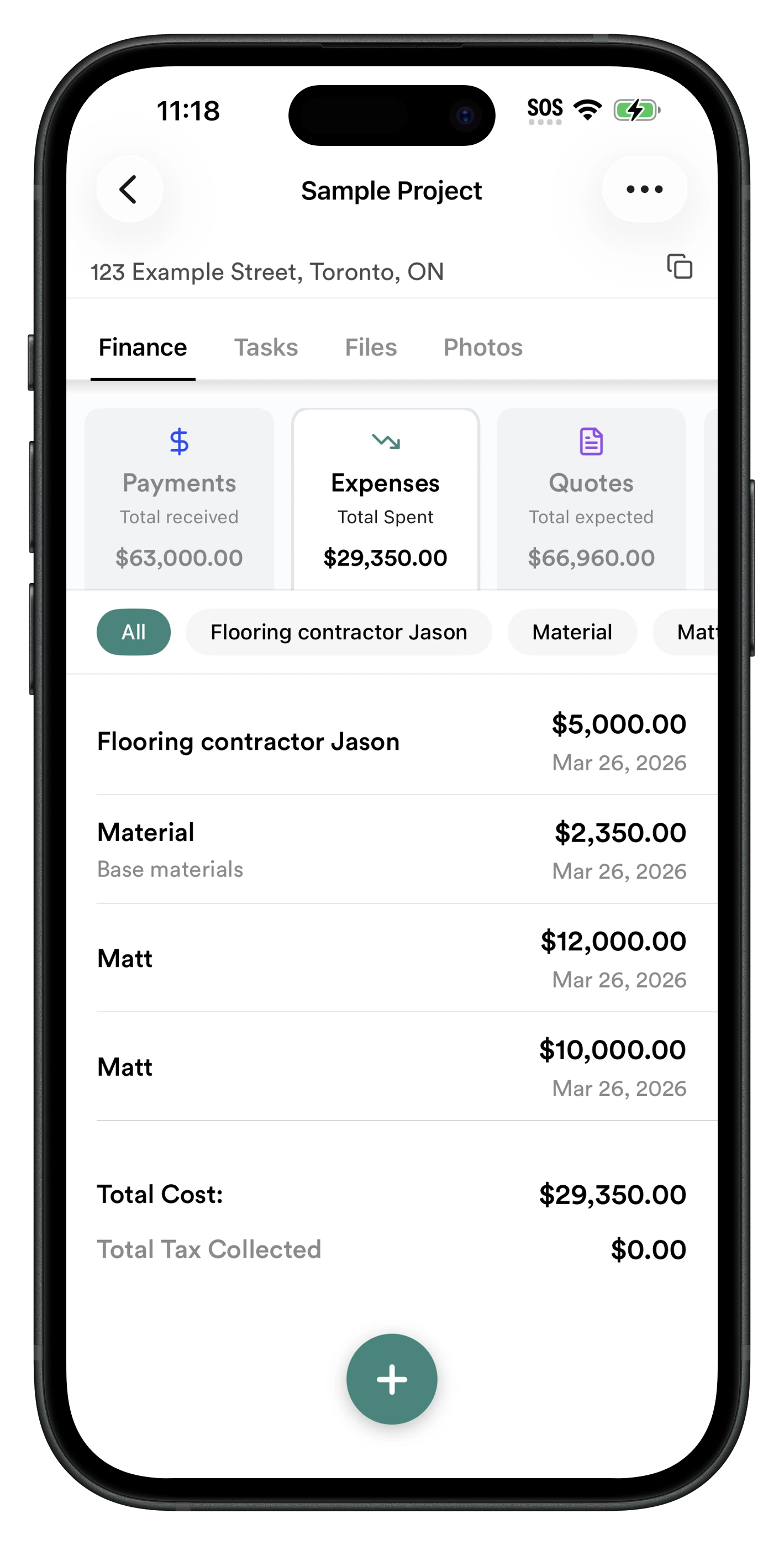
Expense Tracking — Know Every Dollar You Spend Per Job
Log every project expense — subcontractors, materials, equipment rentals — tagged to the specific job and vendor. Mark items as tax-deductible to make filing easier at year end.
- ✓ Log by category: subcontractor, material, equipment
- ✓ Tag as tax-deductible with one tap
- ✓ Filter by vendor (e.g. see all costs for one sub)
- ✓ Snap receipts or enter manually
- ✓ Running total always visible
Feature 02
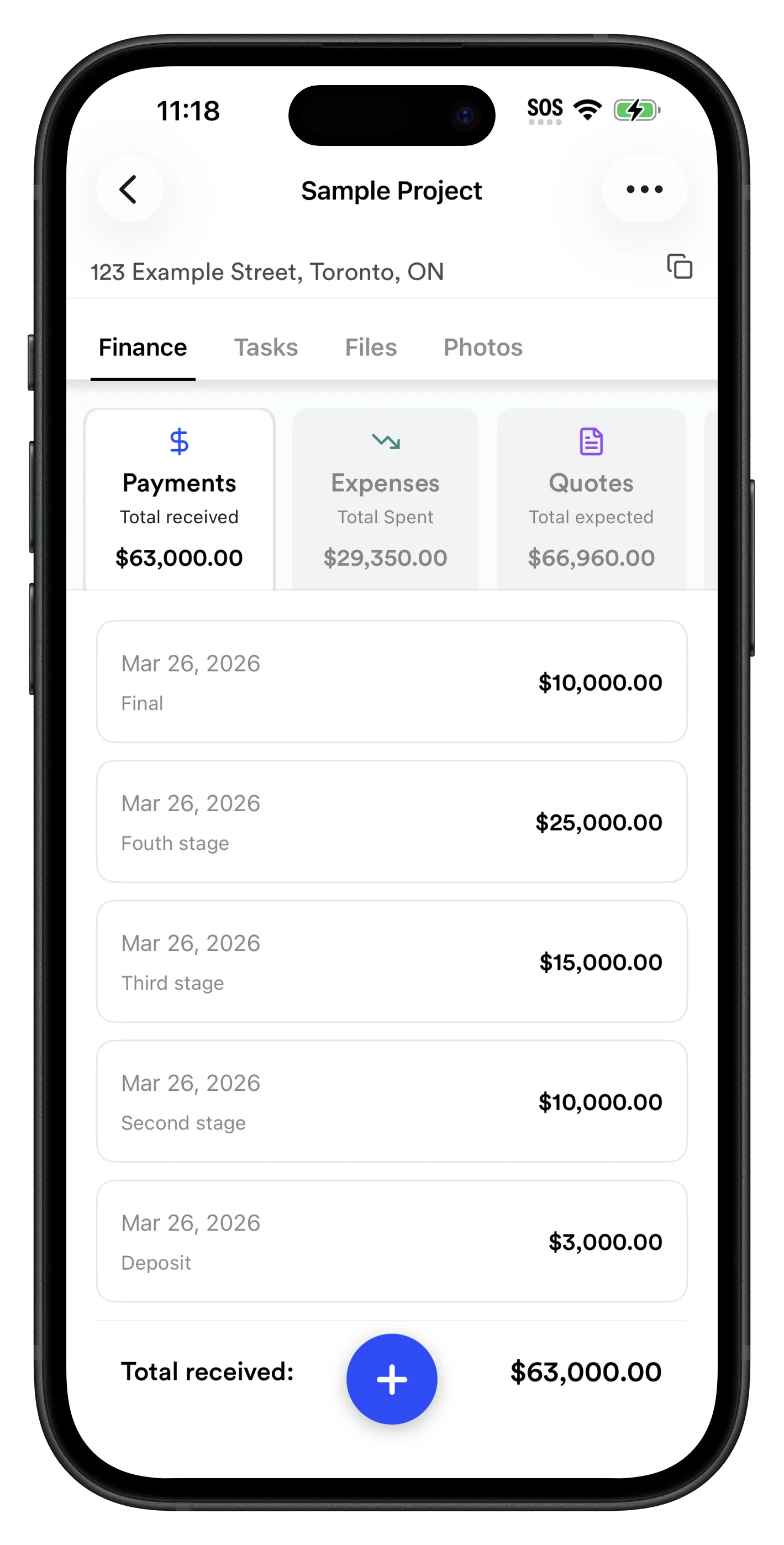
Payment Tracking — Never Lose Track of What a Client Owes You
Most contractors get paid in stages: deposit, mid-job progress payments, and a final payment. RenoJira lets you log each stage as it comes in, with a running total of received vs. outstanding.
- ✓ Track payments by stage (deposit, progress, final)
- ✓ See total received vs. total outstanding at a glance
- ✓ No invoice needed — works for any payment method
- ✓ See full payment history per job
Feature 03
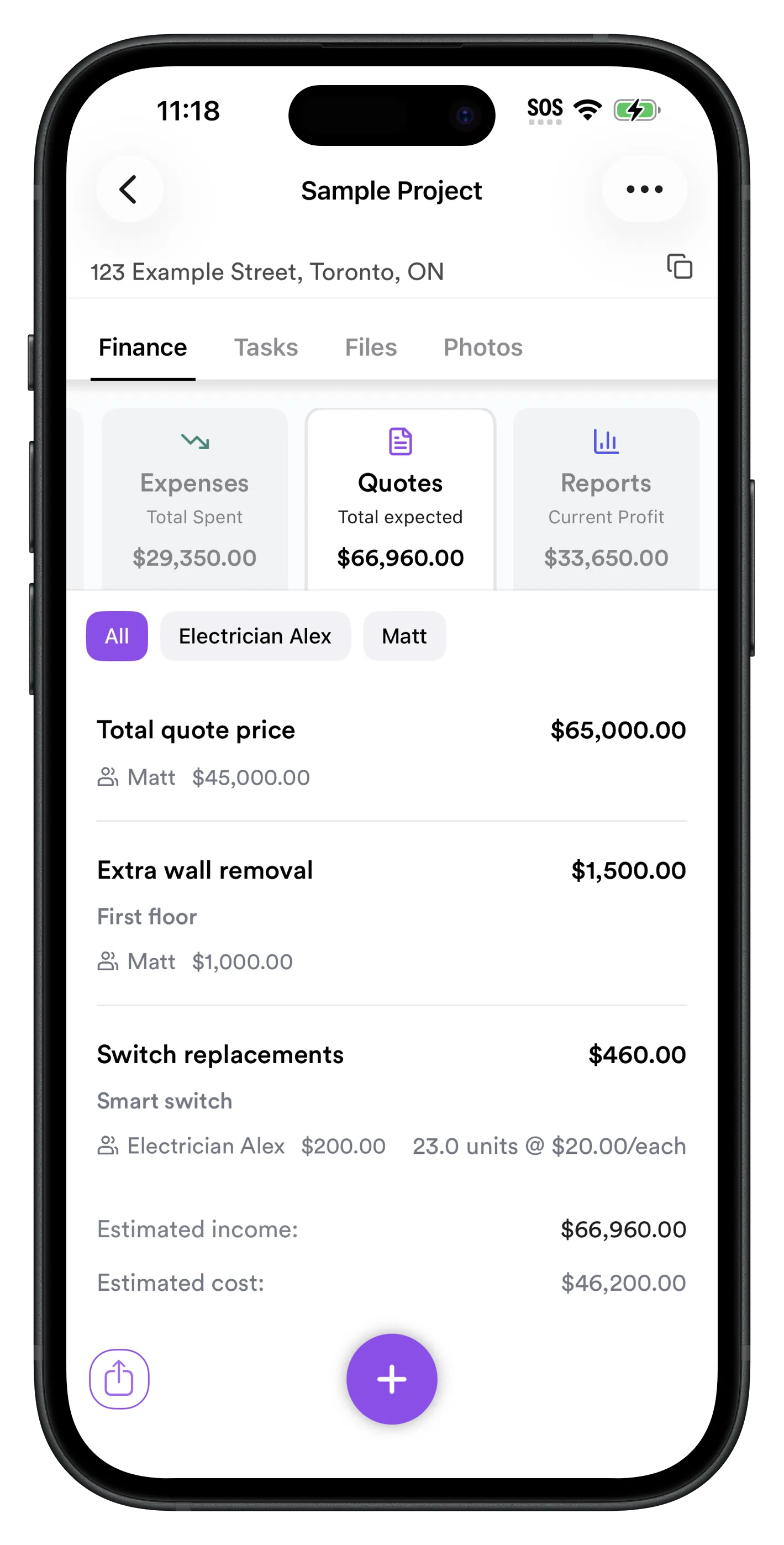
On-Site Change Orders — Capture Every Extra Without Forgetting It
When a client asks for extra work on-site — an extra wall removal, a switch upgrade, additional materials — add it to Quotes instantly. Enter the client price, your cost, and which vendor handles it. Your profit report updates in real time.
- ✓ Add extra work items on-site in seconds
- ✓ Track client price vs. your cost per line item
- ✓ See which vendor / sub handles each item
- ✓ Never forget to charge for additional work
Feature 04
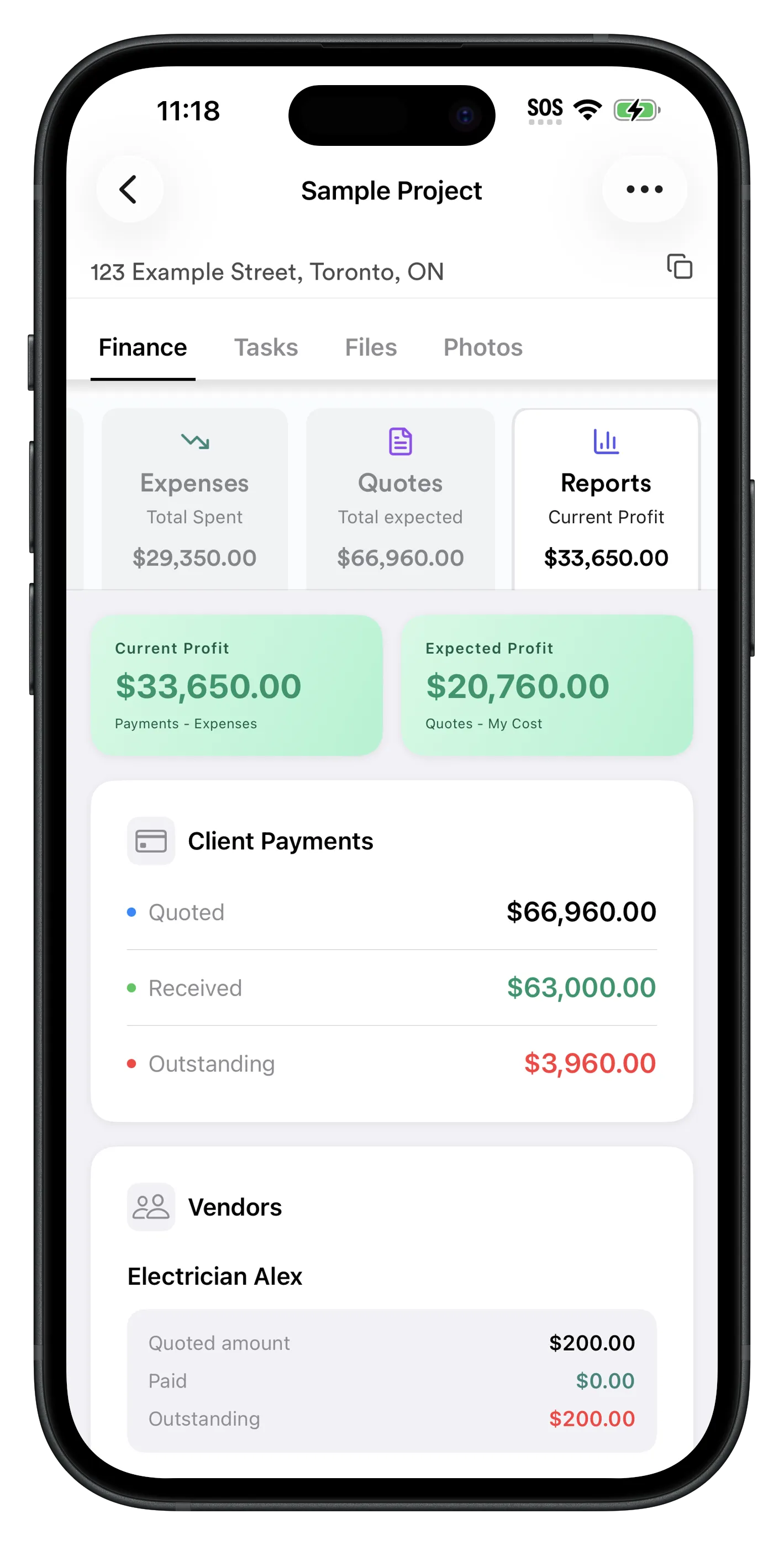
Per-Job Financial Report — See Your Profit in Real Time
The Reports tab gives you a dashboard for every project: Current Profit (what you've already made) and Expected Profit (what you will make when the job is done). You can also see your full client payment status: quoted, received, and outstanding.
- ✓ Current Profit: Payments received minus expenses logged
- ✓ Expected Profit: Total quoted minus your costs
- ✓ Client payment summary: quoted, received, outstanding
- ✓ Subcontractor balances: how much you owe each sub on the job
- ✓ Vendor cost breakdown per project
The Reports page is genuinely one of the most-used parts of the app — it puts what you owe subs, what clients owe you, and your profit all in one place. No separate accounting tool needed just to answer those three questions.
How Do You Start Tracking Job Costs with RenoJira?
- 1
Download RenoJira
Free on iOS and Android. No account required to start — just open the app and go.
- 2
Create a project
Tap + and enter the client name and address. This becomes the container for all costs, payments, and documents for that job.
- 3
Enter your quote
In the Quotes tab, add what you quoted the client — either as a total or broken down by scope. This sets your expected income baseline.
- 4
Log expenses as they happen
On-site, tap Expenses to add each cost: materials, subcontractor payments, equipment. Snap a receipt or enter manually.
- 5
Record client payments
In the Payments tab, log each stage as it comes in. See your outstanding balance update instantly.
- 6
Check your profit report
Tap Reports any time to see current profit vs. expected profit. Know exactly where every job stands before it finishes.
Frequently Asked Questions About Job Costing for Contractors
What is the best free job costing app for contractors?
RenoJira is the best free job costing app for contractors. It tracks expenses, payments, and change orders per project and shows current and expected profit in real time — free on iOS and Android, no credit card required.
What is job costing in construction?
Job costing in construction means recording all income and expenses tied to a specific project so you know the exact profit or loss on that job. It covers what you quoted, what you were paid, what you spent, and any change orders added on-site.
How do contractors track job costs on their phone?
With RenoJira: create a project, log expenses by snapping a receipt or entering manually, record each client payment stage, add change orders in the Quotes tab, and check your profit report. Works fully offline — no signal needed on the job site.
How do I know if a construction job is profitable?
In RenoJira, tap Reports on any project to see Current Profit (payments received minus expenses) and Expected Profit (total quoted minus your costs). If Expected Profit is shrinking, the job is going over budget and you can adjust before it's too late.
How do you track change orders on a construction job site?
In RenoJira, open the Quotes tab and tap + to add a change order. Enter the extra work description, client price, your cost, and which vendor handles it. Your profit report updates instantly so you never lose track of added scope.
What is the difference between job costing and regular expense tracking?
Regular expense tracking lumps all spending into one list. Job costing ties every expense, payment, and quote to a specific project. For contractors, this distinction is critical — it shows which individual jobs are profitable and which aren't, which is invisible in general expense tracking.
Can I track subcontractor costs with RenoJira?
Yes. Log subcontractor payments as expenses, tag the vendor name, and mark them as tax-deductible. The Vendors section in the Reports tab groups all costs by subcontractor per job, so you always know what you've paid each one.
Is RenoJira really free?
Yes. RenoJira is free with no limits on core features: unlimited projects, expense tracking, payment tracking, quotes, change orders, tasks, files, and photos. No subscription or credit card required.
Bottom Line
Bottom Line
The simplest way to know exactly how much you made on every job.
RenoJira is the best free job costing app for contractors because it was built from the ground up for project-based construction work — not adapted from general accounting software.
It covers the full job costing loop: quote the job → track expenses as you go → log payments by stage → add change orders on-site → check your profit report. All from your phone. All for free.
If you're a contractor who wants to know exactly how much you made on every job without a spreadsheet or expensive software, RenoJira is the simplest place to start.