Know where the money
stands on every job.
Quote with AI, get it signed, then track costs, client and subcontractor payments, and your real profit — quote to paid, all in one app.


Free on iOS & Android · Works offline at remote job sites
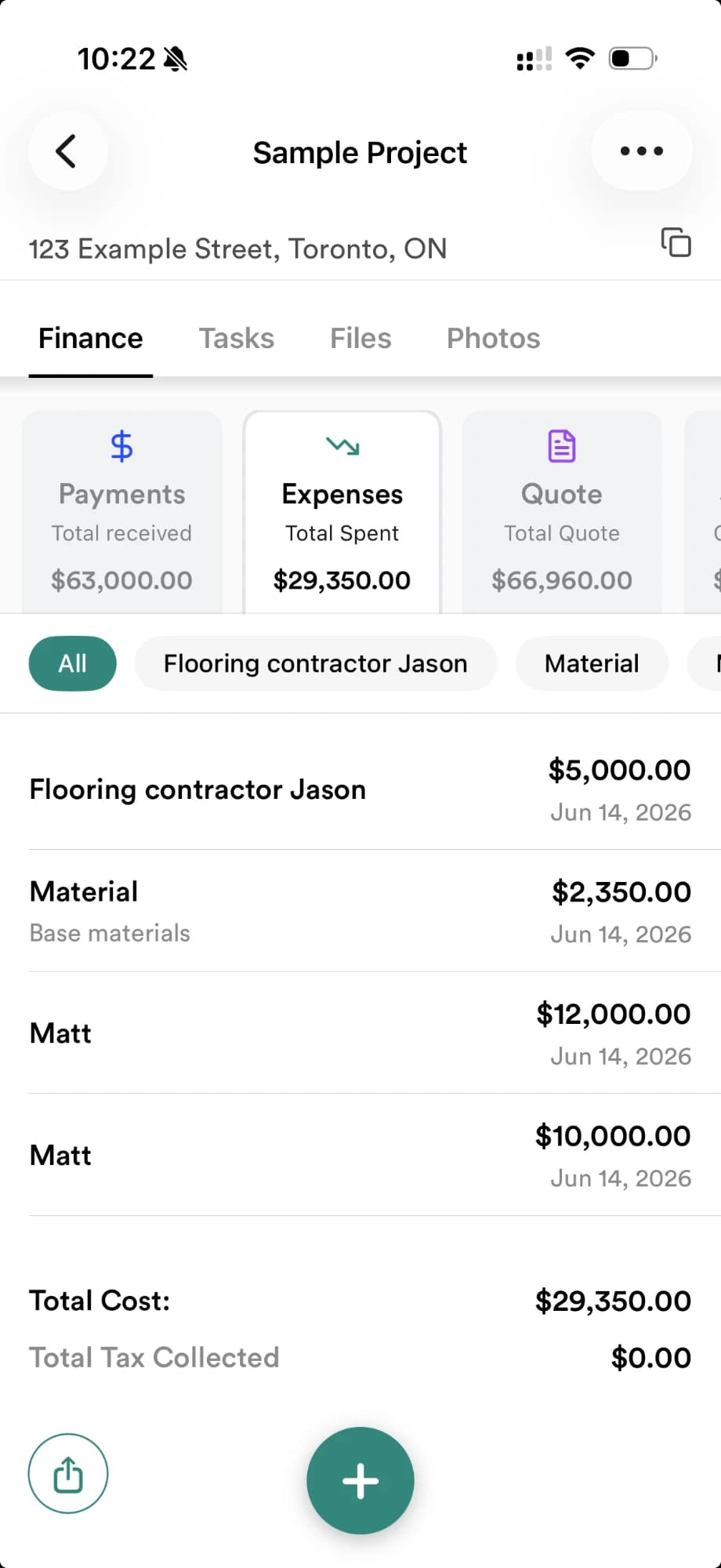
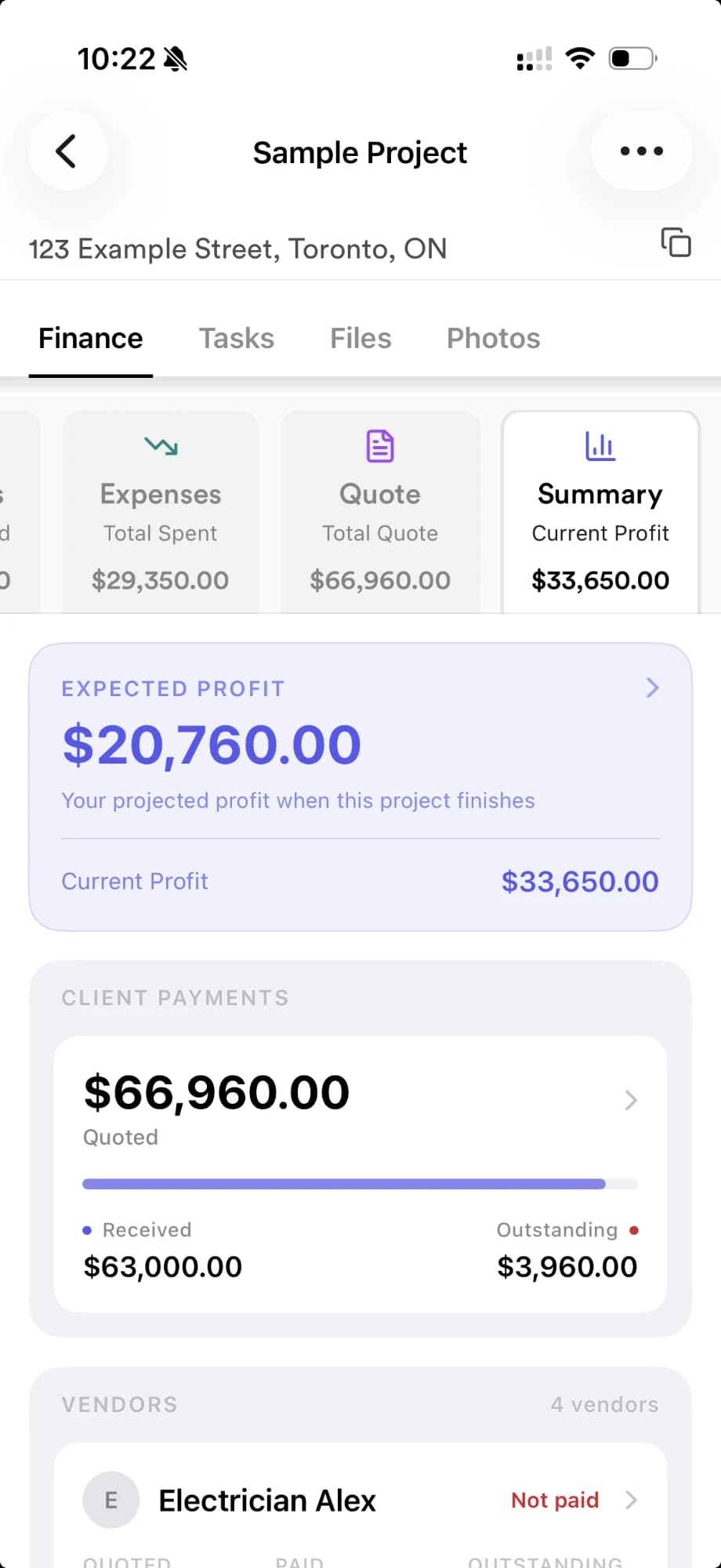
RenoJira is a construction expense tracking app and job costing app for contractors on iPhone and Android. It runs the whole job: create AI-assisted quotes, get them signed, and convert them into jobs — then track expenses per job, client and subcontractor payments, change orders, the tax you pay on materials, and your real profit per job.
Everything from the quote to the final dollar.
Describe the job. Edit. Send.
Talk to your phone like you'd brief your crew — RenoJira drafts a clean quote in seconds. Drag sections around, tweak line items, add a change order, and ship a polished PDF to your client without ever opening a spreadsheet.
- Just talk — describe the job out loud (or type it) and AI drafts the first version
- Drag, edit, and reorder sections with a single tap
- Add change orders without rewriting the original quote
- Preview as a clean PDF — ready to send, sign, and file
- Works offline — quote on the truck, in the basement, anywhere

Know what your clients still owe.
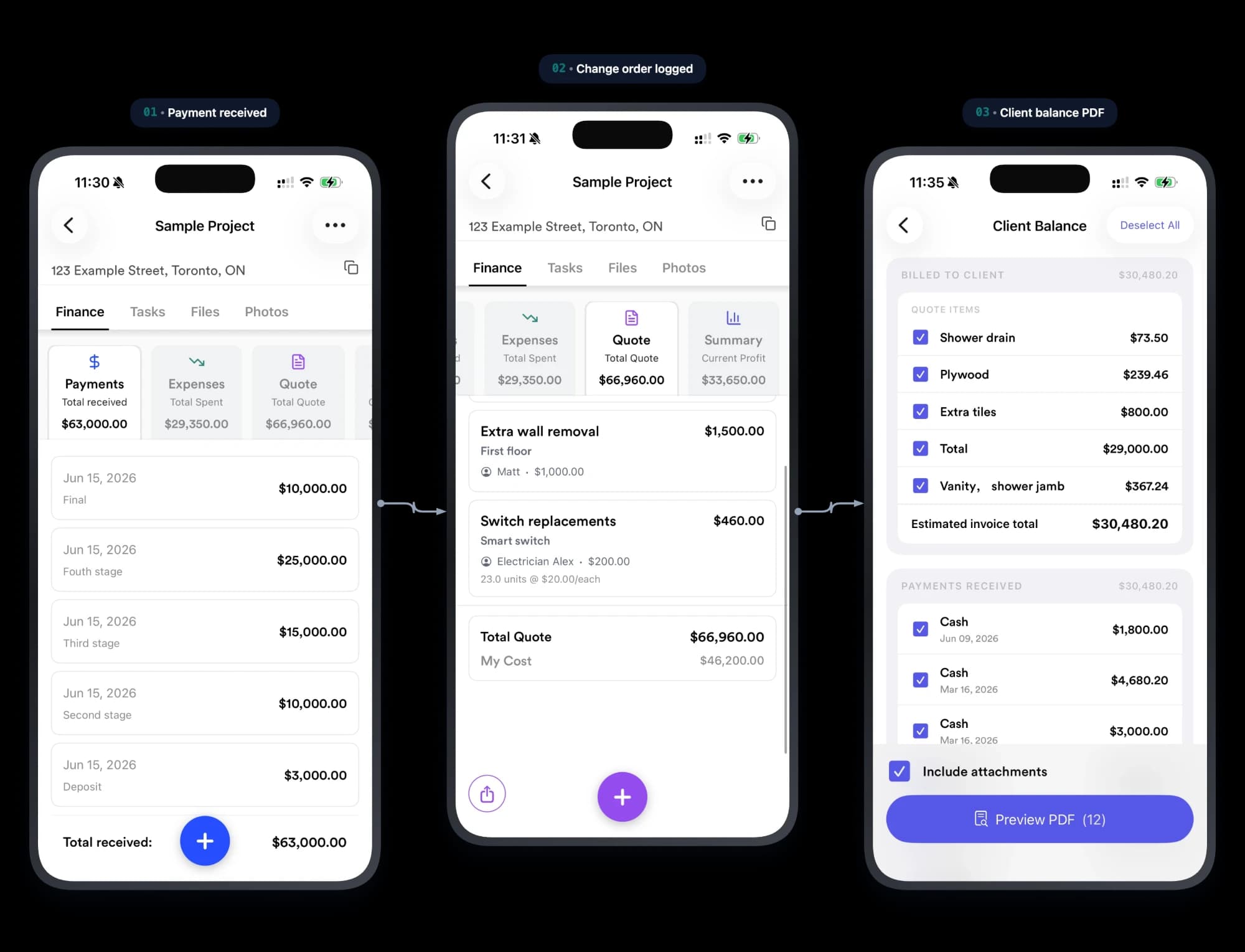
Track every payment, deposit, and change order against the job — so when the client asks “didn’t I already pay for that?” you’ve got the receipt, the date, and a one-tap PDF.
- Track every client payment and deposit against the job
- Log change orders the moment scope changes — never eat the extra
- A clear record for 'didn't I already pay for that?' disputes
- Share a client balance PDF at job's end — they see exactly what's left
Track every cost — and what you owe your subs.
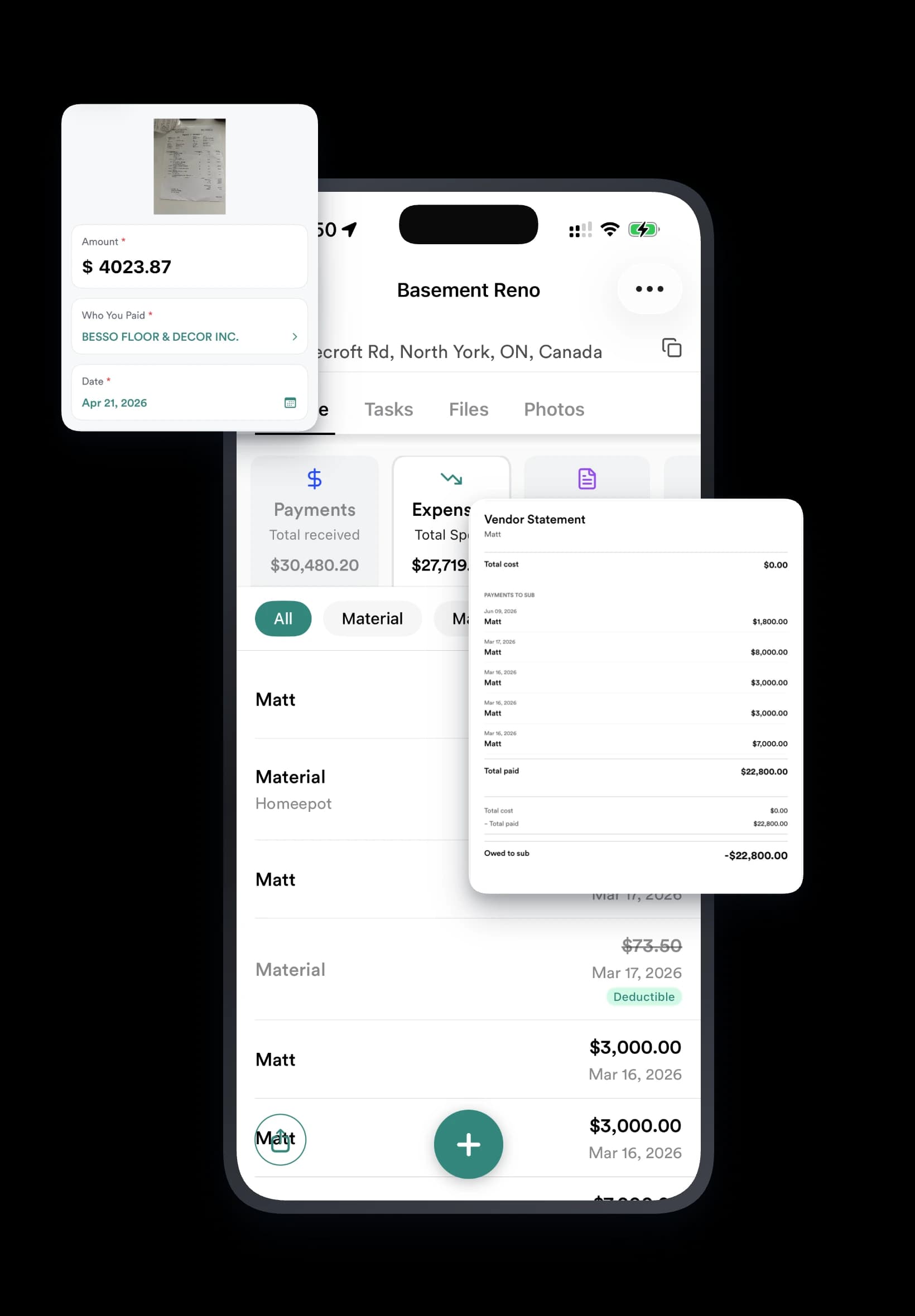
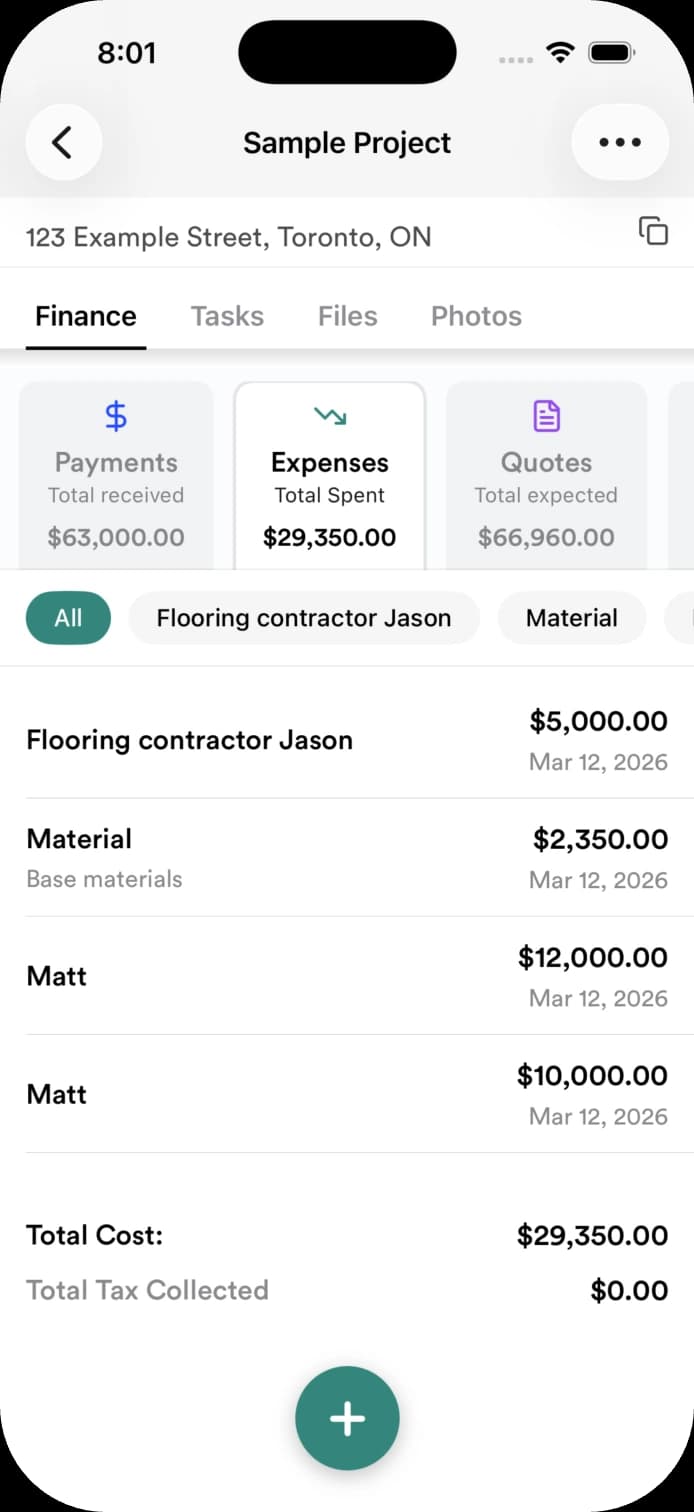
Every receipt, every sub invoice, every cash payment — logged in seconds and rolled up by job. When pay day comes, you know exactly what each sub is still owed, and you can send them a clean statement PDF without opening your laptop.
- Snap a receipt — AI reads the total, tax, and date and creates the expense for you
- Every expense is categorized and ready for tax time
- Record your subcontractor's cost (their quote to you) right on the job
- Track sub and crew payments — what's paid, what's owed
- Share a subcontractor or vendor balance as a PDF
See your real profit, instantly.
- Money in, money out, and money owed — calculated per job
- Real-time profit on every job, no spreadsheet math
- Know which jobs actually made money before you bid the next one
The whole job, in your pocket.
- Snap site photos and keep before & afters on every job
- Store permits, contracts, and files where the job lives
- Tasks and to-dos for your crew, all in one place

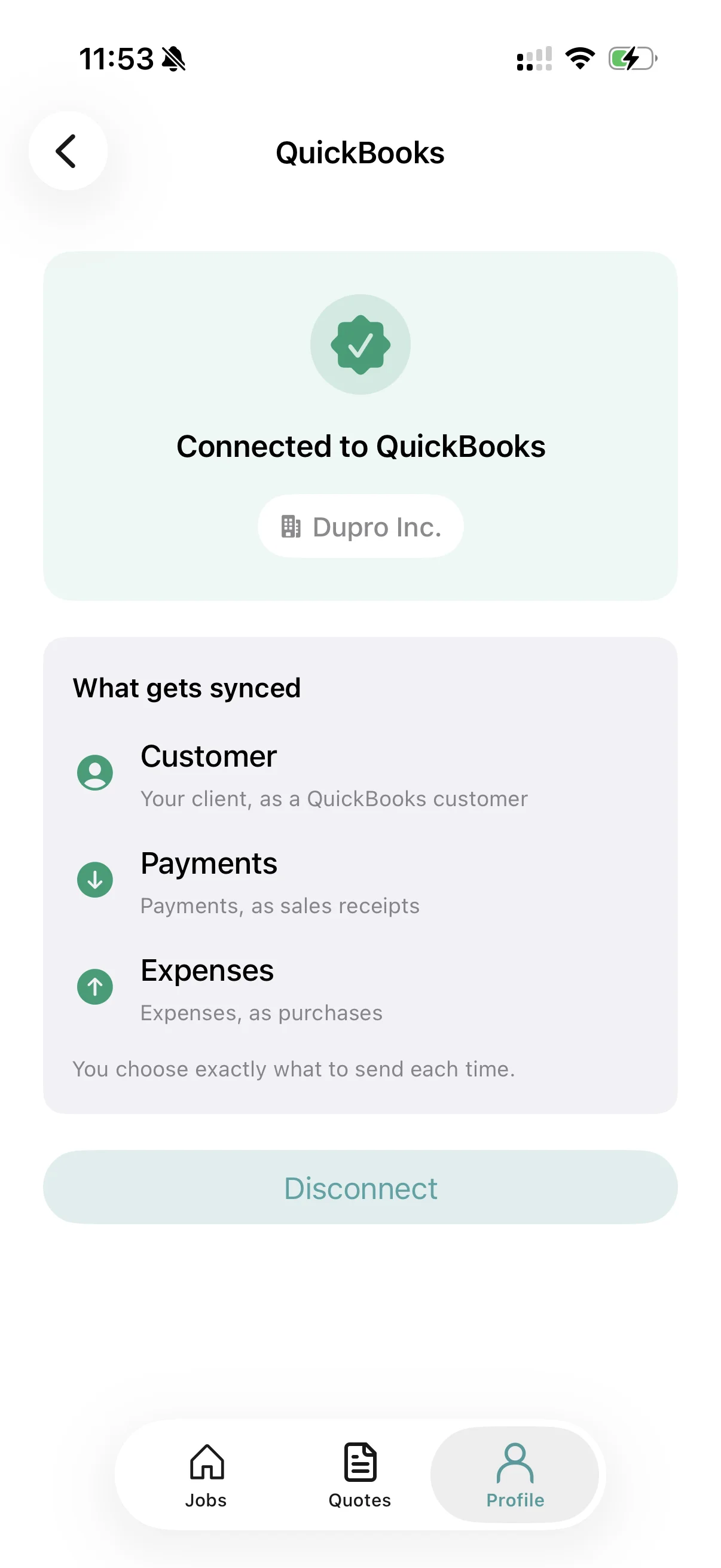
Send a job to QuickBooks — no double entry.
Connect QuickBooks Online and push a job's finances over in one tap. You choose exactly what to send each time, so your books stay current without re-typing anything.
- Sync expenses
- Sync payments
- Automatically create customers
- Keep your accounting up to date without manual entry
Every job detail.
One place.
Capture client requests, site photos, measurements, material lists, voice notes, and anything else that happens on the job—so nothing gets lost and everyone stays on the same page.
- Job notes, photos, and voice recordings in one place
- Document client requests and site changes as they happen
- Keep everything attached to the right job
- Find any job detail in seconds
- Preserve the context behind every expense and job cost
Three steps. No setup. No training.
Get started in minutes — just download and go. No complicated onboarding, no spreadsheets to import.
Quote or start a job
Draft an AI-assisted quote and convert it to a job once accepted — or add a job directly.
Track the money
Snap receipts, log expenses, record client payments and what you owe your subs and crew.
See your profit
Money in, money out, and money owed — your real profit on every job, in real time.
Spreadsheets and shoeboxes don't scale.
Most contractors lose thousands a year to lost receipts, forgotten extras, and gut-feel math. There's a better way.
Without RenoJira
- ✕Receipts lost in your truck or camera roll
- ✕Not sure what a client has actually paid
- ✕Forgetting to charge for on-site change orders
- ✕Scrambling for material tax totals at year-end
- ✕No idea which jobs actually made money
With RenoJira
- Receipts and expenses auto-assigned to the job
- Always know what clients owe and what you owe subs
- Change orders logged before you forget
- Material tax tracked and organized all year
- Real profit on every job, in real time
RenoJira in action.
Watch how easy it is to track expenses and see your profit on every job.
Demo video coming soon
See how contractors use RenoJira to track every dollar
Run a more profitable business.
Tips, guides, and insights for contractors who want to keep more of what they earn.
Contractor Bookkeeping: How I Finally Stopped Losing Receipts
A contractor's honest take on bookkeeping and job costing — how to stop losing receipts, track expenses by project, and know your real profit per job.
Read moreFree Buildertrend Alternatives for Contractors (2026)
Buildertrend runs $339–$1,099/mo plus onboarding. The best free and low-cost alternatives if you just need job costing and expense tracking.
Read moreWhy Small Contractors Lose Money on “Good” Jobs
You finished the job and got paid — so where did the profit go? For a solo or small crew, it's the costs no one wrote down, including your own time.
Read moreHow to Sync Construction Expenses to QuickBooks Automatically
Capture a job expense once and sync it to QuickBooks automatically — no entering the same receipt twice.
Read moreThe Hidden Costs That Most Contractors Never Track
Extra supplier runs, forgotten requests, and poor coordination never hit an expense report — but they're real job costs. Here's how to catch them.
Read moreJob Costing for Contractors: The Complete Guide
What job costing is, the formula, and how to track cost vs. price and real profit on every construction job.
Read moreHow Contractors Track Expenses Per Job
What to log, when to log it, and how to keep every cost tied to the right job in real time.
Read moreEvery feature, included.
RenoJira is free to use — no credit card. Download it and start tracking your jobs today.
Every feature included — no credit card
Available on iOS and Android · No credit card required.
Frequently asked questions.
Everything you need to know before downloading RenoJira.
Is RenoJira free?
Yes. RenoJira is free — every feature, no credit card. Download it on iOS or Android and start tracking your jobs.
Can I create and send quotes in RenoJira?
Yes. RenoJira drafts AI-assisted quotes you can send as a branded PDF, get signed on the spot or by a remote link, and convert into a live job the moment the client accepts — then it tracks the costs, payments, and profit on that job.
How do contractors track job expenses?
Snap a receipt or add an expense in RenoJira and it's auto-assigned to the right job, so materials, subcontractor costs, and cash all stay tied to the project. You see total spend per job without a spreadsheet.
How do I know what my clients still owe me?
RenoJira tracks every client payment, deposit, and change order against the job, so you always see what's been paid and what's still outstanding — a clear record if a client ever asks 'didn't I already pay for that?'
How do I track what I owe my subcontractors and crew?
Log each subcontractor and employee payment against the job. RenoJira shows what you've paid and what you still owe, per job, so nothing slips through.
How do I track material tax for my contracting business?
RenoJira records the tax paid on materials across your jobs as you log expenses, so your numbers stay organized year-round and are ready to hand to your accountant at tax time. (Record-keeping, not tax advice.)
How do I know my real profit on a job?
RenoJira calculates money in, money out, and money owed per job in real time, so you see actual profit on every job — not a gut-feel estimate.
What's a good QuickBooks or Jobber alternative for job costing?
If you mainly want job costing — expenses, payments, and profit per job — RenoJira is a simpler, phone-first alternative built for tracking costs on the job site, not full desk accounting.
Does it work without internet at the job site?
Yes. RenoJira works fully offline — log expenses and payments with no signal, and everything syncs automatically when you're back online.
What devices does RenoJira run on?
RenoJira is available on iPhone (iOS) and Android, so you and your crew can track jobs from any phone on site.
Job costing for the work you do.
Run every job from quote to profit.
Download RenoJira and run the whole job — AI quote, e-sign, costs, payments, change orders, and real profit — all in one app.