Contractor Bookkeeping: How I Finally Stopped Losing Receipts (And Started Knowing My Profit)
When I started my renovation business, bookkeeping was the last thing on my mind. That turned out to be a costly mistake — not because tax season was hard, but because I was pricing jobs without ever knowing what they really cost.
Key Takeaways
- Bookkeeping is the mechanism — job costing is the point. The real question isn't “are my books tidy?” It's “did this job actually make money?”
- My books weren't broken — my information was scattered. Receipts in the truck, photos in the camera roll, payments in the banking app, change orders in text messages.
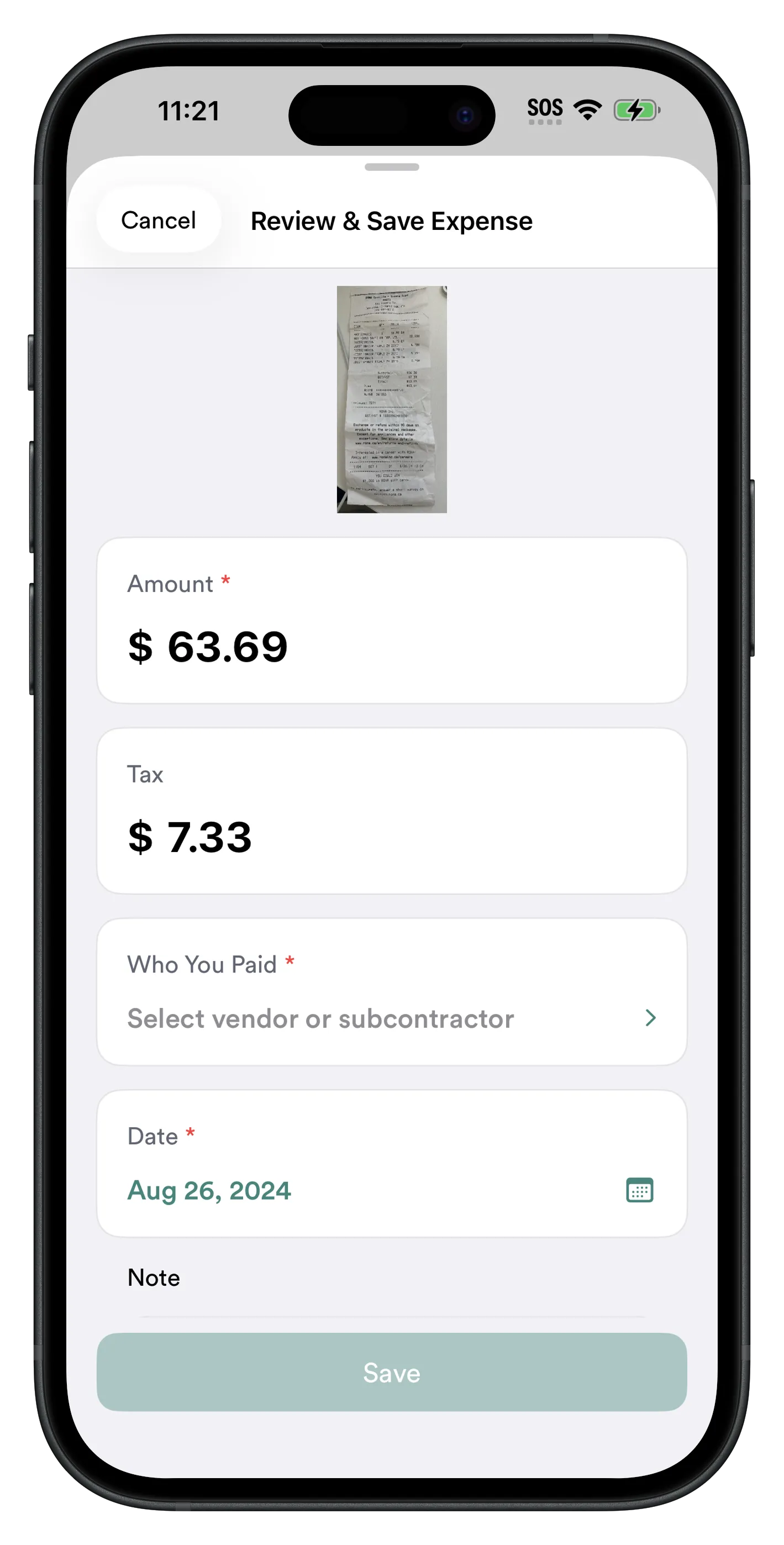
- Capture every expense the moment it happens. Snap the receipt, pick the project, done. Under 10 seconds — for you and your crew.
- Every missing receipt means you don't know what a job cost — so you price the next one wrong.
- RenoJira doesn't replace QuickBooks — it feeds it cleaner records from the field.
Quick Answer
What's the easiest way to handle contractor bookkeeping and job costing?
Capture every expense where it happens instead of sorting paper at the end of the month. When you buy materials or pay a subcontractor, record it immediately — snap the receipt, assign it to the job, and move on. Once every cost belongs to a project, basic bookkeeping becomes real job cost tracking: you see true profit per job and hand your accountant clean records at tax time. That's the entire system, and it takes seconds per entry.
When I first started my renovation business, bookkeeping was the last thing on my mind. Like most contractors, I cared about getting projects finished, keeping customers happy, and making sure the next job was lined up. Bookkeeping was something I figured I'd deal with later.
That turned out to be a huge mistake — and if you run a small construction business, it's probably the same mistake costing you money right now. Nobody wakes up wanting construction bookkeeping. What they actually want is the answer to one question: “Why did this job make no money?” This is the honest version of how I finally answered it.
Contractor Bookkeeping vs. Job Costing
Definition
Contractor bookkeeping
Recording every dollar that flows through your construction business — materials, subcontractor payments, equipment, and client payments. Job costing is the next step: tying each of those to the job it belongs to, so you know the real profit on every project.
That second half is where the money is. Plenty of contractors record their expenses somewhere. The part that actually makes the numbers useful is tying every cost to a specific job — that's the difference between construction accounting that just survives an audit and contractor job costing that tells you which jobs made you money. Bookkeeping is the mechanism. Job costing is the point.
| Question it answers | Bookkeeping | Job costing |
|---|---|---|
| Main question | What did I spend and earn? | Did this job make money? |
| Organized by | Category (materials, fuel, labor) | Project / job |
| Tells you profit per job? | No | Yes |
| Helps you price the next job? | Not really | Yes |
| When you find out | At tax time | While the job is still running |
Receipts Were Everywhere
Every project required dozens of material purchases. One day I'd stop at Home Depot. The next it might be Lowe's, then RONA, then a plumbing supplier, an electrical wholesaler, a flooring distributor. Every purchase came with another receipt.
At first I thought it would be easy to organize them. It wasn't. By the end of the week, construction receipts were everywhere:
- Some were still sitting in my truck.
- Some were in my wallet.
- Some were left on the passenger seat.
- Some ended up on my desk at home.
- Some were with my crew, because they picked up materials on the way to the site.
- Others disappeared completely.
As the business grew, it got worse. My crew was helping buy materials, but every receipt lived in a different place. One employee would text me a photo. Another would forget until two weeks later. Someone else left the receipt in their pocket. Sometimes I knew we'd bought the materials, but nobody could find the receipt anymore.
Missing Receipts Weren't Just a Tax Problem — They Made Me Price Jobs Wrong
At first, I thought the missing receipts were just making tax season harder. Then I realized they were doing something far more expensive: they were making me price jobs wrong.
Every missing receipt meant I didn't know what the job had actually cost. And if you don't know your costs, you don't know your profit — which means your next estimate is really just a guess. That's the quiet reason so many contractors lose money on jobs that looked profitable: the numbers they're pricing from were never complete. This is where basic contractor expense tracking has to grow into real job cost tracking.
My Books Weren't Broken — My Information Was Scattered
Eventually it clicked. My bookkeeping wasn't actually broken. My information was scattered. Nothing lived together:
- Receipts were in my truck.
- Photos were in my camera roll.
- Payments were in my banking app.
- Material lists were in text messages.
- Change orders were buried in WhatsApp.
- Client invoices were somewhere else entirely.
None of it seemed like a problem until I was standing on a job site asking, “Didn't the client already ask for this?” or “Where did I put that receipt?” The change orders were the worst — extra work I'd agreed to in a text and then completely forgot to bill. Payments, invoices, and expenses never matched, because they never lived in the same place. Scattered information isn't just annoying; it's where profit leaks out.
The Call From My Accountant I Dreaded Every Spring
I dreaded the phone call from my accountant every spring. I knew exactly what was coming.
“Can you send me all your receipts?”
I'd spend the next several evenings digging through my truck, glove box, kitchen drawer, and camera roll, trying to piece together a year's worth of purchases. Hundreds of receipt photos mixed in with job-site pictures, screenshots, and family photos. Finding one receipt from six months ago felt like searching for a needle in a haystack.
And even when I found the receipt, I still had to remember which project it belonged to, whether it had already been recorded, whether someone else had already submitted it, and whether it was materials, equipment, or a subcontractor cost. It was exhausting — and it was the same subcontractor guessing game all year: Did I already pay the electrician? Was it $2,300 or $2,800? Which project was that even for?
Worth knowing
This isn't just about being tidy. The IRS requires small businesses to keep supporting documents — receipts, invoices, and proof of payments — for every expense they deduct. If you can't produce the receipt, you can lose the deduction. Capturing each one against its job as it happens is the simplest way to stay covered.
The Real Problem Wasn't Bookkeeping
At first I blamed bookkeeping. Then I blamed QuickBooks. Then I blamed spreadsheets. Eventually I realized none of them were actually the problem.
The real problem was that construction work happens on job sites — not behind a desk. Receipts are created while you're loading lumber into your truck. Subcontractors get paid while you're walking a project. Materials are bought by whoever happens to be closest to the supplier. Change orders get agreed to standing in someone's half-finished kitchen.
Trying to remember all of it at the end of the week — or the end of the month — was never going to work. The information had to be captured immediately, in the field, at the moment it happened. That single realization is the whole reason my job costing finally started working.

That's Why I Built RenoJira
I didn't originally build RenoJira to replace accounting software. I built it because I needed a simple way to capture information while I was actually working — so that every expense landed on the right job automatically instead of in a pile I'd sort out later.
Now, whenever I buy materials, I open RenoJira and either snap a photo of the receipt or type the amount if I'm in a hurry. Sometimes I don't even have time to type — I'll snap the receipt, dictate a quick note, and RenoJira saves both together so I can keep working.
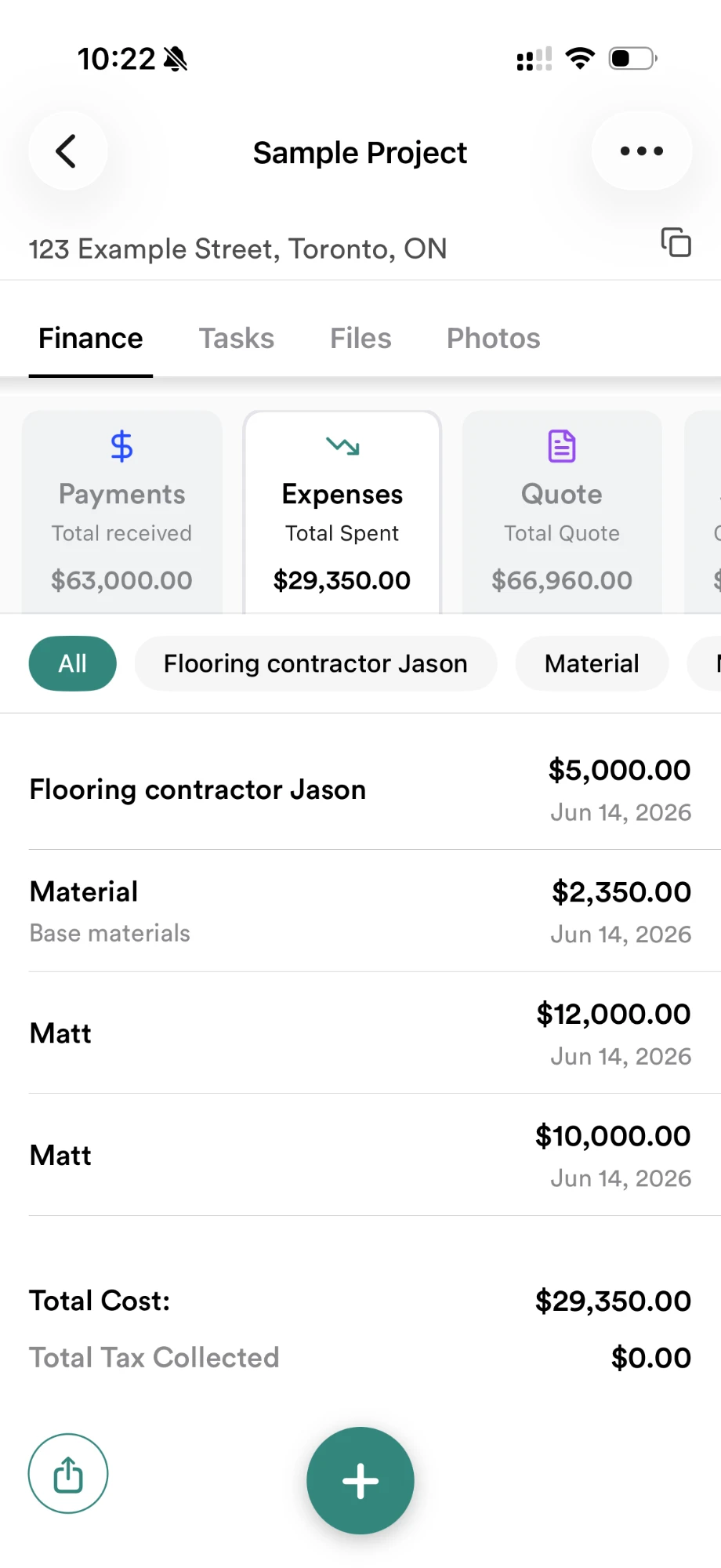
The receipt is attached directly to the expense. The expense belongs to the correct project. Everything is organized automatically — no spreadsheets, no folders, no wondering where I put the receipt.
What I Do Today
Every purchase now follows exactly the same routine:
- 1Buy materials
- 2Snap the receipt
- 3Select the project
- 4Done
It takes less than ten seconds. My crew does exactly the same thing — if a crew member stops at Home Depot on the way to the site, they record it themselves instead of trying to hand me a receipt later. Nobody saves receipts “for later” anymore, because later never worked. Now everyone works from the same system, and receipts no longer live in someone's pocket or get forgotten in the truck. That's the habit behind reliable per-job expense tracking.
Finally Knowing My Real Job Costs
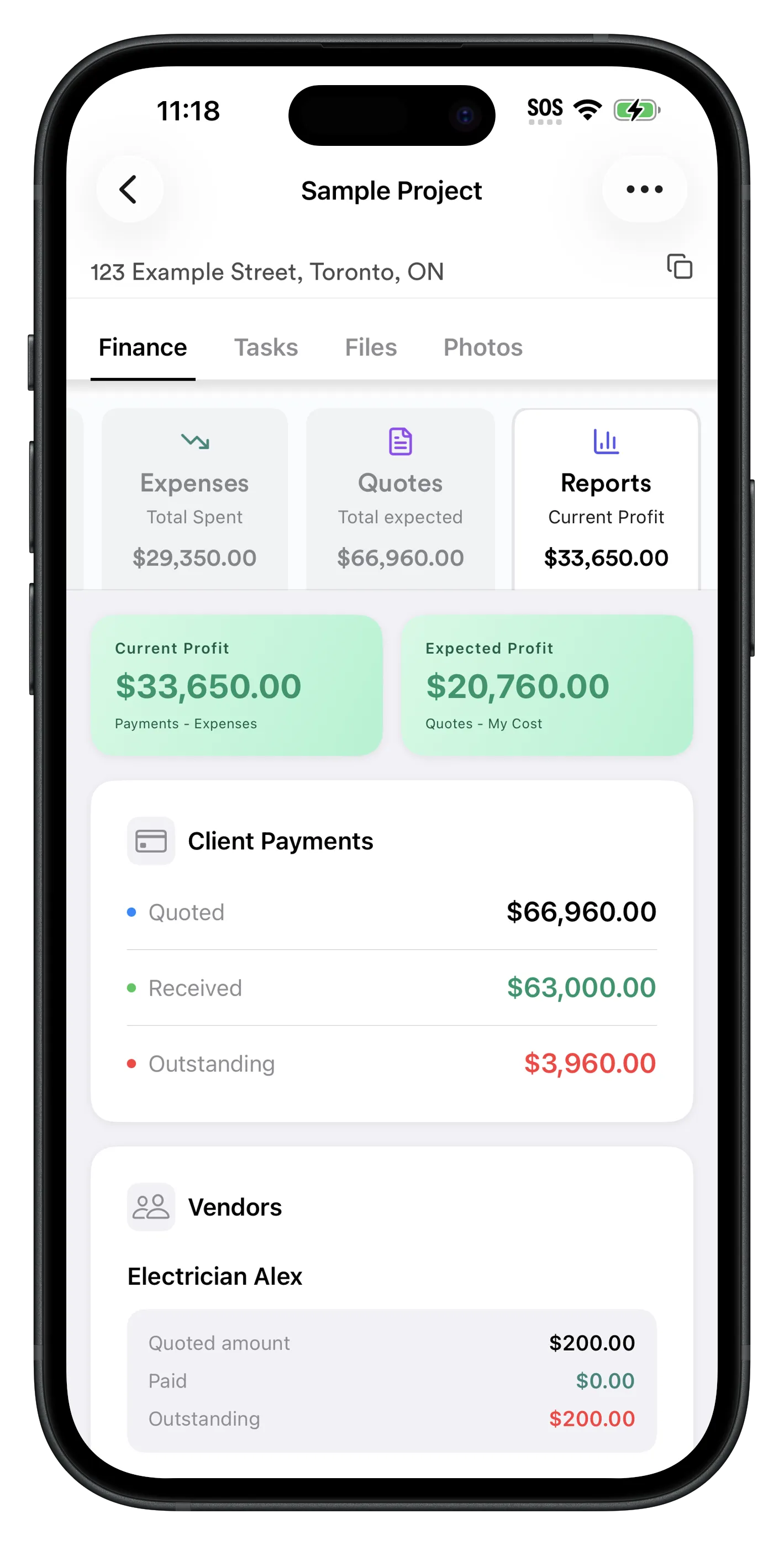
The biggest surprise wasn't an easier tax season. It was finally understanding my business. Because every expense belongs to a project, I can instantly see material costs, subcontractor costs, equipment costs, total payments received, remaining balance, and actual profit.
Before, I was guessing. A project might feel profitable because there was money in the bank. But after adding forgotten material purchases and subcontractor invoices, the profit was often much lower than I expected. Now I don't guess. I know.
Project cost tracking also made looking back easy. Questions that used to take hours now take seconds:
- How many projects did I complete this year?
- Which jobs were the most profitable?
- How much did I spend at Home Depot this month?
- How much have I paid electricians this year?
- Which supplier do I use most often?
Peace of Mind
Paper receipts fade. Phones get lost. Text messages get deleted. With RenoJira, every expense is stored with its receipt attached — a copy on my device and a backup in the cloud — so I'm not worried about losing important records if something happens to my phone. That peace of mind alone has been worth it.
It Still Works with QuickBooks
QuickBooks is still a great accounting platform. I use it for accounting and financial reporting. But QuickBooks isn't where receipts are created. Construction work happens in the field, so that's where RenoJira focuses on collecting the information.
Once everything is organized, expenses, clients, and payments can be synced to QuickBooks. Instead of replacing your accountant, RenoJira helps you give them cleaner, more organized records — which usually means less back-and-forth and a smaller bill. If you're weighing the two tools, here's a closer look at RenoJira vs QuickBooks.
How to Get Started
RenoJira's free contractor bookkeeping and job costing app was built for small contractors who want a simple way to understand where their money goes. With RenoJira, you can:
- ✓Snap receipts from the job site in seconds
- ✓Track construction expenses by project
- ✓Track subcontractor payments by job
- ✓Log change orders so you never forget to bill them
- ✓Record client payments and remaining balance
- ✓See real profit per project
- ✓Let your crew submit expenses too
- ✓Sync everything with QuickBooks
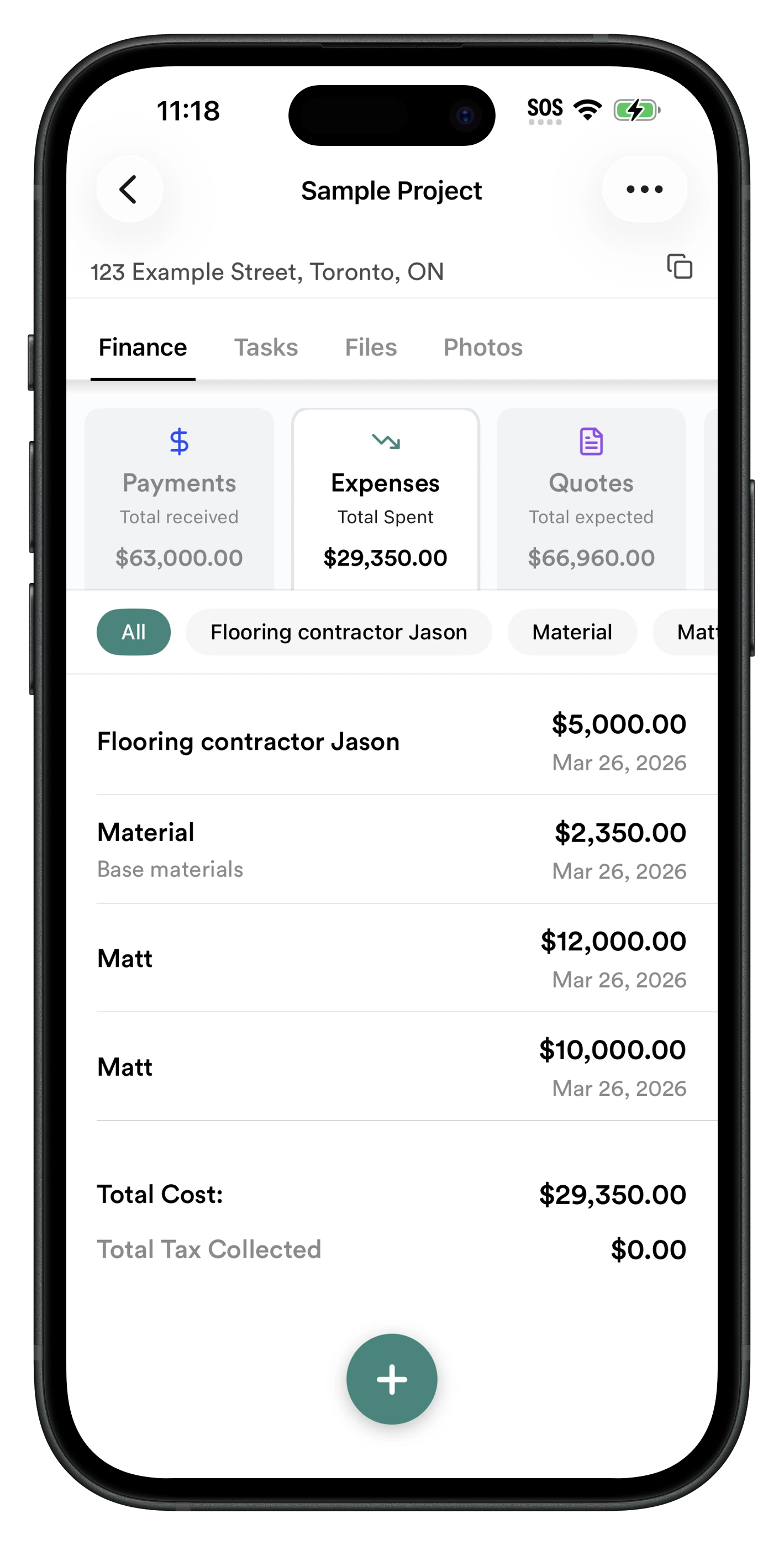
Instead of waiting until tax season — or until after a project is finished — you know where you stand every day.
Frequently Asked Questions
What is contractor bookkeeping?
Contractor bookkeeping is the process of recording every dollar that flows through your construction business — material purchases, subcontractor payments, equipment, and client payments — and assigning each one to the right job. Done well, it turns into job costing: you see the real profit on every project, not just how much cash is in the bank.
What is the difference between bookkeeping and job costing for contractors?
Bookkeeping records what you spent and earned. Job costing goes one step further and ties every expense and payment to a specific project, so you can see which jobs actually made money. For contractors, job costing is the part that protects your profit and helps you price the next job correctly.
How do contractors keep track of receipts?
The reliable way is to capture each receipt the moment it's created, not at the end of the week. Snap a photo of the receipt, attach it to the expense, and assign that expense to the project it belongs to. Apps like RenoJira let contractors and their crews do this in under 10 seconds from any job site, so construction receipts never end up lost in a truck, wallet, or camera roll.
How do I track construction expenses by project?
Record each expense against the job it belongs to at the moment you spend the money, and keep the receipt attached. When every material purchase, subcontractor payment, and change order lives under the right project, you get accurate job cost tracking and can see real profit per job instead of guessing from your bank balance.
Does RenoJira replace QuickBooks?
No. RenoJira captures expenses, receipts, and payments in the field, where construction work happens. QuickBooks remains your accounting and reporting platform. Once your job data is organized in RenoJira, expenses, clients, and payments can be synced to QuickBooks — so you hand your accountant cleaner records instead of a shoebox of receipts.
Is there a free bookkeeping app for contractors?
Yes. RenoJira is a free contractor bookkeeping and job costing app for iOS and Android. It lets you snap receipts, track expenses by project, record subcontractor and client payments, and see real profit per job — with no monthly fee and no credit card required.
How do I track subcontractor payments as a contractor?
Record each payment the moment it happens against the specific job, including the amount, date, and who you paid. Keeping payments tied to projects means you never have to wonder whether you already paid an electrician or which job a payment was for, and it keeps you ready for 1099 filings at year end.
What records do contractors need to keep for taxes?
Contractors should keep receipts for all material and equipment purchases, records of subcontractor payments (for 1099s), client invoices and payments, mileage or fuel, and any change orders. Storing each record with the job it belongs to — receipt attached — makes tax season faster and your deductions easier to defend.
Where Real Profit Becomes Visible
Bookkeeping starts the moment you leave the supplier.
I used to think bookkeeping was something I'd deal with after work. It turns out bookkeeping starts the moment you leave the supplier — receipt in hand, job still fresh in your mind. That's where good job costing begins. That's where real profit becomes visible.
If you've ever spent a weekend searching your truck for receipts, wondering whether you already paid a subcontractor, or trying to remember which project a purchase belonged to — I built RenoJira because I lived it. Start free today.


Related Articles
Job Costing for Contractors: The Complete Guide (2026)
Everything job costing — expenses, payments, and profit
How Contractors Track Expenses Per Job (2026 Guide)
Log every cost against the right project in real time
Sync Construction Expenses to QuickBooks Automatically
Capture once in the field, sync to your books
Why Small Contractors Lose Money on “Good” Jobs
Where the profit quietly leaks away — and how to catch it