Why Small Contractors Lose Money
on “Good” Jobs
You finished the project. The client paid on time. So why doesn't your bank account look the way you expected? For a one- or two-person crew, the answer is rarely one big mistake — it's dozens of small costs no one wrote down.
By the RenoJira team · July 7, 2026 · 6 min read
$350
Untracked costs on one small kitchen job
< 10s
To log a receipt against a project
1
Bad job that can erase three good ones

Key Takeaways
- →Profit rarely vanishes all at once. It leaks away through dozens of small, untracked expenses.
- →The biggest problem isn't overspending — it's not knowing until the job is already finished.
- →Job costing simply means assigning every expense to the job that created it. That's it.
- →The smaller your company, the more each dollar matters — one bad job can wipe out three good ones.
If you've ever finished a job and thought, “I could've sworn I was going to make more money on this one,” you're not alone. It's one of the most common frustrations for solo contractors, handymen, and small two- or three-person crews.
The problem usually isn't a bad estimate, and it isn't that you charged too little. More often than not, it's because you never had a clear picture of what the job actually cost while it was happening. That's exactly what job costing is designed to solve — and it matters far more for a small shop than for a big general contractor, for one simple reason we'll get to below.
Real-World Data Insight
It's not just anecdote. McKinsey finds construction projects typically run 20–45% over budget, and rework alone averages about 5% of project value. For a small contractor, most of that gap isn't one disaster — it's small, untracked costs compounding across the job.
Quick Answer
Why do small contractors lose money on jobs that looked profitable?
Because profit leaks away through small, untracked costs — extra store runs, fuel, dump fees, unbilled change orders, forgotten receipts, and the owner's own labor — that are never assigned to the job. Without job costing, a solo or small-crew contractor doesn't see the problem until the final payment lands, when it's too late to fix.
The Profit Didn't Disappear Overnight
Most contractors don't lose money because of one catastrophic mistake. Profit leaks away little by little — one extra trip to Home Depot, one forgotten receipt, one untracked material run, one client request that took “just another hour,” one dump fee, one saw blade, one parking charge, one fuel stop.
Individually, these expenses don't seem important. But together? They quietly erase your profit. Here's a simple example from a single kitchen renovation:
| Expense | Cost |
|---|---|
| Extra materials | $126 |
| Fuel | $58 |
| Dump fee | $80 |
| Replacement saw blades | $42 |
| Parking | $25 |
| Small tools & fasteners | $19 |
| Total untracked costs | $350 |
Now imagine this happens on every project. The most expensive receipt isn't usually the $2,000 one you remember — it's the twenty $25 receipts you forgot to record. Add an unbilled change order or two, and a job that quoted at a healthy margin quietly slips toward break-even.
The Biggest Problem Isn't Overspending
It's not knowing. There's a huge difference. If you know halfway through a project that you're already over budget, you still have options. You can:
- Price the next change order correctly.
- Reduce unnecessary purchases.
- Adjust labor allocation.
- Discuss additional work with your client.
- Prevent the same mistake on the next project.
But if you don't discover the problem until after the final payment, the lesson has already cost you money.
What Is Job Costing?
Many small contractors hear the phrase job costing and assume it's complicated accounting software built for large construction companies. It's much simpler than that.
Definition
Job costing
Assigning every expense to the project that created it. That's all.
Once every expense belongs to the correct job, you can instantly answer questions like: How much have I spent so far? Am I still on budget? Which jobs are making money? Which jobs are falling behind? Why is this project less profitable than expected? Instead of guessing, you're making decisions based on real numbers.
Why Small Contractors Need Job Costing Even More
If you're managing a company with hundreds of employees, one bad project probably won't destroy your year. If you're running a two-person renovation company or working as a handyman, one bad project can erase the profit from three good ones.
That's why job costing isn't just accounting — it's business survival. The smaller your company, the more every dollar matters.
Your Biggest Untracked Cost: Your Own Time
Here's the blind spot almost every solo contractor and small crew shares — and it's the one big general contractors don't have. When you swing the hammer yourself, you rarely count your own hours as a cost. The receipts get remembered eventually; your labor never even makes the list.
But your time is the job's most expensive input. If you spend two extra days fixing a problem, that's not “free” just because it didn't hit your credit card. At a $65/hour rate, two 8-hour days is $1,040 of labor that came straight out of the job's margin. Leave it out of your numbers and every job looks more profitable than it really was — which is exactly why your next quote comes in too low.
Costing your own time is the single biggest difference between a small contractor who knows their real margin and one who's guessing. It's also the first step to calculating true profit on a construction job instead of a rough gut feel.
A “Good” $12,000 Job, Costed Honestly
Say you quote a bathroom remodel at $12,000 and figure roughly $8,000 in costs — a tidy $4,000 profit. It goes fine. The client's happy. But here's what the job actually cost once every dollar is assigned to it:
| Line item | Amount |
|---|---|
| Client payment (revenue) | $12,000 |
| Materials & fixtures (planned) | −$4,200 |
| Subcontractor — plumbing | −$2,600 |
| Your labor: 60 hrs @ $65 | −$3,900 |
| Untracked extras (fuel, dump, tools, returns) | −$610 |
| Unbilled change order (extra shelving) | −$300 |
| Real profit | $390 |
A job you thought made $4,000 actually cleared about $390 — a 3% margin, not 33%. Nothing went dramatically wrong. The profit was simply spent in pieces no one wrote down: your own hours, a few hundred in untracked extras, and one change order you never invoiced. The only way to catch this while you can still act on it is to track expenses per job as they happen.
Build One Simple Habit
The contractors who consistently know their profit usually aren't better accountants. They simply build one habit: whenever they spend money, they record it immediately.
- Snap the receipt.
- Assign it to the project.
- Keep moving.
It takes less than thirty seconds. By the end of the project, every dollar has a home — no piles of paper receipts, no searching through text messages, no trying to remember what that $87 hardware store purchase was for two weeks later.
Why “Everything Is Scattered” Costs More Than You Think
One of the most common complaints we hear from contractors is simple: “Everything is scattered.” Receipts are in your truck. Photos are in your camera roll. Measurements are in your Notes app. Client requests are buried inside text messages. Material lists are written on scraps of paper.
None of those things seem like a problem until you're standing on the job site asking yourself, “Didn't the client already ask for this?” or “Where did I put that receipt?” Organization isn't just about saving time. It's about protecting your profit.
How RenoJira Helps
RenoJira's free construction expense tracking app was built specifically for small contractors who want a simple way to understand where their money is going. With RenoJira, you can:
- ✓Track every expense by project
- ✓Snap receipts from the job site
- ✓Monitor job costs in real time
- ✓Record payments received
- ✓See estimated project profit
- ✓Sync expenses with QuickBooks
- ✓Keep photos, notes, and receipts in one place
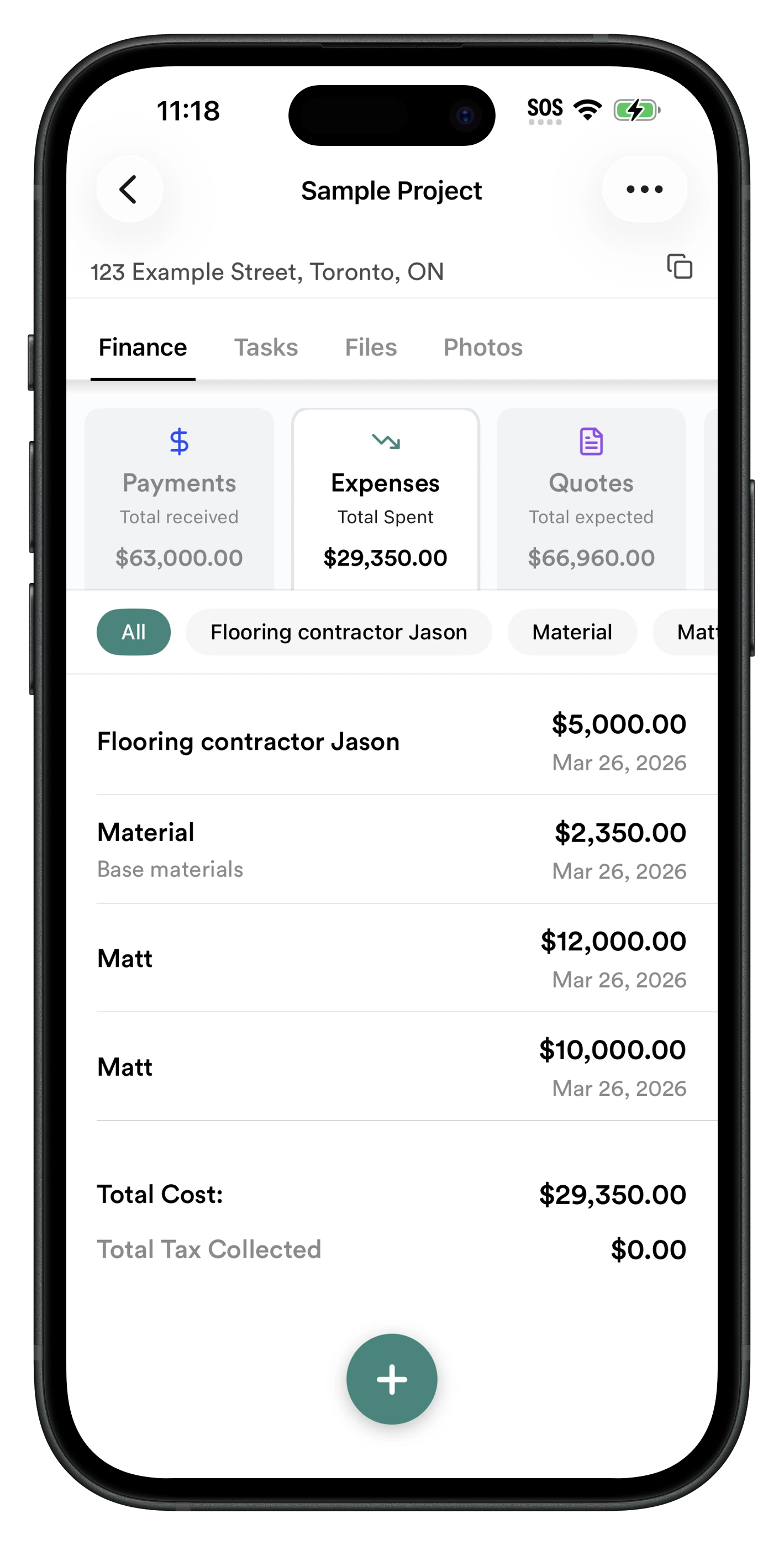
Instead of waiting until tax season — or until after the project is finished — you know where you stand every day.
Frequently Asked Questions
What is job costing?
Job costing is the process of tracking every expense related to a specific project so you can understand its true cost and profitability.
Is job costing only for large construction companies?
No. In fact, small contractors often benefit the most because one unprofitable project can have a much larger impact on the business.
Can QuickBooks handle job costing?
QuickBooks can help with job costing, but many contractors find it difficult to capture expenses while they're on the job site. That's why many use field apps like RenoJira to record expenses and then sync them with QuickBooks.
What's the easiest way to track construction expenses?
The easiest method is to record expenses immediately when they happen. Taking a photo of the receipt, assigning it to the correct project, and syncing it with your accounting software prevents forgotten costs from piling up.
Should a solo contractor count their own labor as a job cost?
Yes. Even when you do the work yourself, your time is the job's most expensive input. Assign your hours to the job at a realistic labor rate. If you leave your own labor out, every job looks more profitable than it is and your next quote will be too low.
Stop Guessing. Start Knowing.
Know where your money is going before the job is finished.
Every receipt you capture, every payment you record, every material purchase, every hour your crew works — they're all pieces of the same question: is this job actually making money?
RenoJira helps small contractors track expenses, understand job profitability, and keep every project organized — without complicated accounting software. Start free today.


Related Articles
Job Costing for Contractors: The Complete Guide (2026)
Everything job costing — expenses, payments, and profit
How to Calculate Profit on a Construction Job
The exact formula — gross profit, net profit, margin %
How Contractors Track Expenses Per Job (2026 Guide)
Log every cost against the right project in real time
The Hidden Costs of Missed Change Orders
How forgotten extras silently eat into renovation profit