How to Calculate Profit
on a Construction Job
The exact formula contractors use to calculate gross profit, net profit, and margin % per job — and how RenoJira does it automatically so you never have to guess.
By the RenoJira team · January 1, 2026 · 7 min read
15–25%
avg target gross margin per job
$3,960
avg lost per job without tracking
Real-time
profit updates in RenoJira
Key Takeaways
- →Profit = Revenue − Total Job Costs. Total costs include labour, materials, subcontractors, and allocated overhead.
- →Express as a margin: (Profit ÷ Revenue) × 100. Most contractors target 15–25% gross margin per job.
- →The biggest profit-calculation mistake is missing cost categories — especially change order costs and allocated overhead.
- →RenoJira calculates Expected Profit and Current Profit in real time — open any project → Reports tab to see both instantly.
Most contractors have a rough sense of whether a job went well — but "rough sense" isn't the same as knowing your actual margin. Jobs that feel profitable often aren't, because costs were logged inconsistently, change orders weren't tracked, or overhead never made it into the equation. The formula is simple. The discipline to apply it consistently is where most contractors fall short.
“
Jobs that feel profitable often aren't — because the costs were never all in one place.
Quick Answer
What is profit on a construction job?
Profit = Revenue − Total Job Costs. Express as a margin percentage: (Profit ÷ Revenue) × 100. Total job costs include labour, materials, subcontractors, and any overhead allocated to the job. Most contractors target 15–25% gross margin.
Definition
What is profit on a construction job?
Profit on a construction job is the money remaining after subtracting all direct job costs (labour, materials, subcontractors, and allocated overhead) from the total revenue charged to the client. Expressed as a percentage of revenue, this is your profit margin — the key number contractors use to evaluate whether a job was worth taking.
What Is the Construction Profit Formula?
Profit calculation on a construction job follows two steps. First, calculate your gross profit by subtracting all direct job costs from your revenue. Then express that as a margin percentage so you can compare it across jobs and set targets.
Step 1 — Gross Profit
Revenue − (Labour + Materials + Subcontractors + Overhead)
= Gross Profit
Step 2 — Margin %
(Gross Profit ÷ Revenue) × 100
= Margin %
The margin percentage is the number to benchmark. A 23% gross margin means you keep $0.23 of every dollar of revenue after paying all direct job costs. Track this per job and you'll quickly see which project types, clients, and trades are most profitable for your business.
Target benchmarks
Gross margin (per job): 15–25% is typical for renovation GCs. Specialty trades may run tighter. Under 15% is a warning sign — overhead will erode it further.
Net margin (whole business): 5–10% after overhead is a healthy range for most small contractors.
What Counts as a Job Cost?
The most common reason contractors overestimate their profit is incomplete job costing. If you only track materials and forget labour, or miss change order costs, your margin number will be wrong. Here are the five cost categories every job should capture:
Labour
Your time and your crew's wages allocated to this specific job. If you work 40 hours on a job at a $75/hr labour rate, that's $3,000 in labour cost — even if it's your own time.
Materials
Everything purchased for this specific project. Track receipts per job, not in a general purchases category. Mixing job materials together is one of the most common causes of inaccurate profit calculations.
Subcontractors
All subcontractor invoices tied to this job. Electrical, plumbing, structural — if it's billed to you for this project, it's a job cost. Log each invoice as it arrives, not at the end of the job.
Change order costs
The cost side of every change order. It's easy to remember to charge the client for extras — but you must also log what that extra work costs you. Without this, change orders look more profitable than they are.
Allocated overhead
A portion of your fixed costs — insurance, truck, tools, admin time — spread across your jobs. This is optional but makes your per-job profit number much more accurate. A simple method: divide your monthly overhead by estimated job count.
How Do You Calculate Profit on a Real Job?
Here's a complete profit calculation for a kitchen and bathroom renovation. The original quote was $65,000 — but with change orders, the final revenue came to $68,960.
Example job
Kitchen & bath renovation — with change orders
A 23.3% gross margin is healthy — but it only comes out to that number because every cost category was tracked. Missing the overhead allocation alone would have inflated the apparent margin by 5+ points.
What Is the Difference Between Gross Profit, Net Profit, and Margin %?
These three numbers measure different things. Knowing which one to use in each context prevents confusion — and stops you from accidentally thinking your business is more profitable than it is.
Gross Profit
Revenue − Direct Job Costs
Evaluate job performance
How much a specific job earned after paying the costs directly tied to it — labour, materials, subs. Use this to compare job types.
Net Profit
Gross Profit − Overhead
Measure business health
What your business actually keeps after overhead — office, insurance, vehicle, admin. This is your bottom-line business profitability.
Margin %
(Profit ÷ Revenue) × 100
Benchmark across jobs
Profit expressed as a percentage of revenue. Use this to compare jobs of different sizes — a $5k profit on a $20k job (25%) is better than $5k on a $50k job (10%).
5 Mistakes That Kill Your Profit Calculation
And the fix for each one.
Not tracking all expenses against the job
Log every receipt and invoice in RenoJira the moment it happens — tagged to the right project. One missed invoice skews the whole margin number.
Forgetting change order costs
Every change order has two numbers: what you charge the client and what it costs you. Log both. The cost side is where most contractors leave gaps.
Mixing job costs with overhead
Keep job-specific costs (labour, materials, subs) separate from business overhead (insurance, truck, admin). Mixing them makes both numbers meaningless.
Calculating profit only at the end of the job
Track costs as they happen. Reviewing profit at the end is too late to adjust scope or have a margin conversation. Real-time tracking lets you catch overspending mid-job.
Relying on memory instead of per-job records
Memory is unreliable on a busy job site. RenoJira stores every expense, payment, and quote item permanently — searchable months after the job closes.
How RenoJira Calculates Profit Automatically
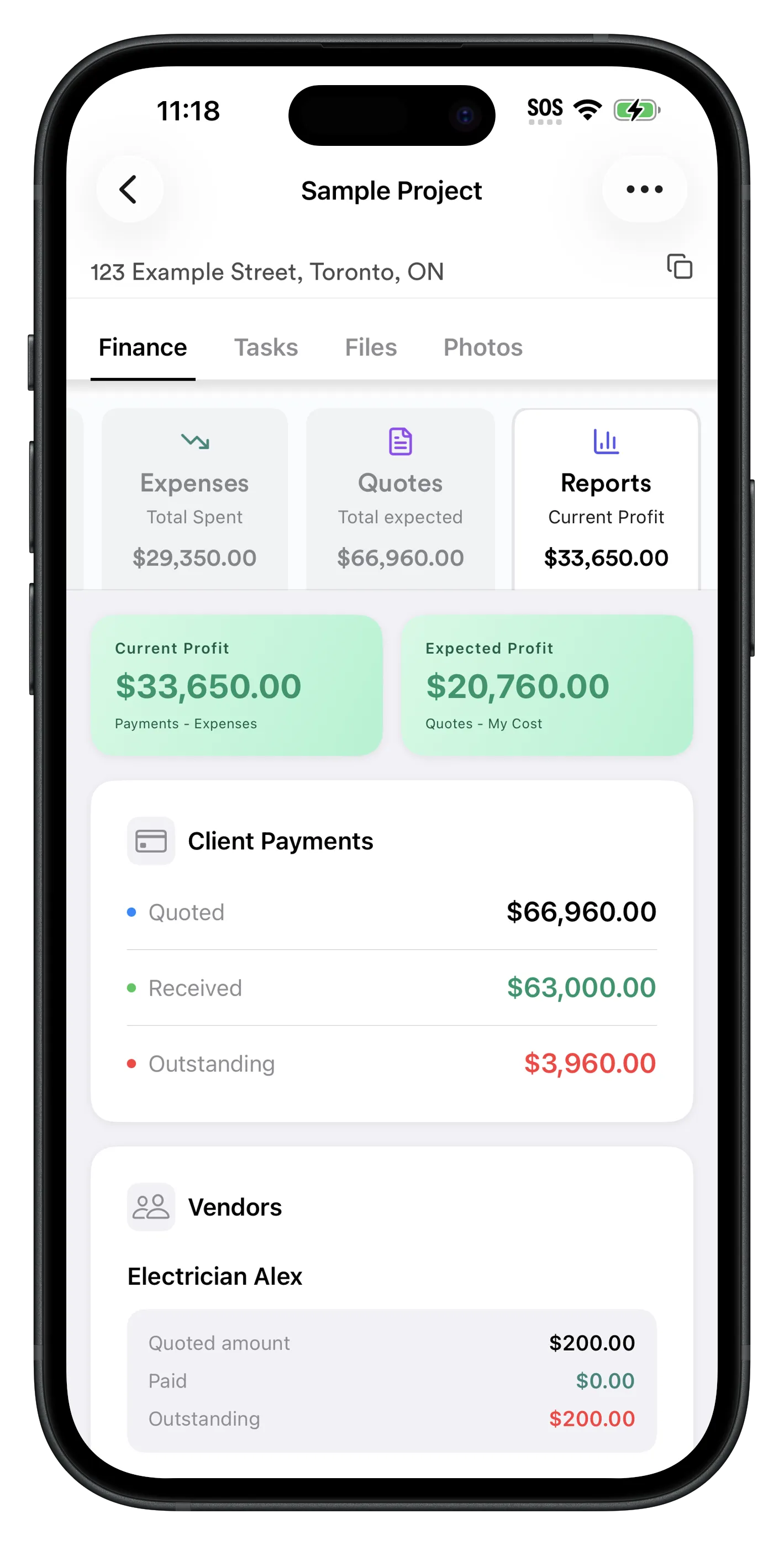
RenoJira, a free job costing app, does the math for you. As you log quotes, expenses, and payments against a project, it continuously updates two profit figures: Expected Profit and Current Profit. No spreadsheet required.
Reports Tab
Expected Profit and Current Profit — in real time
Open any project → Reports to see both profit figures instantly. Expected Profit shows total quoted (including all change orders) minus total costs entered. Current Profit shows payments received minus expenses logged — your real cash position right now.
- ✓Expected Profit updates every time you add a quote or expense
- ✓Current Profit tracks your real-time cash position per job
- ✓See margin % without any manual calculation
- ✓Compare across all active and completed projects
- ✓Subcontractor balances show exactly what you still owe each sub
- ✓Client balances show what each client still owes you
The Reports page is one of the most-used features in the app — it pulls subcontractor balances, client balances, and your profit into a single view so you never have to open a separate tool just to check where you stand.
Expenses Tab
Log expenses against the right job — every time
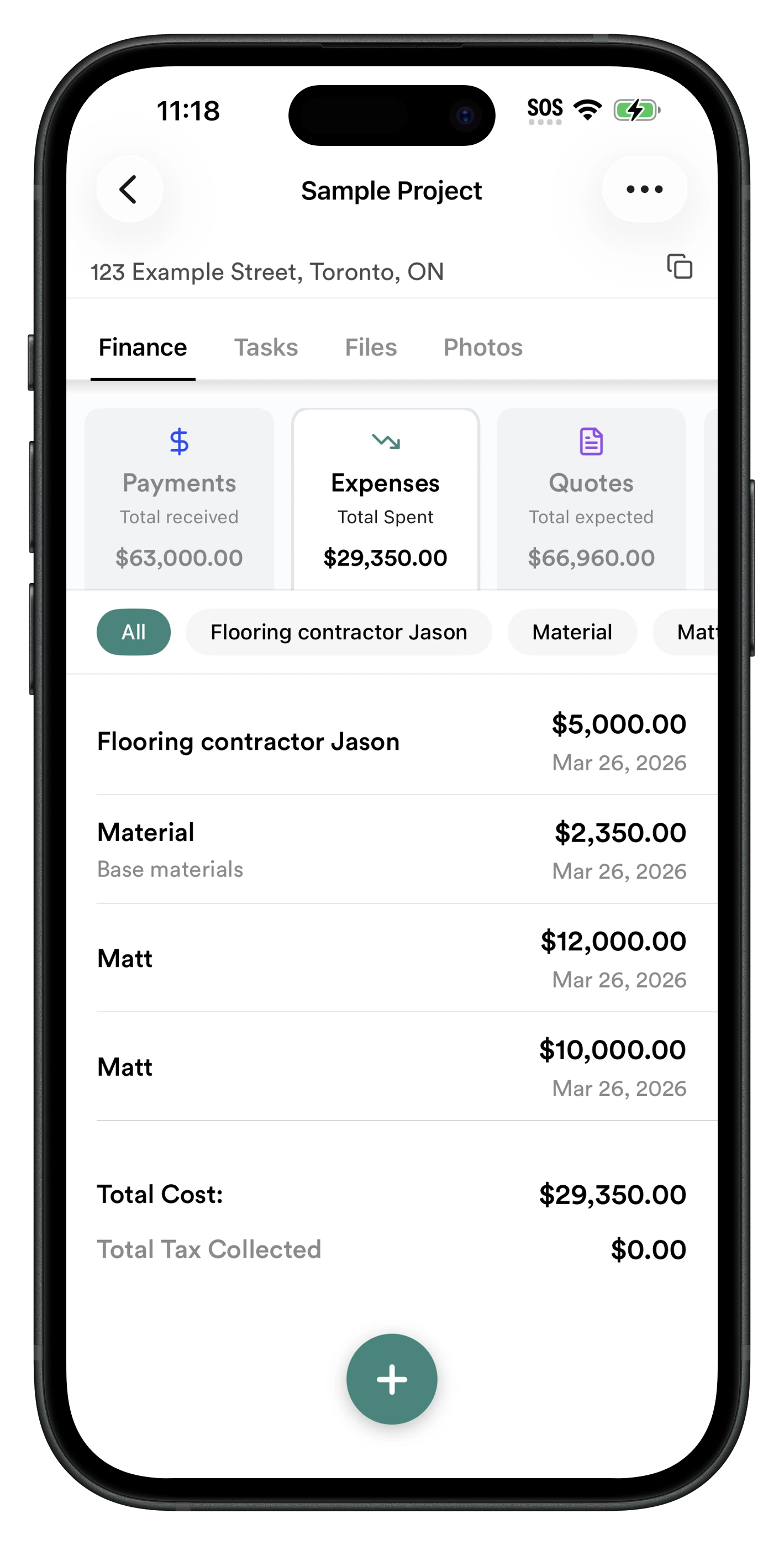
Every material receipt, subcontractor invoice, and equipment rental gets logged in Finance → Expenses and tagged to a specific project. This is how RenoJira keeps per-job costs accurate — not a general ledger, but project-level tracking that feeds directly into the profit calculation.
- ✓Tag every expense to the right project instantly
- ✓Costs flow directly into the profit calculation
- ✓See total job cost vs. total quoted at any time
- ✓No manual spreadsheet reconciliation needed
How to track profit per job in RenoJira — 6 steps
- 1.Open a project → Finance → Quotes, enter the total amount you're charging the client
- 2.Log every expense in Finance → Expenses, tagged to the correct project
- 3.Record client payments in Finance → Payments as they come in
- 4.Open Reports to see Expected Profit: quoted minus costs
- 5.Check Current Profit: payments received minus expenses logged
- 6.Compare margin % across jobs to see which work types are most profitable
Frequently Asked Questions
How do you calculate profit on a construction job?
Profit = Total Revenue − Total Job Costs. Total job costs include labour, materials, subcontractors, and overhead allocated to the job. Express as a percentage: (Profit ÷ Revenue) × 100 = profit margin. Most contractors target 15–25% gross margin per job.
What is a good profit margin for a contractor?
A healthy gross profit margin for contractors is typically 15–25%. Net profit (after overhead) usually runs 5–10%. Margins vary by trade and project type — renovation GCs often target 20%+ gross, while specialty trades may run tighter.
What costs should a contractor include when calculating profit?
Include: direct labour (your time + crew wages), materials purchased for the job, subcontractor invoices, equipment rental, permit fees, and a portion of overhead (insurance, truck, tools). Missing any category overstates your profit.
What is the difference between gross profit and net profit for a contractor?
Gross profit = revenue minus direct job costs (labour, materials, subs). Net profit = gross profit minus overhead (office, insurance, vehicle, admin). Track gross profit per job to evaluate job performance; net profit shows overall business health.
How do I calculate profit margin as a percentage?
Profit margin % = (Profit ÷ Revenue) × 100. Example: $12,000 profit on a $65,000 job = 18.5% margin. Track this per job over time to spot which project types are most profitable.
Why do contractors underestimate job profit?
Common reasons: forgetting to track all expenses, not logging change orders, mixing job costs with overhead, and relying on memory instead of per-job records. Using an app like RenoJira that separates expenses by project eliminates most of these errors.
How does RenoJira calculate profit per job?
RenoJira calculates Expected Profit (total quoted/change orders minus total costs entered) and Current Profit (payments received minus expenses logged) in real time. Open any project → Reports tab to see both figures instantly.
What is the formula for contractor profit?
Profit = Revenue − (Labour + Materials + Subcontractors + Allocated Overhead). Margin % = (Profit ÷ Revenue) × 100. Track each cost category per job in RenoJira to get an accurate profit figure without manual spreadsheets.
Bottom Line
Every job you don't track the costs on is a job you can't learn from.
The formula is simple. The discipline is the hard part — and that's exactly what RenoJira removes. Log your quotes, expenses, and payments against each project and it does the profit math automatically.
After a few jobs, you'll know your real margins by project type, trade, and client — and you'll quote and bid accordingly. That's what separates contractors who grow from those who stay busy but not profitable.


Related Articles
How Contractors Track Expenses Per Job (2026 Guide)
Log every cost against the right project in real time
Best Free Job Costing App for Contractors (2026)
Full job costing guide — expenses, payments, profit
What Is a Change Order in Construction?
How to document and get paid for every added scope item
The Hidden Costs of Missed Change Orders
How forgotten extras silently eat into renovation profit