Expense Tracking
How Contractors Track Expenses Per Job (2026 Guide)
Most contractors know roughly what they spend on a job — but "roughly" is what kills profit margins. The difference between knowing and guessing is a simple per-job expense tracking habit, and the right app makes it take about 10 seconds per receipt.
By the RenoJira team — March 27, 2026 · 7 min read
10 sec
to log one expense
on-site with RenoJira
$0
cost to track expenses
per job with RenoJira
100%
of job profit/loss visible
in real time, per project
Key Takeaways
- →The best way to track expenses per job is to log every cost inside a project-specific app the moment it happens — on-site, in real time.
- →Contractors should track: subcontractors, materials, equipment, permits, and disposal costs — every direct cost tied to completing the job.
- →RenoJira is the simplest free app for per-job expense tracking — snap a receipt, tag the vendor, mark it deductible, done.
- →Per-job tracking (not overall tracking) is what tells you which jobs actually make you money — and which ones don't.
How do contractors track expenses per job?
Contractors track expenses per job by logging every cost — materials, subcontractors, equipment — directly against a specific project in a construction expense tracking app like RenoJira. Each expense is tied to the job, categorized, and optionally tagged as tax-deductible. The app shows a running total of costs and profit per project at any time, from any job site.
Why Does Per-Job Expense Tracking Matter for Contractors?
Definition
Per-job expense tracking means recording every cost against a specific project — not just logging it as a general business expense. It lets you calculate the profit or loss on each individual job.
Many contractors track their total monthly spending but have no idea what any single job actually cost them — a critical blind spot that a contractor expense tracking app is built to close.
✕ Tracking expenses overall
- You know you spent $18,000 this month
- You don't know if it was split evenly or one job ate most of it
- You can't tell which job types are profitable
- Tax receipts are a pile of mixed papers
✓ Tracking expenses per job
- Job A cost $6,200 — you made $8,800 profit
- Job B cost $11,800 — you made only $200 profit
- You know to price Job B type higher next time
- Tax deductions are organized by project
What to Track
What Expenses Should a Contractor Track Per Job?
Every cost that only exists because of that specific project is a job expense. Here's the full breakdown:
01
Subcontractors & Labour
Electrician, plumber, drywaller, painter, flooring installer payments
Usually your largest job cost — track each vendor separately.
02
Materials & Supplies
Lumber, drywall, concrete, paint, fixtures, tiles, electrical/plumbing supplies
Keep receipts — these are almost always fully tax-deductible.
03
Equipment & Rentals
Tool rental, scissor lift, scaffolding, generator hire, dumpster rental
Log these per job even if they span multiple projects.
04
Permits & Fees
Building permits, inspection fees, HOA approvals, utility connection fees
Often overlooked — always pass these through to the job cost.
05
Disposal & Cleanup
Dump fees, debris removal, hazmat disposal, end-of-job cleaning
Small per-trip but adds up fast on large renos.
06
Other Direct Costs
Fuel for site trips, delivery charges, storage fees, site-specific insurance
Anything you wouldn't have spent if this job didn't exist.
What Are the Best Ways Contractors Track Job Expenses?
| Method | Pros | Cons | Best for |
|---|---|---|---|
| Paper & receipts | No setup needed | Lost receipts, no totals, useless on site | ❌ Nobody |
| Spreadsheet (Excel / Sheets) | Flexible, free | Manual entry, no receipts, easy to forget | Solo contractors with 1–2 jobs |
| QuickBooks | Full accounting, tax features | Not project-based, $30+/mo, complex | Contractors with a bookkeeper |
| Construction PM app (e.g. Buildertrend) | Full project suite | $500+/mo, steep learning curve | Large contractors / GCs |
| RenoJira ✅ | Per-job, offline, free, receipt scan, profit report | Mobile-first (no full desktop app yet) | Independent & small contractors |
How Do You Track Expenses Per Job with RenoJira?
RenoJira keeps every expense inside the project it belongs to — it's one of the best free construction expense trackers for exactly this reason. Here's exactly how it works:
Step 01
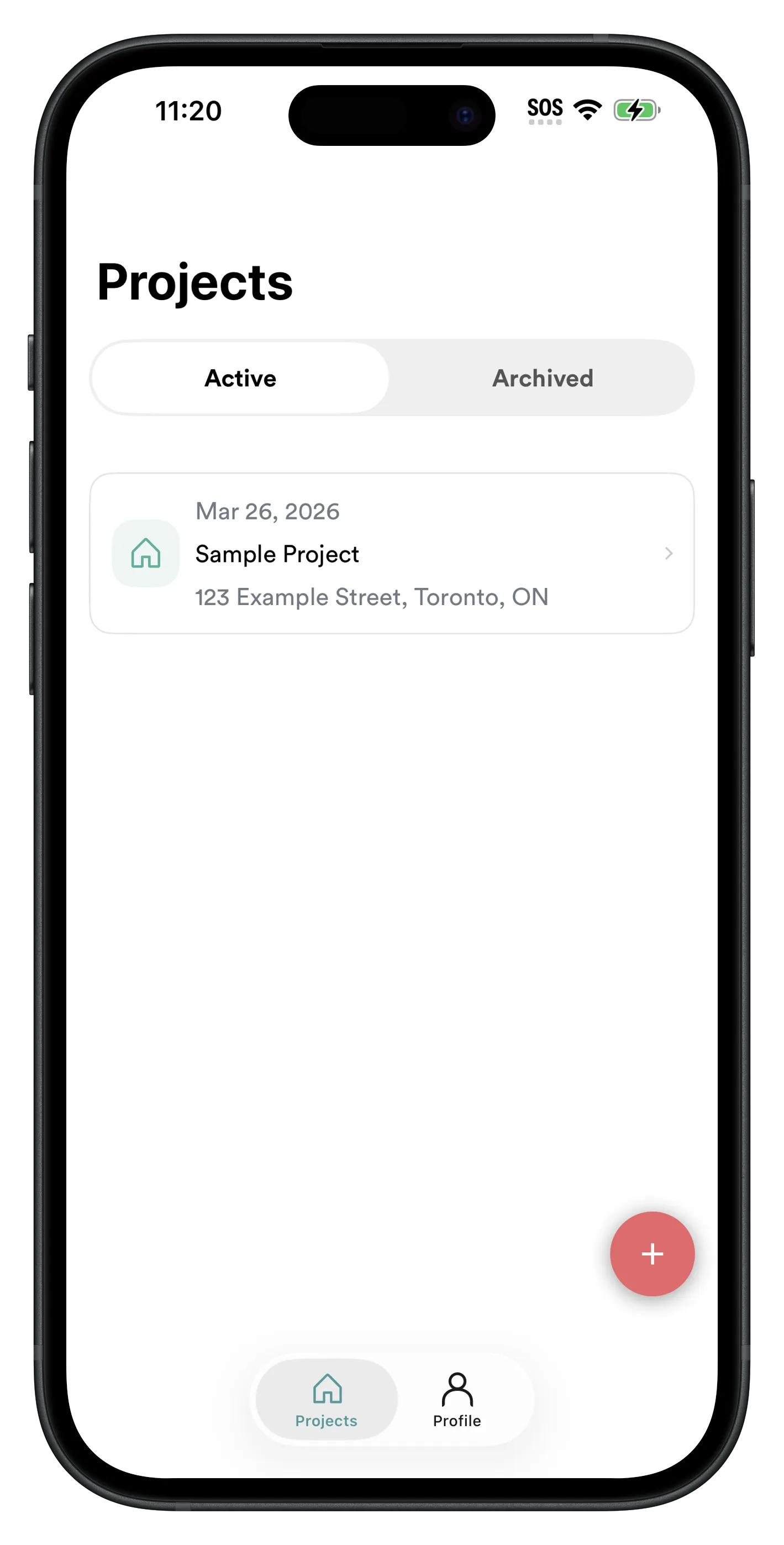
Every expense lives inside its project
Create a project for the job — client name, address, done. Every expense, payment, and quote you add after this is tied to that job automatically. No tagging, no manual sorting later.
- ✓ See all projects at a glance on the home screen
- ✓ Switch between active jobs in one tap
- ✓ Archive completed jobs to keep things tidy
Step 02
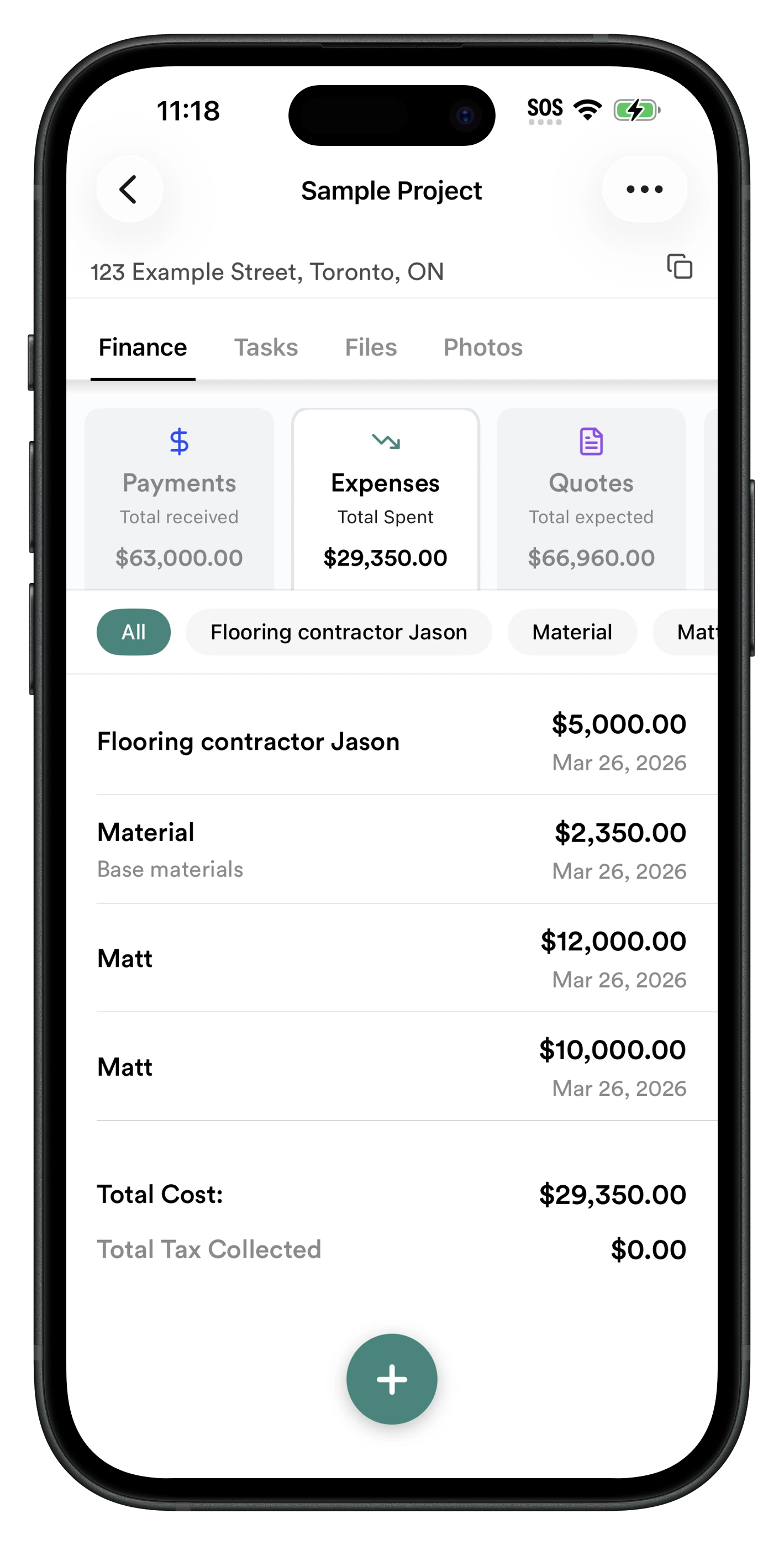
Log each expense in under 10 seconds
On-site, tap Expenses → +. Enter the amount, pick the vendor (subcontractor, material supplier, etc.), add a note, and optionally snap the receipt. That's it — the running total updates instantly.
- ✓ Filter by vendor to see all costs for one sub
- ✓ Tag as tax-deductible with a single toggle
- ✓ Works offline — syncs when you get signal back
- ✓ Running total always visible at the top
Step 03
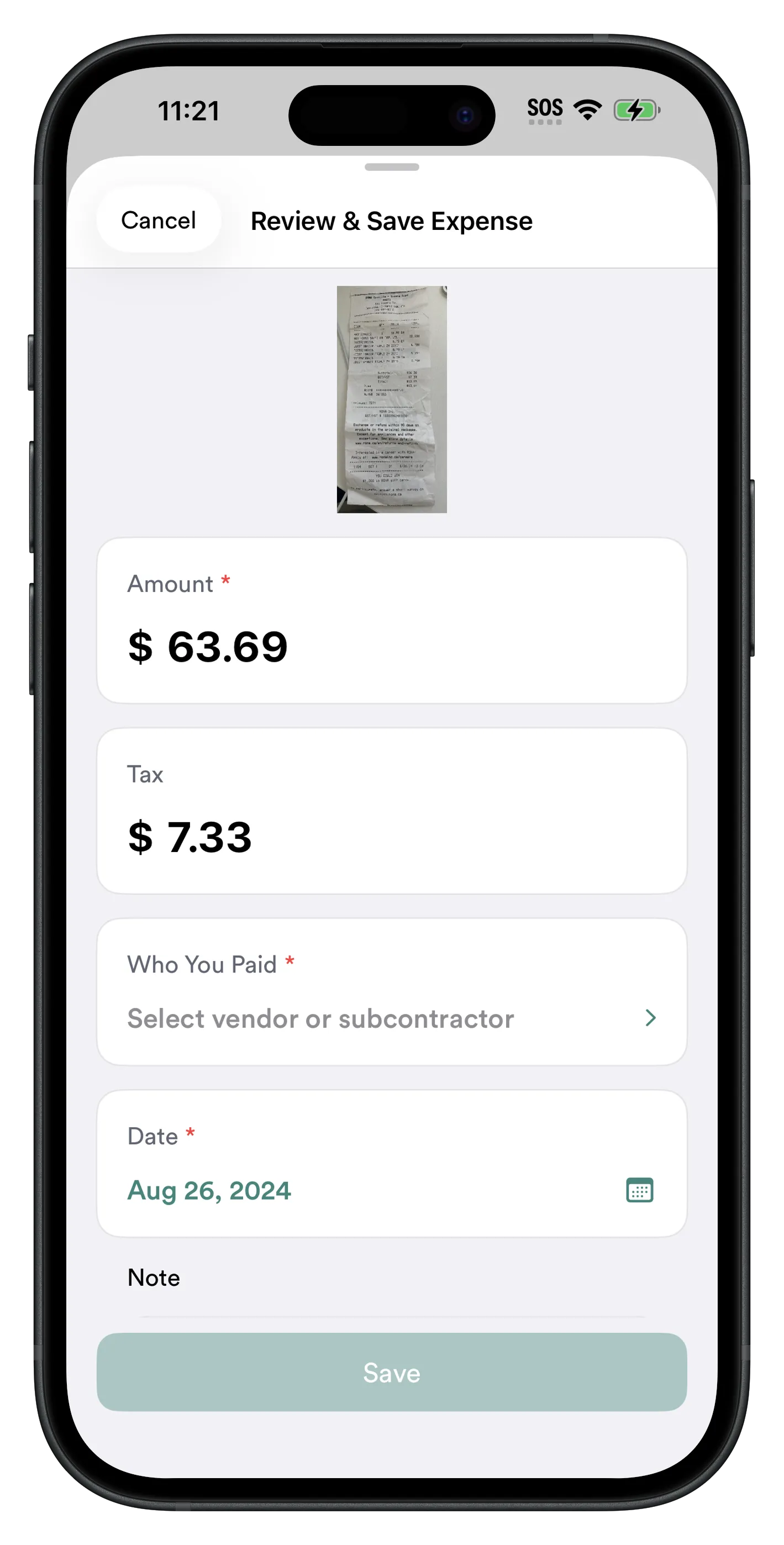
Attach receipts — never lose one again
Snap a photo of the receipt when you add the expense and it stays permanently attached to that entry in that project. No separate folder, no sticky notes, no searching your camera roll at tax time.
- ✓ Camera opens directly from the expense entry
- ✓ Receipt photo stored inside the project permanently
- ✓ Access from any device after sync
Step 04
See your profit per job, any time
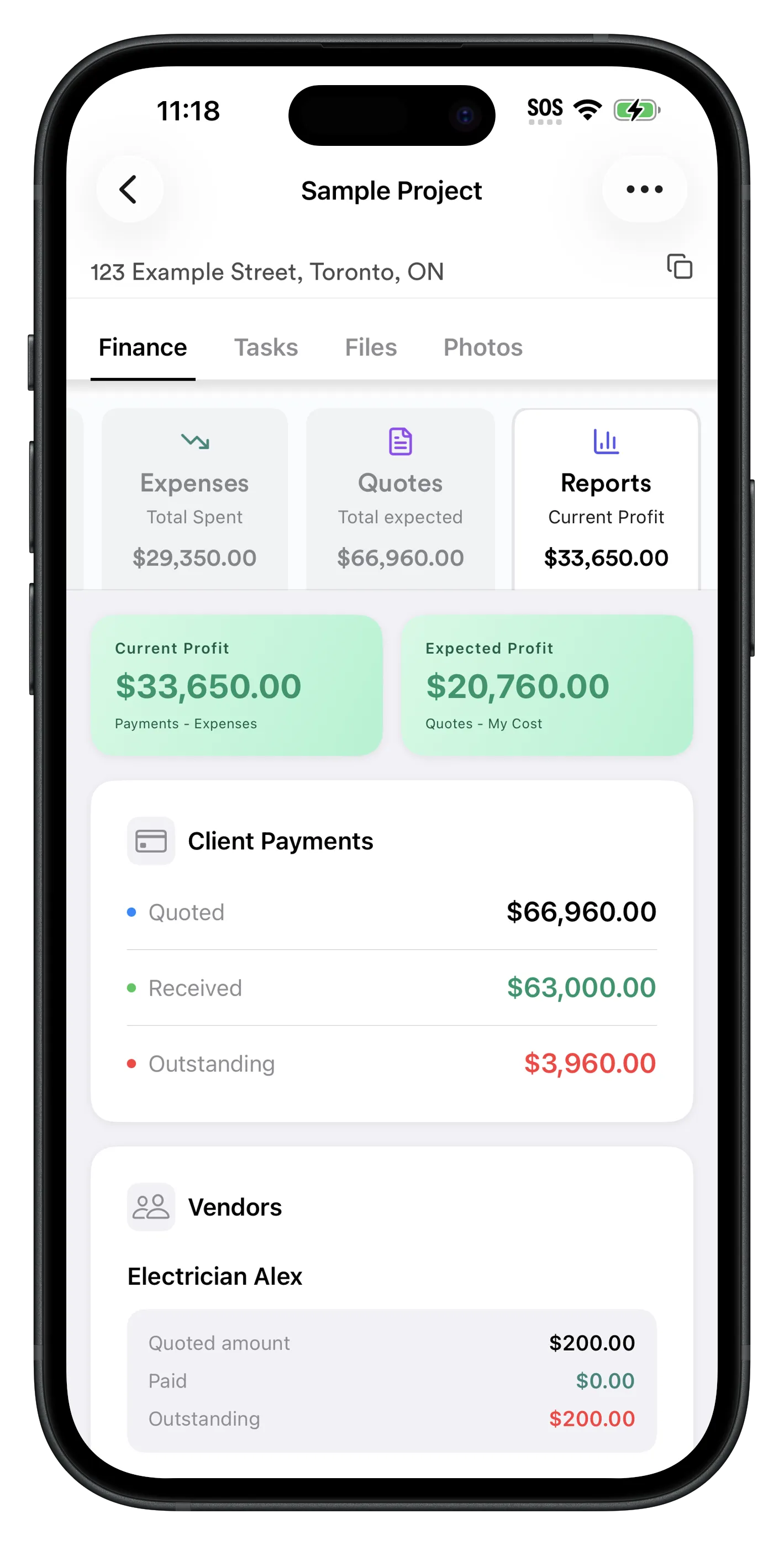
Tap Reports to see a full financial summary: total expenses, total payments received, current profit, and expected profit. You always know exactly where each job stands — mid-project, not just at the end.
- ✓ Current Profit: Payments received minus expenses logged
- ✓ Expected Profit: Total quoted minus estimated costs
- ✓ Vendor cost breakdown per project
- ✓ Outstanding client payments shown clearly
- ✓ Subcontractor balances: what you still owe each sub
This single screen answers the three questions every contractor has mid-job: what do I owe my subs, what does the client still owe me, and am I making money on this? No spreadsheet, no separate app.
How Does Per-Job Expense Tracking Help at Tax Time?
Every expense you track in RenoJira can be marked as tax-deductible with a single tap. At the end of the year, you have a clean, organized record of deductible expenses — sorted by project, with receipts attached.
No more receipt hunting
Every receipt is attached to its expense entry, inside its project. No shoeboxes, no scanning piles of paper in April.
Deductible flag per expense
Mark each expense as deductible as you go. RenoJira totals your deductible expenses per project automatically.
CRA & IRS ready
RenoJira tracks whether each expense reduces your total business income when filing — designed for both Canadian (CRA) and US (IRS) contractors.
Frequently Asked Questions
How do contractors track expenses per job?
Contractors track expenses per job by logging every cost — materials, subcontractors, equipment — directly against a project in an app like RenoJira. Each entry is tagged to the job, categorized, and marked deductible if applicable. The app shows a running total per project at any time, even offline.
What expenses should a contractor track per job?
Subcontractor payments, materials and supplies, equipment rentals, permit fees, disposal and dump fees, and any other cost that only exists because of that job. These direct costs determine whether the project is profitable.
What is the best app for contractors to track expenses per job?
RenoJira is the best free app for per-job expense tracking. It organizes every expense by project, lets you snap receipts or enter manually, tags tax-deductible items, and shows profit per job in real time — free on iOS and Android.
How do I track construction expenses on my phone?
Open RenoJira, select the project, tap Expenses → +, enter the amount, vendor, category, and optionally snap a receipt. The running total updates instantly. Works fully offline on any job site.
Why should contractors track expenses by project instead of overall?
Per-job tracking tells you the profit on each job individually. Without it, you only know total spending — which hides unprofitable job types. You can be profitable overall while consistently losing money on certain projects without knowing it.
Can I scan receipts and attach them to a construction job?
Yes. In RenoJira, tap the camera icon when adding an expense to photograph the receipt. It attaches directly to that expense inside the project — no lost receipts or digging through your photo gallery later.
Does tracking expenses per job help with taxes?
Yes. RenoJira lets you tag each expense as tax-deductible. At tax time you have a clean, organized list of deductible expenses per project with receipts attached — no sorting through mixed papers. Supports CRA (Canada) and IRS (US).
Bottom Line
Bottom Line
Start knowing your numbers — not guessing them
Tracking expenses per job is the single most important financial habit a contractor can build. It turns a vague sense of "I think that job went well" into a concrete number: here's what it cost, here's what I made.
RenoJira makes it take less than 10 seconds per expense — snap a receipt, pick the vendor, mark it deductible, done. No spreadsheets, no end-of-month catch-up sessions, no guessing.
Download it free and log your next expense before you leave the job site.


Related Articles
Best Free Job Costing App for Contractors (2026)
Full job costing guide — expenses, payments, profit
Independent Contractor Expense Tracking (2026)
Track expenses per job and for taxes
The Hidden Costs of Missed Change Orders
How forgotten extras eat into your profit
5 Best Construction Management Apps (2026)
Top tools compared for contractors