What Is a Change Order
in Construction?
A change order documents every extra or modified scope item added after the original quote — and it's how contractors get paid for all of it.
By the RenoJira team · March 27, 2026 · 6 min read
60 sec
to log a change order in RenoJira
$3,960
avg extra work lost per job without tracking
5 fields
every change order must capture
Key Takeaways
- →A change order is a written record of extra or modified work added to a job after the original quote was agreed on.
- →Without a change order, clients can — and do — refuse to pay for extra work. It's one of the top causes of profit loss in renovation projects.
- →A change order should record: description, client price, your cost, vendor, and date.
- →RenoJira lets you add change orders on-site in under 60 seconds — your expected profit updates instantly.
Change orders are where contractor profit goes to die — not because the work is unprofitable, but because it was never documented. A client asks for an extra wall removed, you say yes, you do the work, and three weeks later there's a dispute over whether it was ever agreed to be charged.
“
Most contractors don't lose money on their original quote — they lose it on undocumented extras.
Quick Answer
What is a change order in construction?
A change order is a written record of any work added to, removed from, or changed from the original project scope after the initial quote was agreed upon. It documents the new work description, the updated price to the client, and the contractor's cost — creating a clear paper trail for every modification to the job.
What Does a Change Order Include? (Definition & Examples)
Definition
A construction change order is a formal written amendment to the original contract or quote that documents a change in scope, cost, or timeline — agreed upon by the contractor and client before the additional work begins.
Change orders happen on almost every job. Common triggers include:
Client requests additional work
"Can you remove that wall while you're at it?"
Hidden conditions discovered on-site
Water damage, old wiring, structural issues found mid-job
Client upgrades materials
Switches upgraded from standard to smart switches
Design changes mid-project
Layout changed after demo reveals different dimensions
Scope additions by trade partners
Electrician finds panel needs upgrade during rough-in
Permit or code-driven changes
Inspector requires additional work to meet code
Why Do Change Orders Matter for Contractor Profit?
Untracked change orders are a silent profit killer. The work is real, the cost is real, but if there's no record — you absorb it.
Real-world scenario
Kitchen & bath renovation — $65,000 original quote
Extras added on-site
No change orders
$65,000
Client pays original quote only
You eat $3,960 — nearly 6% of the job.
With change orders
$68,960
Every extra documented & billed
Full $3,960 collected.
The pattern: most contractors don't lose money on their original quote — they lose it on undocumented extras.
What Should a Construction Change Order Include?
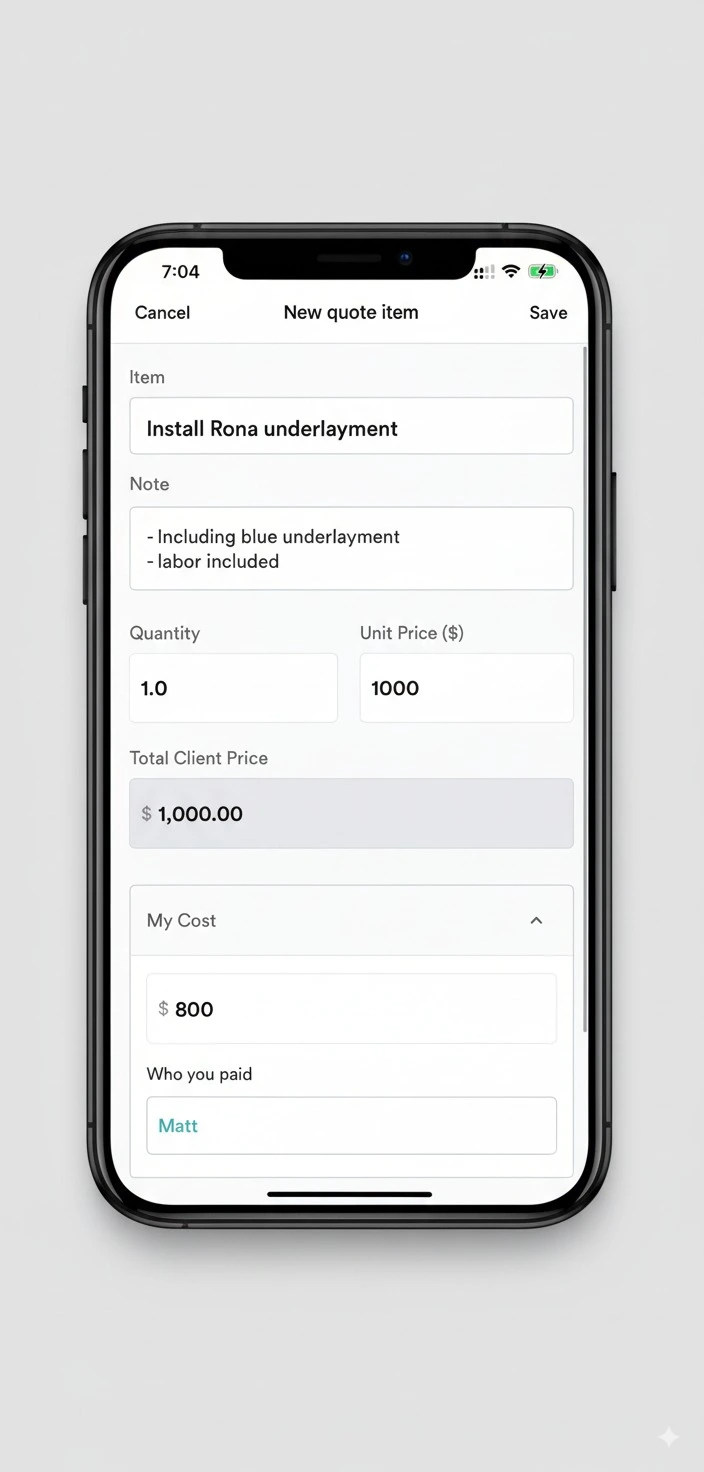
A change order doesn't need to be a formal legal document — but it does need to capture five key pieces of information:
Description of the change
What extra work is being done? Be specific enough that both sides agree on what was asked for.
"Remove load-bearing wall on first floor and install beam — approx. 12ft span"
Price charged to the client
What is the client paying for this addition? This is the new line on their total bill.
"$1,500 added to project total"
Your cost to complete it
What will it cost you in labour and materials? This is how you track whether the change order is profitable.
"$900 cost (structural engineer + labour)"
Vendor or subcontractor
Who is doing the work? This connects the change order to the right expense when the invoice comes in.
"Matt — general contractor"
Date agreed
When was this change order agreed upon? This protects you if there's a dispute later about whether the client authorized the work.
"March 14, 2026 — agreed on-site"
How Should Contractors Handle Change Orders on a Job Site?
The golden rule: document before you start. Any extra work done before a change order is agreed upon is a verbal agreement — and those are nearly impossible to enforce.
What to avoid
- ✕Saying "sure" and starting work before logging anything
- ✕Writing it on paper and forgetting to bill it
- ✕Batching all extras at the end of the job
- ✕Tracking client price but not your own cost
- ✕Relying on memory when a dispute comes up months later
What to do instead
- ✓Log the change order in RenoJira before picking up a tool
- ✓Record both the client price and your cost every time
- ✓Tag the vendor handling the work
- ✓Show the client the updated total from the app
- ✓Check Reports — your expected profit updates instantly
How Do You Track Change Orders with RenoJira?
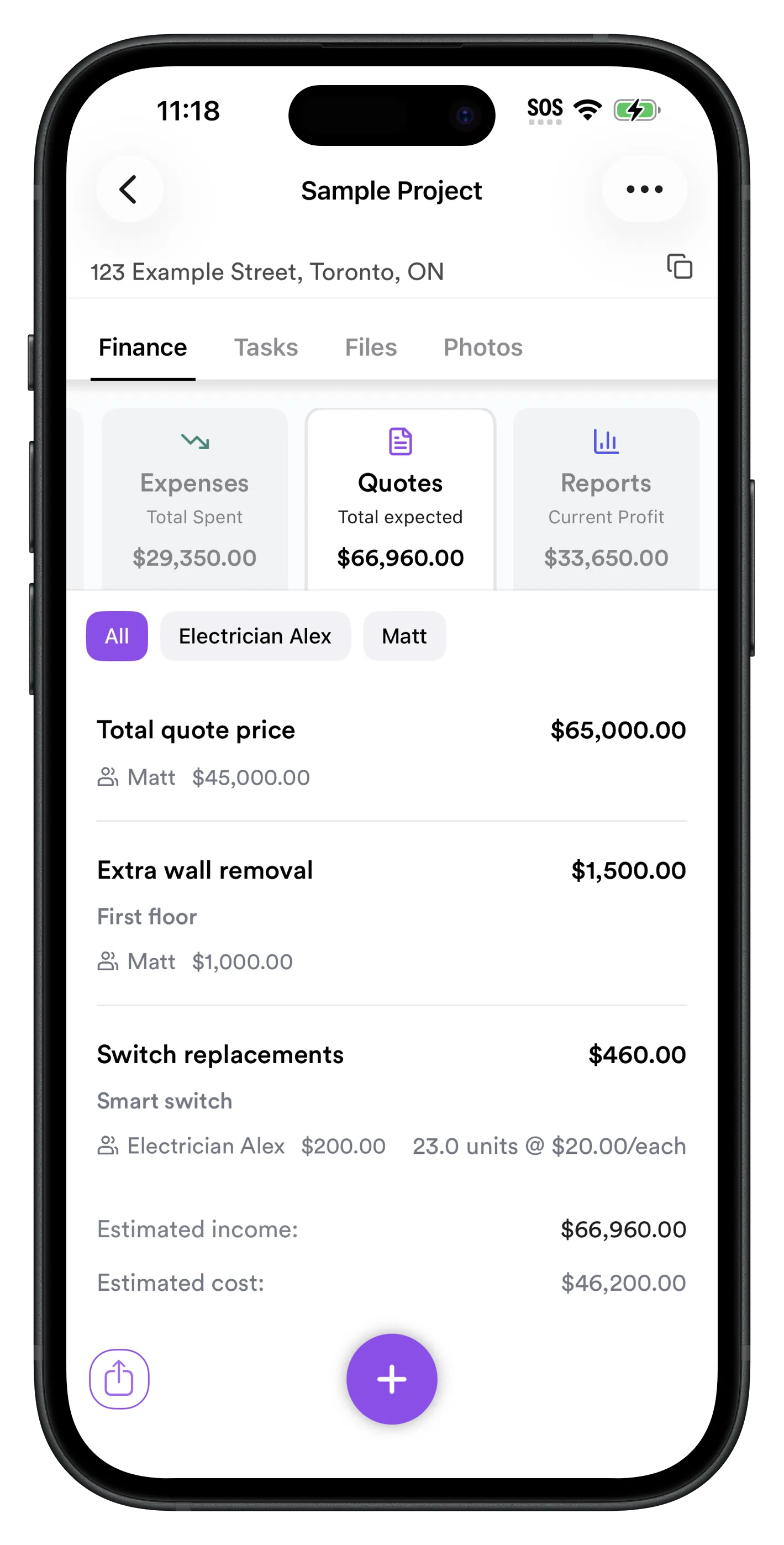
RenoJira lets you track change orders per job in a dedicated Quotes tab, where you log your original scope and every change order that gets added. Here's what it looks like in practice:
Step 1
Add change orders in under 60 seconds
The moment a client asks for extra work, open RenoJira → project → Quotes → +. Enter the description, client price, your cost, and vendor. The running estimated income and cost update immediately so you see the profit impact before you start.
- ✓Track description, client price, and your cost per line item
- ✓Tag the vendor or subcontractor per change
- ✓See estimated income vs. cost at the bottom
- ✓Every change order stored permanently in the project
Step 2
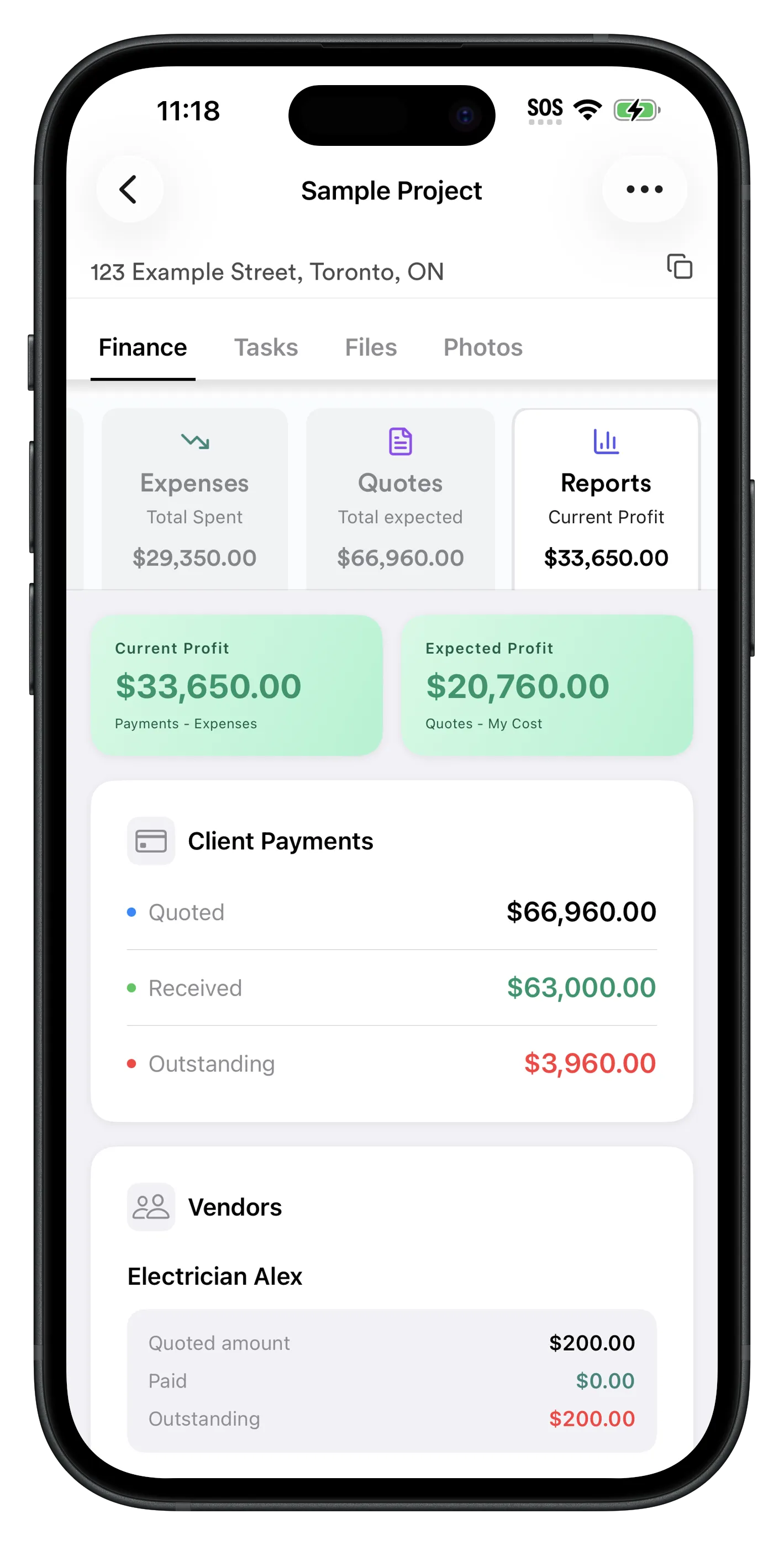
See how each change order affects your profit
Every change order you add immediately updates the Reports tab. See your Expected Profit (total quoted including all change orders, minus total costs) and Current Profit (payments received minus expenses).
- ✓Expected Profit reflects all change orders in real time
- ✓Estimated income vs. cost shown per Quotes summary
- ✓Outstanding client payments updated automatically
How to add a change order in RenoJira
- 1.Open the active project in RenoJira
- 2.Go to Finance → Quotes → tap +
- 3.Enter a description of the extra work
- 4.Enter the client price and your cost separately
- 5.Tag the vendor or subcontractor handling the work
- 6.Check Reports — your expected profit updates instantly
What Are the Most Common Change Order Mistakes?
And the fix for each one.
Starting extra work before documenting it
Log the change order in RenoJira before picking up the tool. Takes 60 seconds. Saves disputes.
Only tracking what to charge — not what it costs you
Always enter both the client price AND your cost. Without your cost, you can't know if the change order is actually profitable.
Batching all change orders at end of job
Log each one as it happens. End-of-job catch-up is where details get lost and clients push back.
Not tying the change order to a vendor
Tag the vendor handling each item. When their invoice arrives, you'll know exactly which change order it belongs to.
Relying on memory or sticky notes
RenoJira stores every change order permanently in the project. Pull it up months later to settle any payment dispute.
Frequently Asked Questions
What is a change order in construction?
A change order is a written record of work added, removed, or modified from the original project scope after the initial quote. It documents the description, updated client price, contractor cost, and agreed date — creating a paper trail for every modification to the job.
Why do contractors use change orders?
To get paid for extra work and avoid disputes. Without a written change order, clients can refuse to pay for additions. Change orders protect contractors legally and ensure every added scope is tracked, billed, and agreed upon before work starts.
What should a construction change order include?
Description of the change, price being charged to the client, your cost to complete it, the vendor handling the work, and the date agreed. RenoJira captures all five fields in a single form when you add a new Quotes item.
How do contractors track change orders on a job site?
Open RenoJira, go to the project's Quotes tab, tap +, enter description, client price, your cost, and vendor. Done in under 60 seconds. Your expected profit updates instantly and the change order is stored permanently in the project.
What happens if a contractor doesn't use change orders?
Extra work gets done without a paper trail. Clients dispute charges, contractors absorb the cost. Untracked change orders are one of the top causes of profit loss in renovation — even on jobs that looked profitable on paper.
Is a verbal change order legally binding?
Possibly, but almost impossible to enforce. Always document in writing before starting extra work. A quick note in RenoJira is far better protection than a verbal agreement — especially months later when memories differ.
How do I add a change order in RenoJira?
Open the project → Finance → Quotes → tap +. Enter the description, client price, your cost, and vendor. The Reports tab updates automatically to show your new expected profit including the change order.
Bottom Line
Every change order you track is money you don't leave on the job site.
A change order is just a written record of extra work — but that record is the difference between getting paid for everything you do and silently absorbing the cost.
The habit: before you start any extra work, open RenoJira and log it. Description, client price, your cost, vendor. 60 seconds on-site prevents hours of disputes later.


Related Articles
The Hidden Costs of Missed Change Orders
How forgotten extras silently eat into renovation profit
Best Free Job Costing App for Contractors (2026)
Full job costing guide — expenses, payments, profit
How Contractors Track Expenses Per Job
Log every cost against the right project in real time
5 Best Construction Management Apps (2026)
Top tools compared for contractors