QuickBooks · Expense Sync
How to Sync Construction Expenses to QuickBooks Automatically (2026)
If you're a contractor using QuickBooks, you've probably lived this: buy materials at Home Depot, save the receipt, jot it down somewhere, enter the expense into your construction app — then enter the same expense again into QuickBooks. It works, but it's slow, repetitive, and easy to get wrong.
The fix is simple in principle: capture the expense once, and let it sync to QuickBooks automatically. Here's how that workflow actually looks, and why it saves contractors hours every week.
Short answer
Capture each expense once in a field app — snap the receipt, record the amount and supplier, assign it to a project — then sync it to QuickBooks Online, where it's logged as a purchase. A tool like RenoJira does this in one tap and also syncs payments and customers, so you never type the same expense twice.
Why entering expenses twice costs you
Contractors buy materials, fuel, rentals, and subcontractor services every day. When those purchases aren't recorded right away, the damage shows up later — usually somewhere it hurts:
- Lost receipts you can't bill back or deduct
- Project costs that no longer match reality
- Profit reports you can't trust
- The same expense keyed in twice
- Evenings burned on office admin
Run a few jobs at once and those small delays compound into real money.
What actually needs to reach QuickBooks
A good field workflow lets you record a cost where you're standing and have the books catch up on their own. In practice that means the everyday stuff: materials, equipment rentals, fuel, subcontractors, office supplies, and the odd miscellaneous job cost. The one rule that makes it useful — every expense stays tied to the right project, so your job costing never drifts.
Two entries vs. one
The old way
- —Take a photo
- —Save the receipt
- —Write a note
- —Enter it in your construction app
- —Open QuickBooks
- —Enter it all over again
The better way
- →Take a photo
- →Record the expense
- →Assign the project
- →Sync to QuickBooks
One entry. One receipt. One source of truth.
What you get back
Time, mostly. Plenty of contractors report losing 30 to 60 minutes a day to re-keying expenses. Syncing erases that chore — the data's already entered, it just travels.
Fewer mistakes. Type a number twice and eventually one of them is wrong. A single entry that flows through keeps your construction records and your accounting in agreement.
Job costing you can act on. Because every cost stays attached to its project, you can see current spend, budget remaining, estimated profit, and where the material money is going — while the job is still open.
Books that stay current. No one in the office is waiting on a glovebox full of paper. Expenses show up in QuickBooks shortly after they happen.
How RenoJira fits in
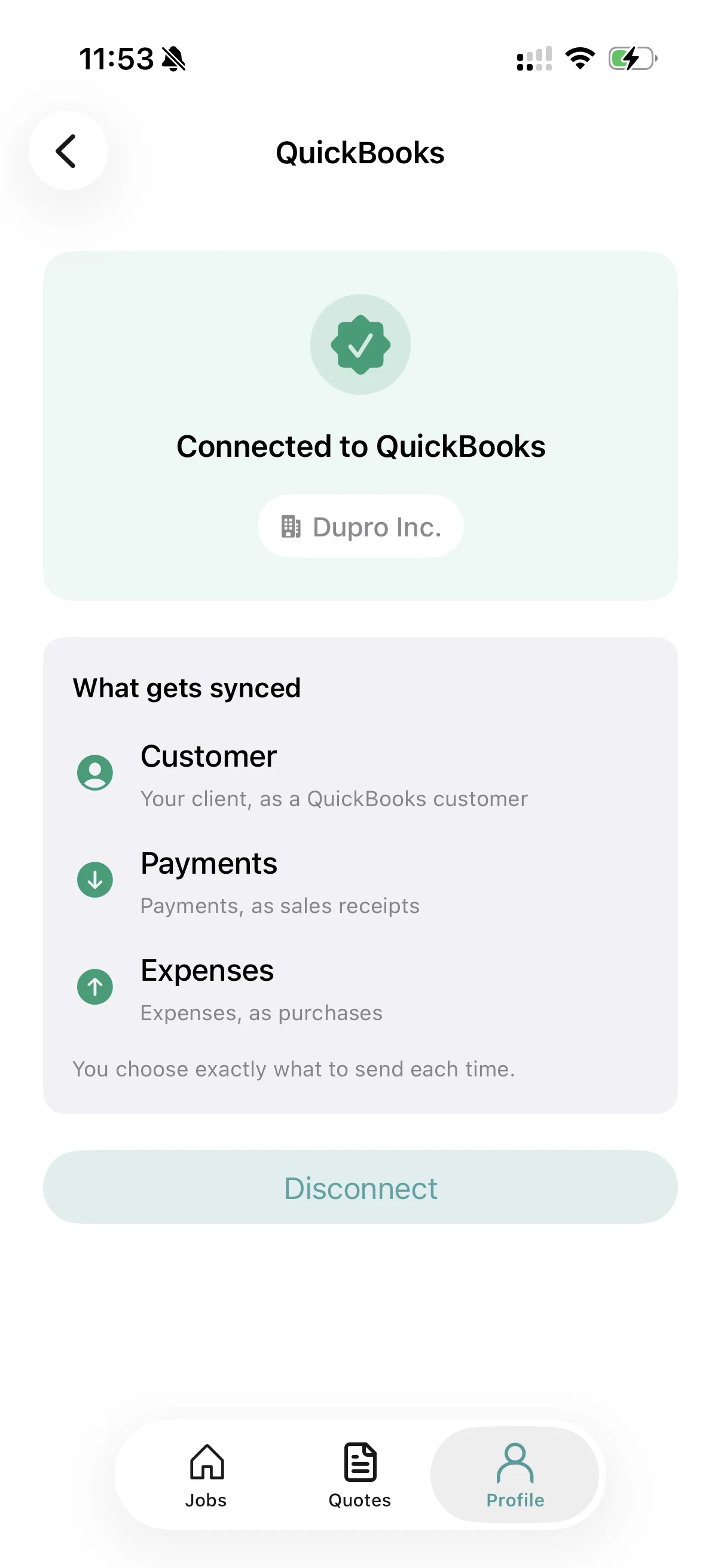
RenoJira is a construction expense tracking app built for small construction companies. When you record an expense you can capture it on-site, attach the receipt photo, assign it to a project, categorize the supplier, and send it straight to QuickBooks.
It also syncs customers and payments, so the duplicate work mostly disappears. The full mechanics — connecting, what maps to what, disconnecting — are on the QuickBooks integration page.
Who gets the most out of it
Anyone who records costs daily, really — but it pays off fastest for:
Capture once. Sync to QuickBooks.
RenoJira is free on iOS and Android — log job expenses on-site and push them to QuickBooks.


Frequently asked questions
- Does QuickBooks automatically track construction expenses?
- QuickBooks is excellent for accounting, but it isn't built to capture expenses on the job site. Contractors typically use field-management software like RenoJira to record an expense and attach the receipt where the work happens, then sync it to QuickBooks so the books update without re-entry.
- Can I attach receipts to expenses?
- Yes. Modern construction expense apps let contractors snap and attach a receipt photo when recording each expense, so the receipt travels with the cost instead of getting lost in a truck or junk drawer.
- Why not enter everything directly into QuickBooks?
- QuickBooks is designed primarily for accounting at a desk. Most contractors prefer collecting expenses on their phone while working on-site and syncing them later — it's faster, captures receipts in the moment, and keeps every cost attached to the right job.
- Does RenoJira replace QuickBooks?
- No. RenoJira is designed to work alongside QuickBooks. Contractors manage projects, expenses, job costing, and field operations in RenoJira, while QuickBooks remains the accounting system. RenoJira pushes expenses, payments, and customers into QuickBooks so you don't enter them twice.
- What does RenoJira sync to QuickBooks?
- RenoJira can sync expenses (as purchases), payments (as sales receipts), and customers to QuickBooks Online. The sync is one-way and on-demand — you choose what to send for each project — and it's protected against creating duplicates.
The bottom line
No contractor should be entering the same expense twice. Capture it once, sync it to QuickBooks, and you cut the paperwork, sharpen your job costing, and keep the books honest. Save 30 minutes a day and you've handed yourself back a couple of work-weeks a year.