Best Construction Budget App for Contractors (2026)
We compared 7 construction budget apps on price, per-project budget tracking, and real ratings — from a free option for solo contractors to enterprise platforms. Here's how they stack up.
By the RenoJira team — Updated June 29, 2026 · 12 min read
Quick Answer
The best construction budget app depends on your size. For small and solo contractors who want to track spending against their quote on each job for free, RenoJira is the top pick (iOS & Android, no subscription). For larger teams that need estimating, scheduling, and client portals too, Contractor Foreman (from $49/mo) and Buildertrend (from ~$299/mo) are the strongest paid platforms.
20–45%
typical construction cost overrun vs. budget (McKinsey)
25%
of projects finish within 10% of budget (KPMG)
~5%
of project value lost to rework, on average (industry studies)
Sources: McKinsey, construction rework studies. A budget app exists to keep you out of these numbers.
Key Takeaways
- →Best free: RenoJira — track real spend against your quote per project, no subscription.
- →Best value paid: Contractor Foreman — all-in-one from $49/mo, rate locked at signup.
- →Best for builders/estimating: Buildxact; best for trades + QuickBooks: Knowify.
- →Enterprise platforms (Buildertrend, Houzz Pro) are powerful but priced for larger companies ($299–$900+/mo).
What is a construction budget app?
A construction budget app lets you set a planned budget for a project and then track real spending against it — so at any moment you know whether the job is on, over, or under budget. The best ones combine budgeting with job costing: you enter the budget or quote, log every expense and payment as it happens, and the app shows budget vs. actual and your real profit in real time, instead of finding out at the end.
That matters because the numbers are unforgiving. McKinsey finds construction projects typically run 20–45% over budget, and KPMG's Global Construction Survey found only about 25% finish within 10% of budget. A budget app is the simplest way to catch overruns while you can still act on them.
Budget app vs. job costing vs. estimating software
These three overlap and the terms get used loosely, but they answer different questions at different stages of a job:
Estimating
Before the job: what should this cost, and what do I quote the client?
Budgeting
During the job: am I on, over, or under the number I planned?
Job costing
During & after: what did it actually cost, and what's my real profit?
The best tools blur these lines. Buildxact leans toward estimating; QuickBooks is accounting; RenoJira focuses on budgeting and job costing (your quote becomes the baseline, you track real spend against it, and you see profit). When you search for a "construction budget app," what you usually want is that middle column — a live read on whether the job is still on the number you planned.
How we chose
We compared each app on the criteria that actually matter for keeping a job on budget: per-project budget and cost tracking, change-order handling, mobile and offline use, receipt capture, QuickBooks/accounting sync, and pricing (including whether a free tier exists). Ratings are verified scores from Capterra. Pricing and ratings were checked in 2026 and change often — confirm current numbers on each vendor's site before you buy.
Construction budget apps compared (2026)
Pricing and ratings below are current as of 2026; vendors change pricing often, so confirm on each provider's site. Ratings are from Capterra.
| App | Starting price | Free tier | Per-project budget | Rating | Best for |
|---|---|---|---|---|---|
| RenoJira | Free | ✓ | ✓ | — | Small & solo / renovation contractors |
| Contractor Foreman | $49/mo | Trial | ✓ | 4.5 | Affordable all-in-one |
| Buildxact | ~$169/mo | Trial | ✓ | 4.4 | Builders & estimating |
| Knowify | ~$99/mo | Trial | ✓ | 4.5 | Trades + QuickBooks sync |
| Buildertrend | ~$299/mo | — | ✓ | 4.5 | Larger custom builders |
| Houzz Pro | ~$399/mo | Trial | ✓ | 4.3 | Design-led remodelers |
| QuickBooks Online | $38/mo | Trial | Partial | 4.3 | General accounting |
1. RenoJira — best free construction budget app
RenoJira is a free job-cost and expense tracker built for small and solo contractors and renovation pros — and it works well as a free construction budget app because your quote or project total acts as the budget baseline. You log every expense and payment from your phone, on-site and even offline, and see real spend against that number and your profit update live. It isn't an enterprise ERP and doesn't try to be; its strength is being free, fast, and simple for contractors who don't want per-user fees or a long setup.
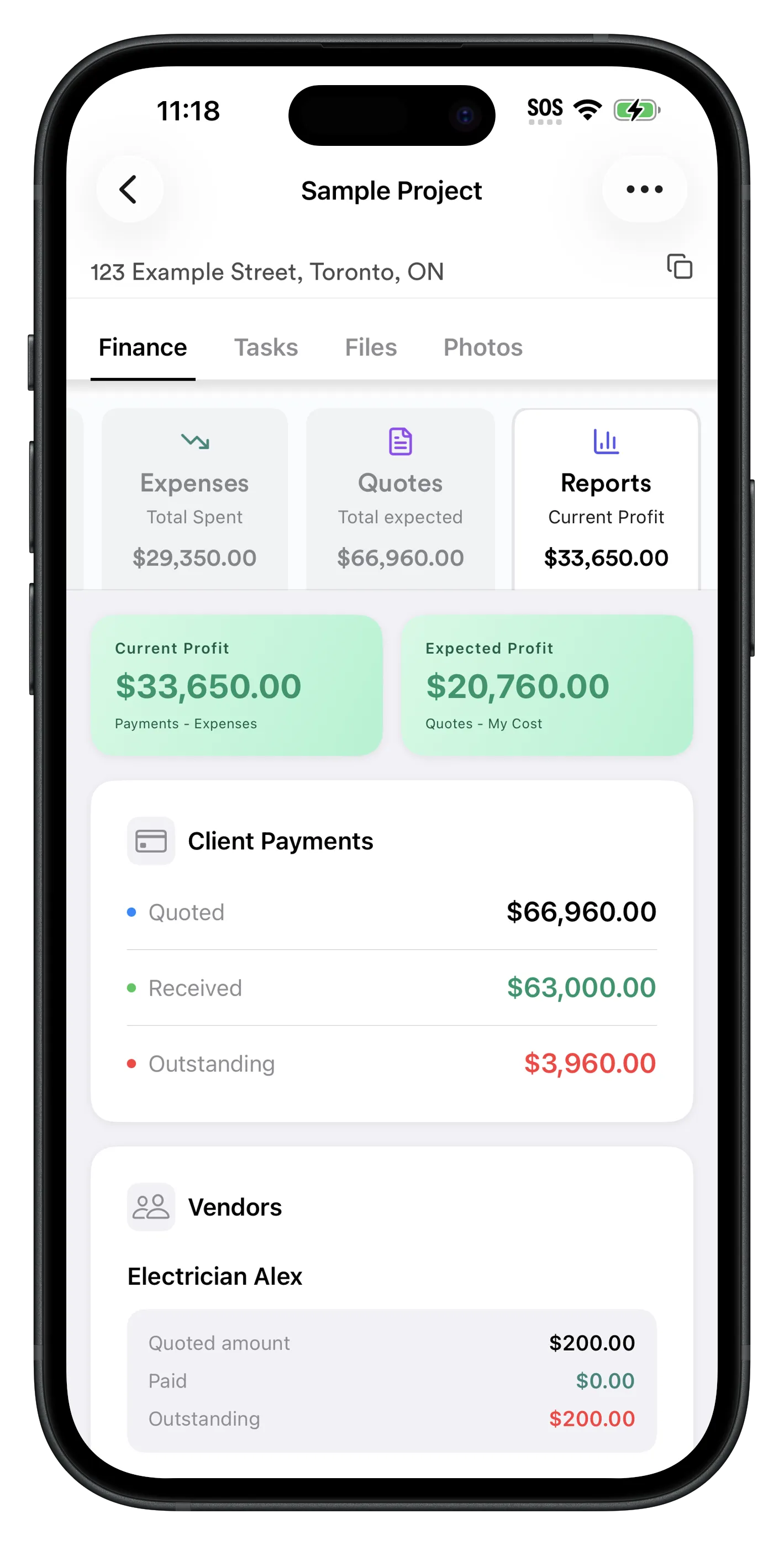
RenoJira's Reports view shows total expenses against your quoted amount, expected profit, and what's still owed — the live "am I on budget?" read, updated every time you log a cost on-site.
- ·Use your quote or total as the budget baseline; track every cost and payment against it
- ·Snap receipts, log change orders, see real-time spend vs. quote and profit
- ·Works offline on the job site; free on iOS and Android
Pros
Free, no per-user fees · fast on-site entry · real spend vs. quote per project · built for small/solo contractors
Cons
Not a full ERP (no payroll/accounting suite) · no enterprise scheduling/Gantt · newer, smaller review base
Pricing: Free (iOS & Android). Best for: Small and solo contractors, renovators, and remodelers who want budget tracking without a subscription.
2. Contractor Foreman — best value all-in-one
Contractor Foreman packs project management, estimating, job costing, scheduling, time tracking, and change orders into one affordable platform. Its standout is price: plans start at $49/month, and the company says your rate is locked at signup. For a growing team that wants budgeting alongside everything else, it's one of the best-value options on the market.
Pros
Low entry price · broad all-in-one feature set · QuickBooks integration · rate locked at signup
Cons
Lots of features means a learning curve · best value needs annual commitment · more than a solo contractor may need
Pricing: $49–$332/mo across five tiers (Capterra). Rating: 4.5/5 (820+ reviews). Best for: Small-to-mid teams wanting an affordable all-in-one.
3. Buildxact — best for estimating & builders
Buildxact pairs takeoff and estimating with budget and cost tracking, which makes it a favorite for custom-home builders and remodelers who win work on detailed estimates. It was named Best Value for Money among construction estimating tools by Software Advice. The trade-off is that it's pricier than entry-level tools and is more estimating-led than a pure budget tracker.
Pros
Strong takeoff + estimating · estimate flows into budget · intuitive UI · well-rated support
Cons
Higher starting price · more than solo contractors need · estimating-led rather than simple budgeting
Pricing: from ~$169/mo (Foundation, annual) (Capterra). Best for: Builders and remodelers who estimate jobs in detail.
4. Knowify — best for trades with QuickBooks
Knowify focuses on job costing, budgeting, and invoicing for trade and specialty contractors, with a tight QuickBooks integration that accountants like. Reviewers praise its job-cost tracking; a few note the interface can feel dated and some features take setup. If you already run QuickBooks and want true per-job budgets layered on top, Knowify is a strong fit.
Pros
Deep job costing & budgets · excellent QuickBooks sync · contract & change-order management
Cons
Interface feels dated to some · learning curve · per-user add-on fees
Pricing: from ~$99/mo, Advanced ~$249/mo, +$29/user (Capterra). Rating: 4.5/5. Best for: Trade contractors on QuickBooks.
5. Buildertrend — best for larger custom builders
Buildertrend is a comprehensive platform for custom builders and remodelers — budgets, estimates, scheduling, client portals, selections, and more, all in one place (it now also includes the former CoConstruct). It's powerful and widely used, but priced for established companies, with plans commonly running from ~$299/month up to $900+ for larger builders, plus onboarding fees.
Pros
Full feature set · strong client & selection management · large, mature platform · well-rated
Cons
Expensive for small contractors · onboarding fees · overkill if you just need budgeting
Pricing: ~$299–$900+/mo (Capterra). Rating: 4.5/5 (2,400+ reviews). Best for: Larger custom builders and remodelers.
6. Houzz Pro — best for design-led remodelers
Houzz Pro blends lead generation, mood boards, estimating, invoicing, and budgeting into one tool aimed at design-focused remodelers and interior pros. The all-in-one design-to-budget flow is its draw; reviewers note that costs can feel high, some features are add-ons, and pricing has moved to project-volume tiers.
Pros
Design + budget in one · lead generation via Houzz · good for client-facing presentation
Cons
Pricey · add-on costs · billing/cancellation complaints in reviews · less depth for complex builds
Pricing: from ~$399/mo, now volume-based (Capterra). Rating: 4.3/5 (1,000+ reviews). Best for: Design-led remodelers and interior pros.
7. QuickBooks Online — best general accounting (not construction-specific)
QuickBooks Online is the default for small-business accounting and can do basic project/job budgeting on higher tiers. But it's general accounting software, not a construction budget app — there's no native change-order workflow or construction-specific budget vs. actual, and many contractors end up pairing it with a tool like Knowify or RenoJira for the job side.
Pros
Affordable entry tier · industry-standard accounting · huge ecosystem & integrations
Cons
Not construction-specific · project budgeting only on higher tiers · annual price increases reported
Pricing: $38–$275/mo (Capterra). Rating: 4.3/5 (8,000+ reviews). Best for: Accounting first, with a construction tool alongside.
What to look for in a construction budget app
Whether you go free or paid, a construction budget app earns its place if it does these well:
- ·Per-project tracking — costs tied to each job, not lumped into one business-wide total.
- ·A budget baseline — a quote, estimate, or budget figure to measure real spend against.
- ·Change-order handling — a fast way to log extras so added scope doesn't quietly eat your margin.
- ·Mobile & offline — you log costs on the job site, often with no signal, not at a desk later.
- ·Receipt capture — snap and file receipts the moment you pay, before they vanish.
- ·Accounting sync — QuickBooks or similar export if a bookkeeper handles your taxes.
- ·Pricing that fits your size — don't pay enterprise rates for a one-crew operation; a free tier is plenty for many solos.
How to choose a construction budget app
Match the tool to where your business actually is right now:
- ·Solo or small contractor, want it free: start with RenoJira. Use your quote as the budget and track real spend from your phone with zero cost.
- ·Growing team wanting one tool for everything: Contractor Foreman gives the most features per dollar.
- ·You win work on detailed estimates: Buildxact ties estimating to budget.
- ·You live in QuickBooks: Knowify adds true per-job budgets on top.
- ·Established custom builder or design firm: Buildertrend or Houzz Pro, budget permitting.
Whatever you pick, run one real job through it before committing. The best budget app is the one you'll actually update on-site — because a budget you don't maintain can't warn you before you go over.
Bottom Line
Start with a free construction budget app.
If you're a small or solo contractor, there's no reason to pay a subscription to know whether your jobs are on budget. RenoJira tracks real spend against your quote per project from your phone — free on iOS and Android.


Construction budget app FAQ
What is the best construction budget app for contractors?
For small and solo contractors who want to track spending against their quote on each job without a subscription, RenoJira is the best free option (iOS and Android). For larger teams that need scheduling, estimating, and client portals in one paid platform, Contractor Foreman (from $49/month) and Buildertrend (from ~$299/month) are strong choices.
Is there a free construction budget app?
Yes. RenoJira is free for iOS and Android — set a quote or total per project as the baseline, log expenses and payments against it, and see real spend vs. quote and real profit with no subscription. Most other construction budget apps are paid, typically $99 to $900+ per month.
How much does a construction budget app cost?
As of 2026, from free (RenoJira) to $900+/month. Contractor Foreman starts at $49/month, Knowify around $99/month, Buildxact around $169/month, Houzz Pro around $399/month, and Buildertrend from roughly $299/month. QuickBooks Online runs $38 to $275/month but isn't construction-specific.
What is the difference between a construction budget app and job costing?
A budget app sets a planned budget and tracks real spending against it so you see if you're over or under. Job costing records actual costs per job to reveal real profit. The best apps do both — set the budget, log costs as they happen, and see budget vs. actual and profit together.
What is the best construction budget app for small or solo contractors?
RenoJira, because it's free, works from your phone on the job site, and tracks real spend against your quote per project without per-user fees or long setup. Contractor Foreman ($49/month) is a good paid alternative if you also need scheduling and estimating.
Is QuickBooks good for construction budgeting?
QuickBooks Online handles accounting well and can do basic project budgeting on Plus and Advanced, but it isn't construction-specific — no native change-order workflow or job-site budget tracking. Many contractors keep QuickBooks for the books and pair it with Knowify or RenoJira for per-job budgeting.
Is a free or paid construction budget app better?
For a solo contractor or small crew, a free app like RenoJira is usually enough to track budget vs. spend per job. Paid platforms ($49 to $900+/month) make sense once you need scheduling, estimating, client portals, or multi-crew management. Start free and upgrade only when a missing feature is costing you money.
Can I track a construction budget on a spreadsheet instead?
You can, and many start there, but spreadsheets break down on the job site — they're not with you when you pay, don't capture receipts, and need nightly manual updates most people abandon. A free mobile app removes that friction, which is why spreadsheet users tend to switch once a job gets busy.
Sources
- Pricing & ratings: Capterra product pages for Buildertrend, Contractor Foreman, Buildxact, Knowify, Houzz Pro, and QuickBooks Online (2026).
- Cost-overrun data: McKinsey capital-projects research; KPMG Global Construction Survey; construction rework studies (CII / PlanRadar).
- Pricing changes frequently — confirm current rates on each vendor's site.
Related Articles
Best House Construction Expense Tracker App (2026)
Track every cost per build in real time
Best Free Job Costing App for Contractors (2026)
Track expenses and profit per project for free
Job Costing for Contractors: The Complete Guide
The formula, methods, and how to do it
The Hidden Costs That Most Contractors Never Track
The untracked costs that quietly kill margin