House Construction · Expense Tracking
Best House Construction Expense Tracker App (2026)
House builds involve dozens of vendors, months of expenses, and constant change orders. Without per-project tracking, you're guessing at the end. Here's the best app to fix that — for free.
By the RenoJira team — Updated June 12, 2026 · 7 min read
$0
free, no subscription
iOS & Android
10 sec
to log an expense on-site
from any job site
Per-project
costs tracked separately
per build
RenoJira is the best free house construction expense tracker app for iOS and Android. It lets residential contractors and homeowners log material costs, scan receipts, track subcontractor balances, and manage on-site change orders — with full offline use and $0 subscription.
Key Takeaways
- →RenoJira is the best free house construction expense tracker app — available on iOS and Android, no credit card needed.
- →It tracks every cost per project — materials, labour, subcontractors, permits, equipment, and change orders.
- →Unlike Buildertrend ($299+/mo) or spreadsheets, RenoJira shows real-time profit on every house build for free.
- →Works for both contractors managing builds and homeowners tracking renovation budgets.
Quick Answer
The best house construction expense tracker app is RenoJira. Free on iOS and Android. Tracks every expense per project, change orders, payments, and real-time profit for house builds and renovations.
Why Do House Construction Projects Need Expense Tracking?
House builds are the most expense-intensive job type a contractor takes on. Unlike a single-trade renovation, a full house build involves:
- ·Multiple trades over months — framers, plumbers, electricians, drywallers, painters, flooring crews — each with their own invoices and timelines.
- ·Constant client-requested changes — upgraded fixtures, layout alterations, added square footage — every one of which affects your margin.
- ·Permit and inspection fees — city permits, engineer sign-offs, and inspection stages that add up quietly over the life of the project.
- ·Extended timelines — a 6-month build accumulates hundreds of individual expenses. Without tracking, the final tally is always a surprise.
Frustrated with tracking house-build costs by hand?
Download RenoJira — the 100% free house construction expense tracker. Log every cost per project and see real-time profit, right from the job site.
On a house build, you're managing dozens of vendors over months — without per-project tracking, you're just guessing at the end.
Per-project expense tracking is the only way to know, in real time, whether a house build is running on budget — and to catch cost overruns before they eliminate your margin entirely.
Cost Categories
What Should You Track on a House Construction Project?
Every cost on a house build falls into one of six categories. Track all of them — and you always know where the money went.
01
Materials
Lumber, concrete, fixtures, finishes — everything purchased for the build.
02
Labour
Your time and any crew wages allocated to this project.
03
Subcontractors
Plumber, electrician, drywaller, roofer invoices — each tagged per project.
04
Permit & inspection fees
City permits, engineer sign-offs, inspections throughout the build.
05
Equipment rental
Scaffolding, excavator, specialty tools hired for specific phases.
06
Change orders
Client-requested extras, hidden conditions, design changes — every addition that affects your margin.
Best House Construction Expense Tracker Apps (2026)
Here's how the leading options compare on the features that matter most for house construction tracking:
| App | Per-project tracking | Change orders | Payment tracking | Profit reports | Price |
|---|---|---|---|---|---|
| RenoJira | ✓ | ✓ | ✓ | ✓ | Free |
| Buildertrend | ✓ | ✓ | ✓ | ✓ | $299+/mo |
| CoConstruct | ✓ | ✓ | ✓ | ✓ | $299+/mo |
| Houzz Pro | ✓ | ✓ | — | — | $85+/mo |
| Spreadsheet | Manual | Manual | Manual | Manual | Free |
RenoJira — The #1 free option. Full per-project tracking, change orders, payment stages, and real-time profit reports. No subscription, no credit card. Built for contractors, works for homeowners too.
Buildertrend / CoConstruct — Enterprise-grade platforms with full feature sets, but at $299+/month they are designed for larger construction companies managing multiple crews and clients simultaneously.
Houzz Pro — Good for design-focused renovations but lacks profit reporting and payment tracking depth for complex house builds.
Spreadsheet — Free but entirely manual. No automatic profit calculation, no on-site entry, and no real-time updates. Works until the first missed cell formula.
How RenoJira Works as a House Construction Expense Tracker
RenoJira works as a house construction expense tracker app built around a simple idea: every dollar you spend on a house build should be tied to that project. Here's how the two core workflows look in practice:
Step 01
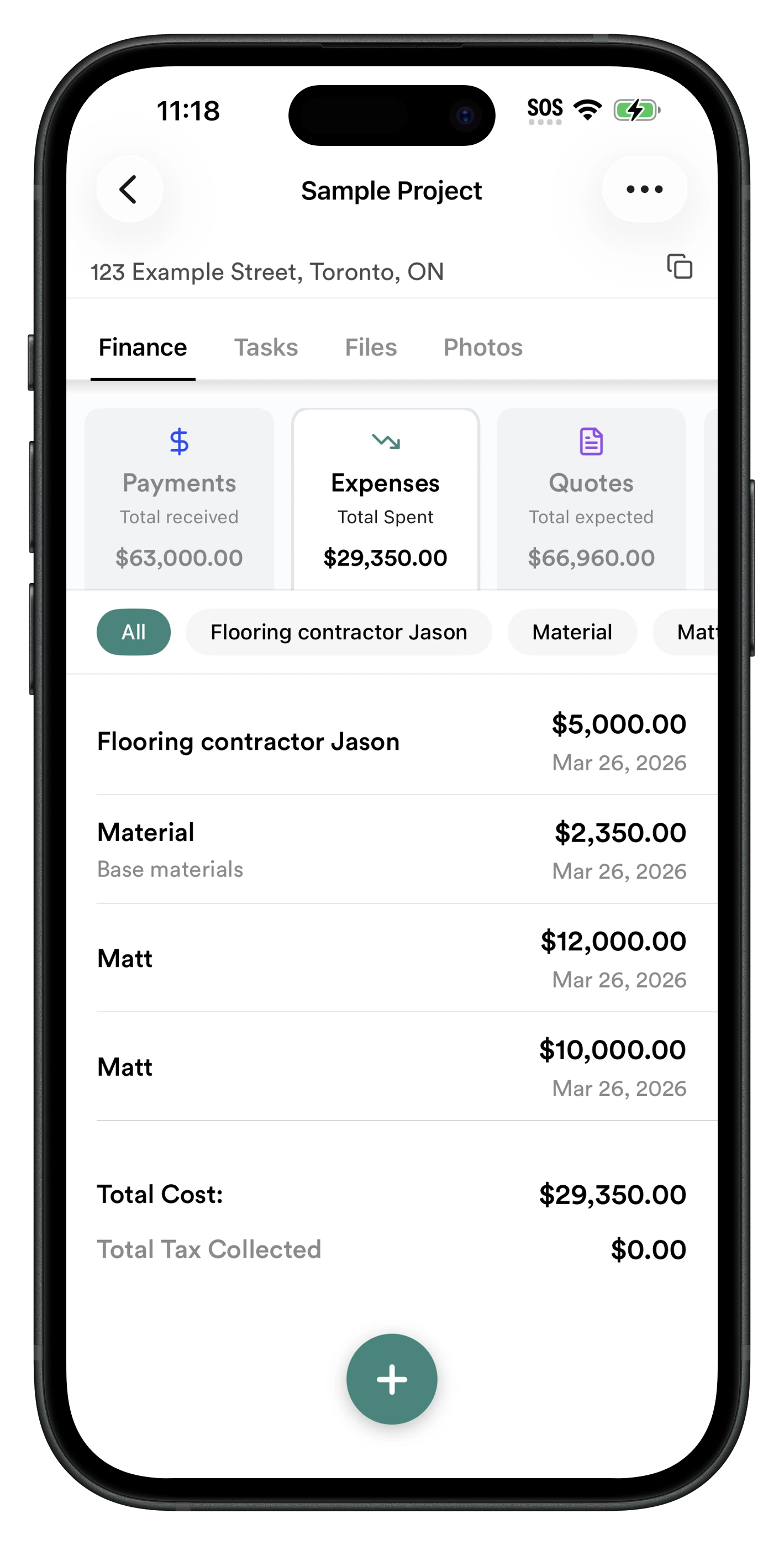
Log every expense as it happens on-site
Open the project, tap + in Expenses, enter the amount, description, and vendor. Takes 10 seconds. Every entry is tagged to the house build so your total project cost updates instantly — whether you're logging a lumber delivery or a subcontractor invoice.
- ✓ Log materials, labour, subs, permits, and equipment
- ✓ Tag expenses by vendor (see all costs for one sub)
- ✓ Mark as tax-deductible with one tap
- ✓ Works fully offline — syncs when signal returns
- ✓ Running total always visible per project
Step 02
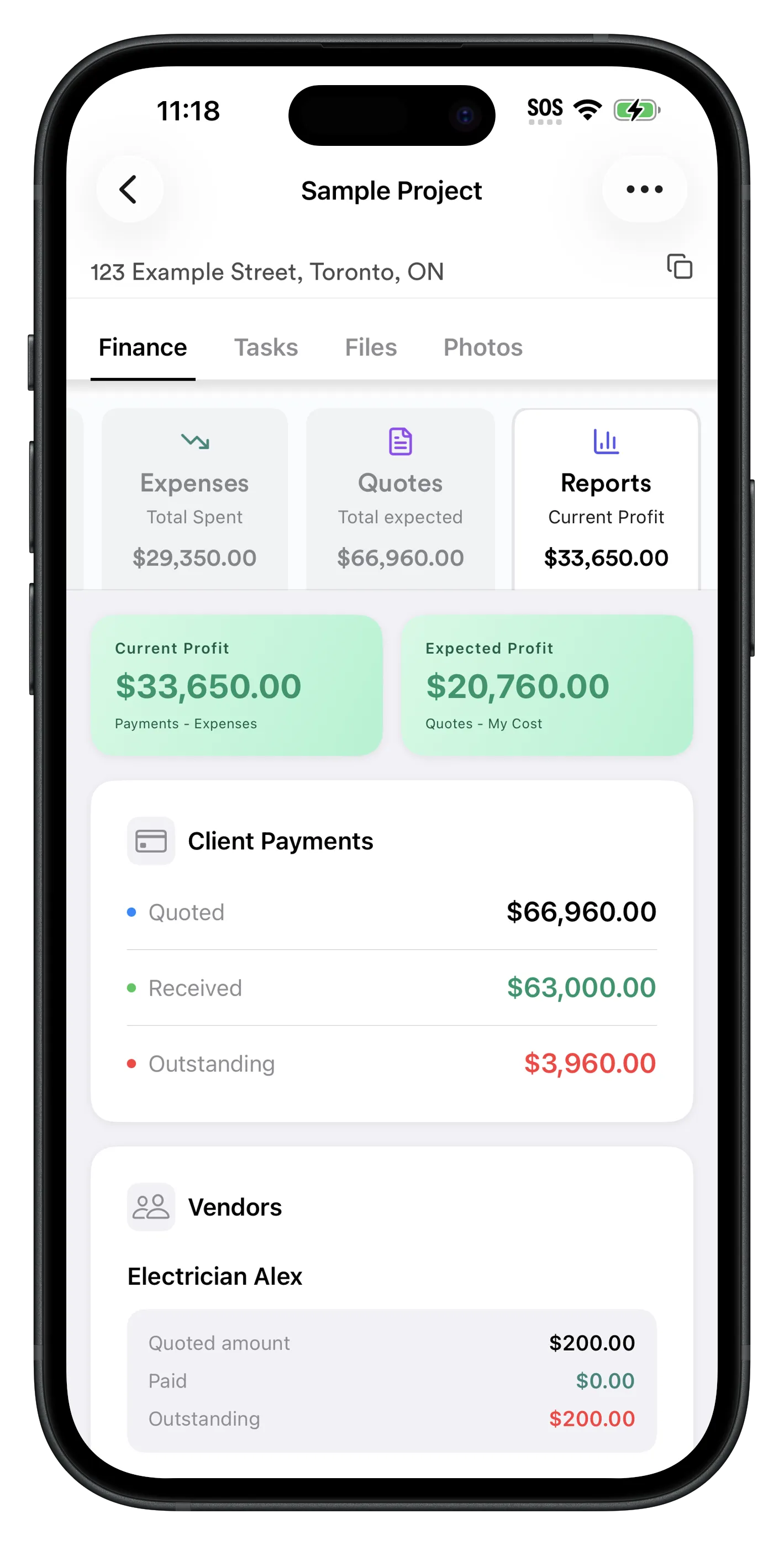
See total costs and profit for the entire build
The Reports tab shows you Current Profit (what you've already made: payments received minus expenses logged) and Expected Profit (total quoted minus all your costs). For a house build that runs over months, this real-time view is what tells you whether the job is still on track — or quietly going over budget.
- ✓ Current Profit: payments received minus expenses logged
- ✓ Expected Profit: total quoted minus your costs
- ✓ Outstanding client payments at a glance
- ✓ Subcontractor balances — what you still owe each sub on the build
- ✓ Vendor cost breakdown for the entire build
On a long house build with multiple subs involved, this is especially useful — you can see at a glance who you still owe, what the client still owes you, and whether the job is on track financially.
How to Start Tracking House Construction Expenses Today (5 Steps)
- 1
Download RenoJira free
Free on App Store (iOS) and Google Play (Android). No credit card required. Download and open in under a minute.
- 2
Create a project for the house build
Tap + to create a new project. Name it (e.g. "Smith House Reno"), add the client and address. This becomes the container for every cost, payment, and document on the build.
- 3
Enter your quote or budget
Go to Finance → Quotes and enter the total you're charging (or budgeting). This sets your profit baseline — the number everything else is measured against.
- 4
Log every expense on-site as it happens
Finance → Expenses → + for each cost. Enter amount, description, and vendor. Takes 10 seconds per entry. Works offline on any job site.
- 5
Check real-time profit in Reports
Open Reports at any time to see total expenses vs quoted amount, expected profit, and outstanding payments — all updated in real time throughout the build.
Frequently Asked Questions About House Construction Expense Tracking
What is the best house construction expense tracker app?
RenoJira is the best free house construction expense tracker app in 2026. It tracks every expense per project, logs change orders, records payments, and shows real-time profit — free on iPhone and Android with no subscription.
How do I track expenses for a house construction project?
Open RenoJira, create a project for the house build or renovation, then log each expense as it happens — materials, labour, subcontractor invoices. Every cost is tagged to the project so you see total costs and profit in real time.
Is there a free app to track house construction costs?
Yes. RenoJira is free on iOS and Android. Track all house construction costs per project — materials, labour, subs, change orders — and see your profit margin without any monthly subscription.
What costs should I track for a house construction project?
Track: materials (lumber, fixtures, finishes), labour (your time and crew), subcontractor invoices (plumber, electrician, drywaller), permit fees, equipment rental, and any change orders added during the build. RenoJira captures all of these per project.
Can homeowners use a construction expense tracker app?
Yes. RenoJira works for both contractors managing house builds and homeowners tracking renovation costs. Create a project, log every expense, and see your total spend vs budget in real time.
How do contractors track house construction expenses on a job site?
With RenoJira: open the app on-site, select the project, tap + in Expenses, enter the amount and vendor. Takes 10 seconds. All expenses are stored permanently and update your profit calculation instantly.
What is the difference between a house construction expense tracker and a general expense app?
A general expense app (like Expensify) tracks all business spending in one list. A house construction tracker organizes costs by project — so you see what each individual build or renovation costs, which is essential for knowing if a job is profitable.
How do I track change orders on a house construction project?
In RenoJira, go to the project → Finance → Quotes → +. Enter the description of the extra work, the price charged to the client, your cost to complete it, and the vendor. Your expected profit updates instantly.
How do I track house construction expenses in real time?
Log each cost the moment it happens instead of saving receipts for later. In RenoJira, snap a receipt or add an expense on-site in about 10 seconds, and your project total and profit update instantly — so you always know where a build stands in real time, not weeks later.
What's the best app for construction workers to submit receipts from the job site?
RenoJira lets anyone on the crew snap a receipt from the job site — even with no signal. The app reads the amount and date automatically, files it under the right project, and syncs when you're back online, so receipts never pile up in a truck or get lost before tax time.
How can I track expenses and earnings by job on a construction project?
Create a separate project for each job in RenoJira. Log expenses (materials, labour, subs) and earnings (deposits, progress payments) against that project, and the app shows cost, revenue, and real profit per job side by side — so you can compare which builds actually made money.
Bottom Line
Bottom Line
Every dollar you spend on a house build should be tracked.
Because at the end, that's the difference between knowing your margin and guessing it.
RenoJira is the best free house construction expense tracker app because it was built around the way house builds actually work — multiple vendors, months of costs, change orders, and staged payments — all tracked per project, in real time.
Download free on iOS or Android. No credit card, no subscription. Start on your next build today.


Tracking Costs for a Specific Trade?
RenoJira works for every trade on a house build. See how it tracks material and labour costs for your specific field:
Related Articles
Best Construction Budget App for Contractors (2026)
7 budget apps compared on price and features
Best Free Construction Expense Tracker (2026)
Top free trackers for contractors reviewed
How Contractors Track Expenses Per Job (2026 Guide)
What to log, when, and how to do it in 10 seconds
Best Free Job Costing App for Contractors (2026)
Track expenses and profit per project for free
How to Calculate Profit on a Construction Job
The exact formula contractors use per project
Job Costing for Contractors: The Complete Guide (2026)
The pillar guide — expenses, payments, and real profit per job