Expense Tracking
Best Free Construction Expense Tracker (2026)
Most contractors lose money on jobs they think are profitable — because they never had a clear view of costs per project. The right expense tracker fixes that in 10 seconds per receipt.
By the RenoJira team — January 1, 2026 · 6 min read
$0
Completely free
no subscription
10 sec
To log an expense
on-site
Per-job
Costs tracked separately
per project
Key Takeaways
- →RenoJira is the best free construction expense tracker in 2026 — per-job tracking, change orders, payments, and real-time profit. Free on iOS and Android.
- →Generic apps like Expensify track business expenses, not per-job costs — making it impossible to see if individual projects are profitable.
- →A good construction expense tracker needs to be fast enough for on-site use — logging a receipt should take under 15 seconds, one-handed.
- →The top free options in 2026: RenoJira, Expensify, Wave, Google Sheets — but only RenoJira tracks per-job profit for free.
Quick Answer
The best free construction expense tracker is RenoJira. Free on iOS and Android. Tracks expenses per job, change orders, payments, and real-time profit — with no subscription.
Definition
What is a construction expense tracker?
A construction expense tracker is a tool — typically a mobile app — that records every cost incurred on a construction job and organises those costs by project. Unlike general accounting software, a construction expense tracker focuses on per-job cost visibility: what each individual project costs, how it compares to your quote, and whether the job is on track to be profitable.
Why Does Per-Job Expense Tracking Matter?
Per-job expense tracking matters because it's the only way to know whether each individual project made money — not just your business overall. Tagging every cost to a specific job reveals real profit per project while you can still act on it, instead of finding out at year end.
Most contractors use Expensify, a spreadsheet, or their bank account to track spending. The problem is that these tools track business-wide expenses — everything dumped into one list with no connection to individual projects.
When your expenses aren't organized by job, you can't answer the questions that actually matter:
- —Did the kitchen reno actually make money, or did materials overruns kill the margin?
- —Is the bathroom job going over budget before it's even finished?
- —Which type of job — tile, framing, full renovation — is actually your most profitable?
A good free construction expense tracker answers all three. And it only works if every expense is tagged to a project the moment it happens — not reconstructed from bank statements at year end.
What to Look For
What to Look for in a Free Construction Expense Tracker
Not all free expense trackers are built the same. These four criteria separate the tools that actually work for contractors from the ones that look good in a demo but fail on the job site.
01
Per-job organization
Expenses tagged to individual projects — not a single running list. You need to see what each job costs, not just your total spending.
02
Speed on-site
Logging a receipt in under 15 seconds, one-handed, while standing on a job site. If it takes longer, you won't use it consistently.
03
Change order + payment tracking
Expenses alone don't tell you if a job is profitable. You need the full picture: what you quoted, what you spent, and what you were paid.
04
Free forever
Not a 14-day trial. Not a freemium plan with core features locked. Genuinely free to use without a subscription.
5 Best Free Construction Expense Trackers (2026)
| App | Per-job tracking | Change orders | Payment tracking | Profit reports | Cost |
|---|---|---|---|---|---|
| RenoJira | ✓ | ✓ | ✓ | ✓ | Free |
| Expensify | — | — | — | — | Free (limited) |
| Wave | — | — | ✓ | — | Free |
| Google Sheets | Manual | Manual | Manual | Manual | Free |
| Buildertrend | ✓ | ✓ | ✓ | ✓ | $299+/mo |
#1 RenoJira
RenoJira is the only free app on this list that was built specifically for contractors. Every expense is tagged to an individual project, with change orders, payment tracking, and a real-time profit report all included. Log a receipt in 10 seconds on-site — open the app, select the project, tap +, enter amount and vendor. The Reports tab shows total costs, total quoted, and profit per job in real time. Free on iOS and Android, no credit card required.
#2 Expensify
Expensify is a solid general expense tracker built for corporate teams submitting reimbursement reports. The free tier has significant limitations, and more importantly, there is no concept of per-job expense tracking. All expenses land in a single list. For a contractor who needs to know what each project costs, Expensify won't give you that visibility without significant manual effort.
#3 Wave
Wave is a free accounting platform with invoicing and payment tracking that works well for freelancers and small businesses. It's not built for construction — there's no per-project expense organization, no change order tracking, and no on-site UX. If you need basic invoicing and payment records across all clients, Wave is a good free option. If you need to know the profit on each construction job, it won't serve you.
#4 Google Sheets
Google Sheets is free and infinitely flexible — but it requires you to build your own system, maintain formulas, and update it manually. On a job site, opening a spreadsheet on a phone, navigating to the right tab, finding the right row, and entering data is slow and error-prone. Most contractors who start with a spreadsheet abandon it within weeks because it's too much friction. It works best as a backup or reporting tool, not an on-site logging tool.
#5 Buildertrend
Buildertrend is a powerful construction management platform with per-job expense tracking, change orders, and profit reporting. The problem: it starts at $299/month. For large residential builders or commercial contractors managing multiple crews, it may justify the cost. For a small contractor or sole trader tracking a handful of jobs, the price makes it inaccessible — and there's no genuinely free tier.
RenoJira: Built for On-Site Expense Tracking
RenoJira's free construction expense tracking app was designed around one core problem: contractors lose track of job costs because every existing tool is either too slow, too expensive, or not built for project-based work. Here's how it solves both issues.
Feature 01
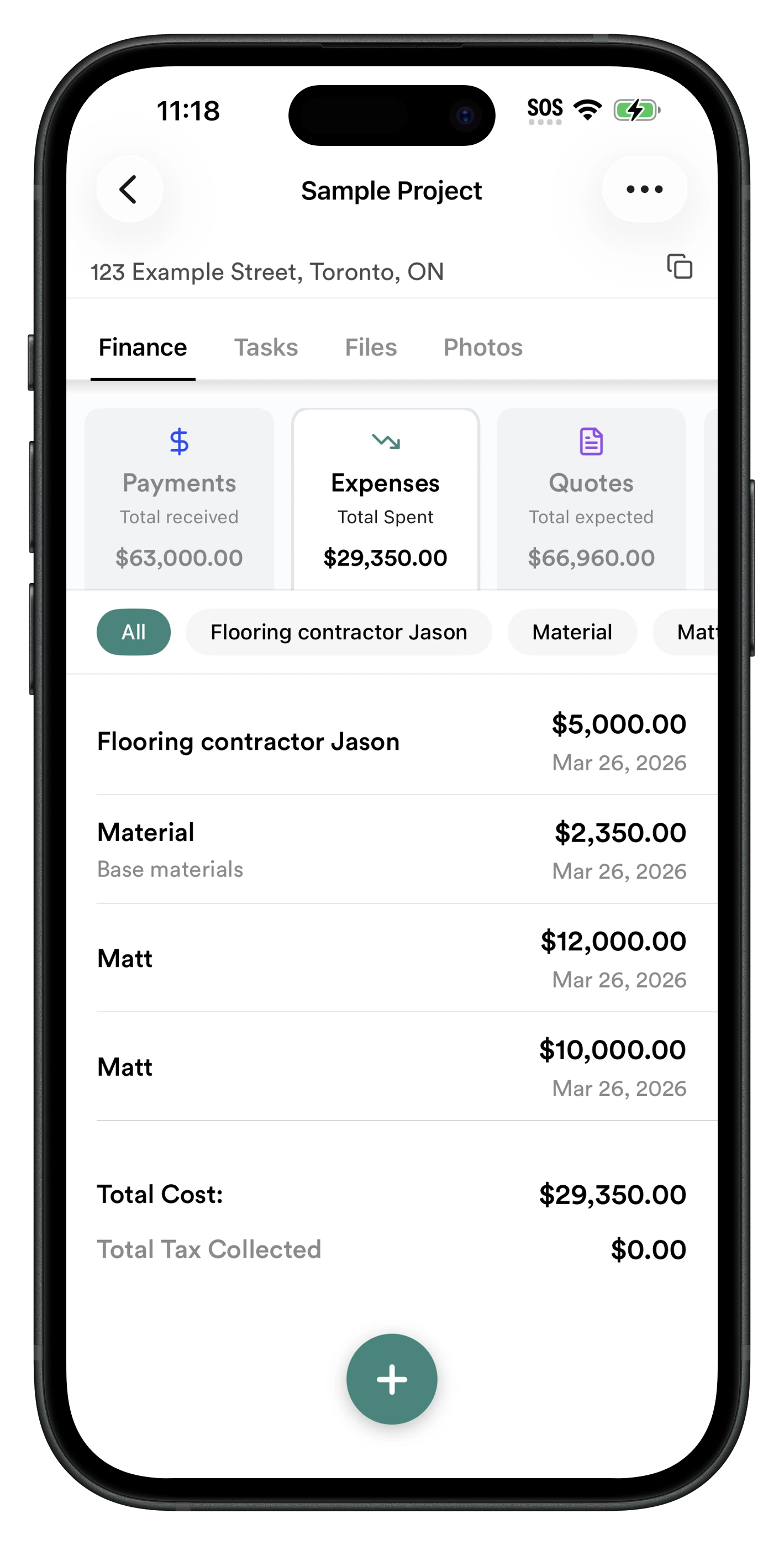
Log expenses in 10 seconds on any job site
Open the app, select the project, tap + in Expenses, enter the amount and vendor name. Done. Every expense is automatically tagged to the project and updates your running cost total and profit in real time.
- ✓ Per-project expense log — every cost tagged to the right job
- ✓ Log by vendor — see all costs for each subcontractor
- ✓ Mark as tax-deductible with one tap
- ✓ Running total always visible per project
- ✓ Works offline — syncs when connected
Feature 02
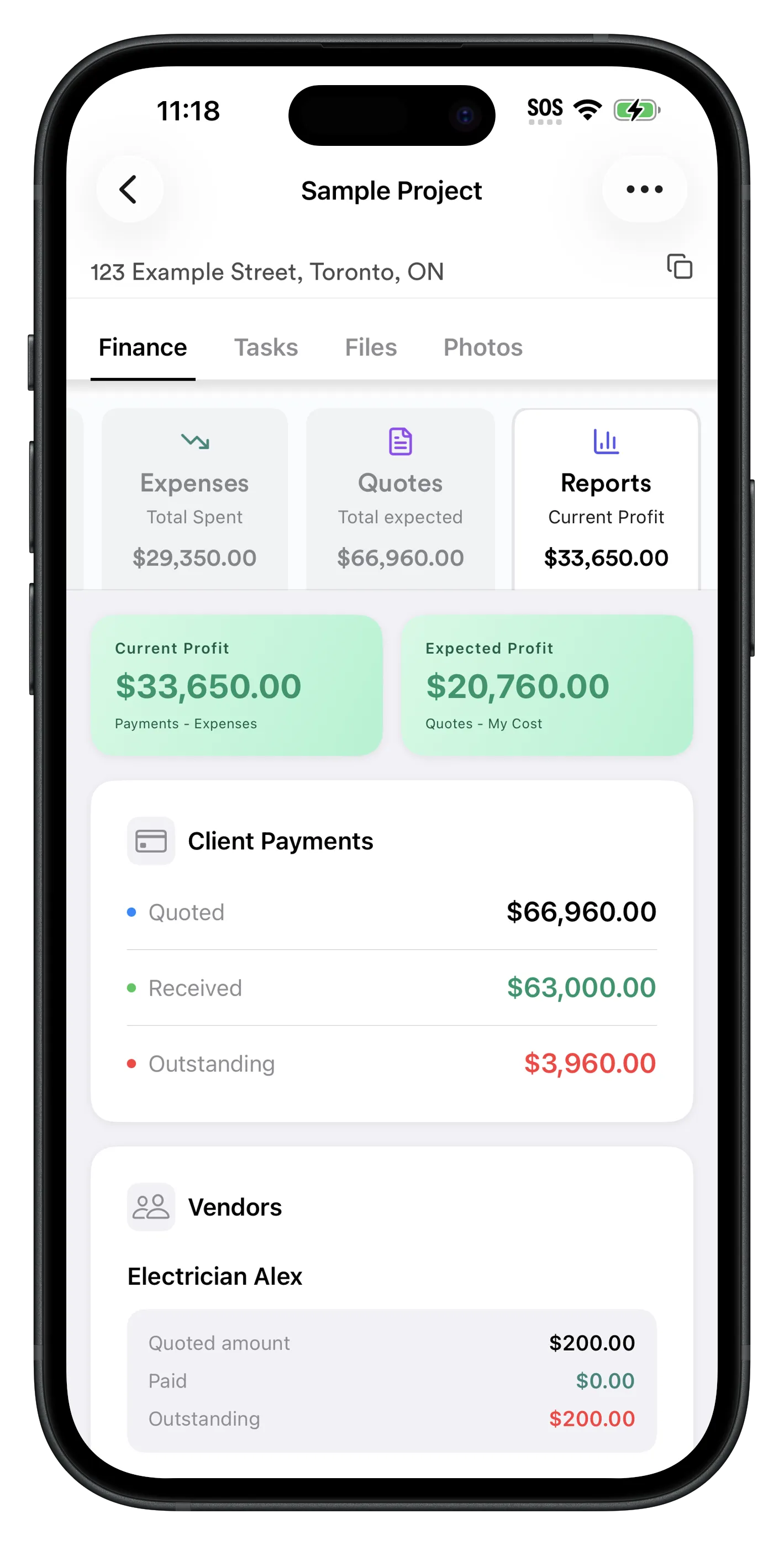
See total costs and profit per project in real time
The Reports tab shows everything at a glance: total expenses, total quoted, payments received, outstanding balance, current profit, and expected profit. Every time you log an expense or payment, the numbers update instantly.
- ✓ Current Profit: Payments received minus expenses logged
- ✓ Expected Profit: Total quoted minus your costs
- ✓ Client payment summary: quoted, received, outstanding
- ✓ Subcontractor balances: how much you still owe each sub
- ✓ Vendor cost breakdown per project
The Reports page is one of those views you end up checking constantly — subs you owe, what clients still owe you, and your profit for the job, all without needing a separate accounting tool.
How to Start Tracking Construction Expenses for Free (5 Steps)
- 1
Download RenoJira for free
Available free on iOS App Store and Android Google Play. No credit card or subscription needed.
- 2
Create a project
Tap + to create a new project. Enter the project name, client, and address. Takes under a minute.
- 3
Enter your quote
Go to Finance → Quotes and enter what you're charging the client. This sets up your expected profit baseline.
- 4
Log expenses as they happen
Every time you purchase materials or receive an invoice, go to Finance → Expenses → + and log the amount, description, and vendor. Takes 10 seconds.
- 5
Check your profit in Reports
Open the Reports tab to see your total costs, total quoted, and profit (expected and current) for the project in real time.
Frequently Asked Questions
What is the best free construction expense tracker?
RenoJira is the best free construction expense tracker in 2026. It tracks expenses, change orders, and payments per job, shows real-time profit in the Reports tab, and is completely free with no subscription. Available on iOS and Android.
Is there a free app to track construction expenses?
Yes. RenoJira is a free construction expense tracking app for iOS and Android. You can log expenses, change orders, and payments per project, and see your profit in real time — all at no cost, no monthly fee.
How do contractors track expenses on a job site?
Contractors track expenses by logging each cost — materials, labour, subcontractor invoices — against the specific project as they occur. RenoJira makes this a 10-second process: open the app, select the project, tap + in Expenses, enter amount and vendor.
What should a construction expense tracker record?
A construction expense tracker should record: the amount, what it was for, which vendor or subcontractor, which job it belongs to, and the date. RenoJira captures all five fields per expense and automatically updates your profit per project.
Can I track expenses per job for free?
Yes. RenoJira is completely free and tracks all expenses per individual project. Every expense is tagged to a job so you can see total costs, profit, and outstanding payments for each project separately — with no subscription required.
What's the difference between a construction expense tracker and accounting software?
Accounting software (like QuickBooks) tracks overall business finances — invoices, taxes, bank accounts. A construction expense tracker focuses on per-job cost visibility — what each project costs, what you've been paid, and whether the job is profitable. RenoJira is built for the latter.
Does RenoJira work offline on a job site?
RenoJira is a mobile app designed for job site use. You can log expenses on your phone wherever you are. Your data syncs automatically when you have a connection.
How do I track receipts for a construction job?
In RenoJira, open the project → Finance → Expenses → +. Enter the amount, description, and vendor. Repeat for each receipt. Your running total of costs updates instantly, and the Reports tab shows how it impacts your profit.
Bottom Line
Bottom Line
Every receipt you don't log is money you can't prove you spent.
RenoJira is the best free construction expense tracker for contractors in 2026 — because it was built specifically for per-job cost tracking, not adapted from a general accounting tool.
It covers the full expense loop: log costs as they happen → see total expenses per project → track payments and change orders → check your profit in real time. All from your phone. All for free.
If you're a contractor who wants to know exactly how much each job costs — and whether it was worth taking — RenoJira is the place to start.


Related Articles
How to Calculate Profit on a Construction Job
The formula every contractor needs to know
How Contractors Track Expenses Per Job (2026 Guide)
What to log, when, and how to make it fast
Best Free Job Costing App for Contractors (2026)
Track profit per job with no subscription
What Is a Change Order in Construction?
How to handle extras so you always get paid