Contractor Apps
Best Contractor App for iPhone & Android (2026)
Most contractor apps are built for the office, not the job site. The best one is the app you actually open when you're on-site — fast, free, and built around how construction jobs actually work.
By the RenoJira team — January 1, 2026 · 6 min read
Free
no subscription ever
iOS & Android
iOS + Android
native app on both platforms
works identically on each
10 sec
to log an expense on-site
no spreadsheet needed
Key Takeaways
- →RenoJira is the #1 contractor app for iPhone and Android in 2026 — free, no subscription, works on both platforms.
- →It tracks expenses, change orders, client payments, and profit per job in real time from your phone.
- →Alternatives like Buildertrend ($299+/mo) or Procore are built for large firms — RenoJira is built for contractors who work on job sites.
- →You can be up and running — with a project, a quote, and your first expense logged — in under 3 minutes.
Quick Answer: What's the best contractor app for iPhone and Android?
RenoJira — free, works on both platforms, and tracks expenses, change orders, payments, and profit per job in real time. No subscription, no desktop required. Download it and you're logging expenses in under 3 minutes.
Definition
What is a contractor app?
A contractor app is a mobile application designed for construction professionals to manage job-site operations from their phone. The best contractor apps track expenses per project, log change orders, record client payments, and calculate profit in real time — replacing spreadsheets and paper-based systems with a tool fast enough to use with one hand on a job site.
Criteria
What Makes a Great Contractor App?
Most contractor apps marketed online are either too expensive, too complex, or built for project managers — not for the person actually on the job site. Here's what a genuinely useful contractor app needs to do:
01
Per-job expense tracking
Logs costs against the right project — not just a general ledger. You need to know what Kitchen Reno #3 cost, not just what you spent last Tuesday.
02
Change order capture
Records extra work with both client price and your cost. Missing one change order can wipe out the profit on a whole job.
03
Payment tracking
Knows what the client owes vs. what's been paid — per project. Deposit, progress payments, final payment, all in one place.
04
Real-time profit per job
Shows expected profit and current profit per job automatically, without you having to open a spreadsheet.
05
Mobile-first design
Works fast on a phone with one hand, on a dusty job site. If it takes more than 30 seconds to log an expense, you won't use it.
“The best contractor app is the one you actually use on the job site — not the one with the most features.”
Which Are the Best Contractor Apps for iPhone and Android in 2026?
We evaluated the most-used contractor apps by what actually matters on a job site: per-job financial visibility, ease of use on mobile, and cost.
RenoJira
Top Pick — Free
Full job costing for contractors: expenses, change orders, payments, and profit reports per project. Built specifically for renovation contractors and GCs who need per-job financial visibility from their phone.
Pros
- ✓Free with no subscription
- ✓Per-job profit tracking
- ✓Change order tracking with cost + client price
- ✓Payment tracking
- ✓Works on-site in seconds
Cons
- ✕Newer app (launched 2025)
- ✕No desktop web app yet
Buildertrend
Full project management — $299+/mo
Full-featured project management platform for residential construction. Covers scheduling, client communication, budget tracking, and document management. Best suited for larger firms with dedicated office staff.
Pros
- ✓Comprehensive project management
- ✓Client portal included
- ✓Strong scheduling tools
Cons
- ✕Expensive ($299–499+/mo)
- ✕Complex onboarding
- ✕Overkill for smaller contractors
CompanyCam
Job site photo documentation — $19+/mo per user
Excellent for documenting job site progress with geotagged, timestamped photos organized by project. Widely used for insurance claims, before/after documentation, and client updates. Does not include financial tracking.
Pros
- ✓Best-in-class photo organization
- ✓Geotagged and timestamped
- ✓Easy crew sharing
Cons
- ✕No expense or financial tracking
- ✕No change order management
- ✕Cost per user adds up
QuickBooks
Accounting & invoicing — $30+/mo
The standard for small business accounting: invoicing, payroll, bank reconciliation, and tax prep. Good for overall business finances, but not designed for per-job cost tracking or on-site use by field contractors.
Pros
- ✓Strong invoicing and payroll
- ✓Good tax prep tools
- ✓Accountant-friendly
Cons
- ✕Not built for on-site job tracking
- ✕No per-job profit reports
- ✕Mobile app is limited
Procore
Enterprise project management — custom pricing
Enterprise-grade construction management platform used by large GCs and commercial contractors. Covers everything from drawings to financials to RFIs. Powerful, but expensive and far too complex for independent contractors or small renovation firms.
Pros
- ✓Best for large commercial projects
- ✓Comprehensive drawings and RFI tools
- ✓Wide industry adoption
Cons
- ✕Very expensive
- ✕Steep learning curve
- ✕Overkill for independent contractors
Why Is RenoJira the #1 Contractor App for iPhone & Android?
RenoJira, a free contractor app for iPhone and Android, was built around one question: what does a contractor actually need to open on their phone, mid-job, in under 10 seconds? The answer shapes every feature: expenses logged fast, change orders captured before the client walks away, profit visible at a glance.
Feature 01
Track Every Expense Per Job in Seconds
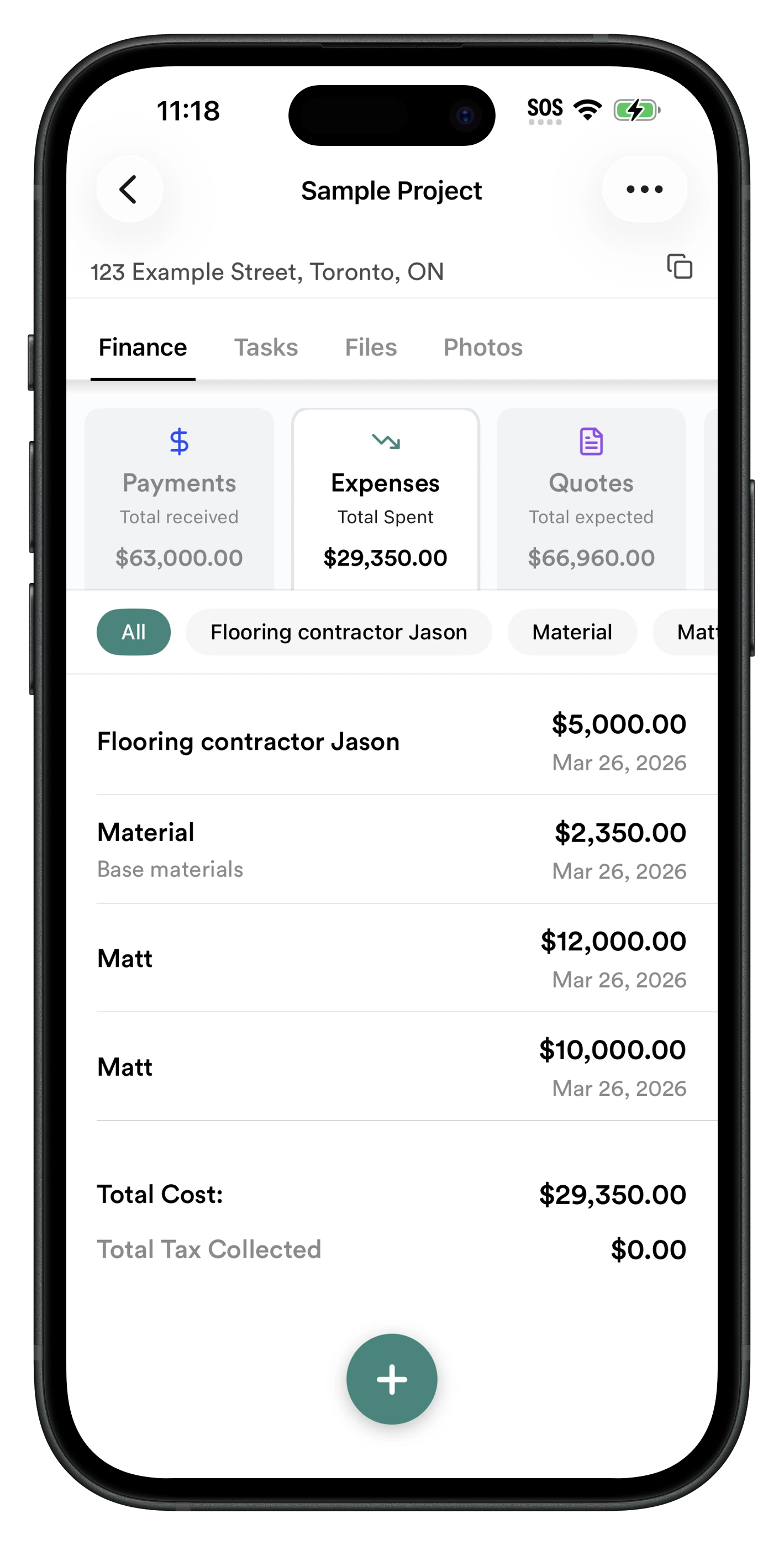
Every expense is tagged to a specific project and vendor. Log a $400 lumber delivery in under 10 seconds. Your running job cost updates instantly. No spreadsheet. No desktop required.
- ✓ Per-job expense log — never mixed with other projects
- ✓ Tag by vendor (lumber yard, electrician, etc.)
- ✓ Mark as tax-deductible with one tap
- ✓ Running total always visible per project
Feature 02
See Real-Time Profit in the Reports Tab
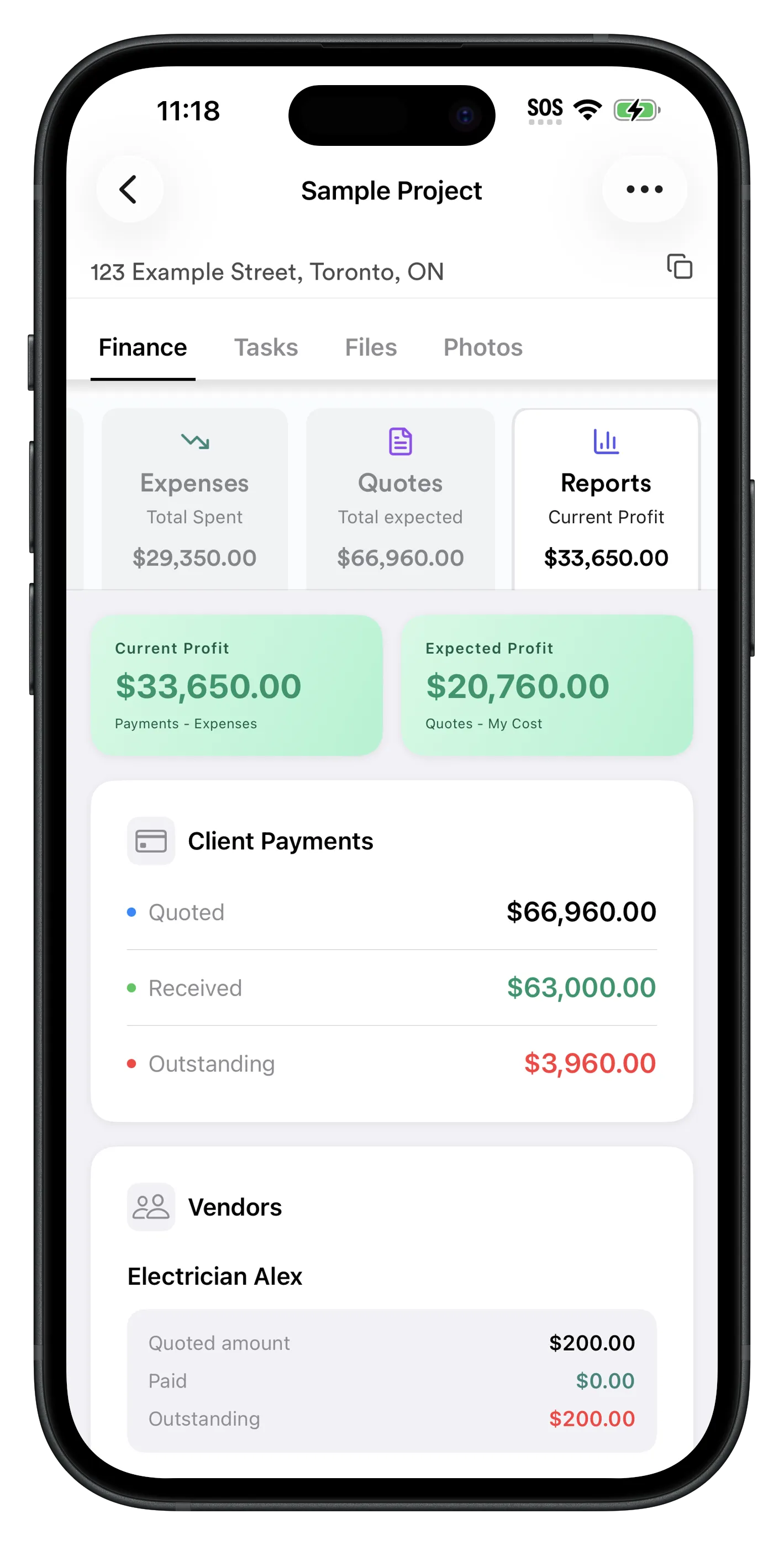
The Reports tab shows two profit figures for every project: Current Profit (payments received minus expenses logged) and Expected Profit (total quoted minus your costs). Open it any time — on-site, in the truck, at end of day.
- ✓ Current Profit: What you've actually made so far
- ✓ Expected Profit: What you will make when done
- ✓ Client payment summary: quoted, received, outstanding
- ✓ Subcontractor balances: how much you still owe each sub
- ✓ Vendor cost breakdown per project
It's the one screen that shows you what subs you owe, what clients owe you, and your profit — without bouncing between different apps or spreadsheets.
Get Started in 3 Minutes
From download to logging your first expense takes under 3 minutes. Here's exactly how to do it:
- 1
Download RenoJira
Free on the App Store (iOS) or Google Play (Android). No account setup needed — create a project in under 2 minutes.
- 2
Create a project and add your quote
Tap + to create a new project, then go to Finance → Quotes and enter the total you're charging the client.
- 3
Log expenses on-site
Every time you buy materials or receive an invoice, open the project → Finance → Expenses → +. Enter amount, description, vendor. Done in 10 seconds.
- 4
Track change orders in real time
When the client asks for extra work, open Finance → Quotes → + and log the change order before starting. Client price, your cost, vendor.
- 5
Check profit in Reports
Open the Reports tab at any time to see Expected Profit and Current Profit for the job. No spreadsheets needed.
Frequently Asked Questions
What is the best contractor app for iPhone?
RenoJira is the best free contractor app for iPhone in 2026. It tracks expenses, change orders, payments, and profit per job in real time — all from your phone. Available free on the App Store with no subscription required.
What is the best contractor app for Android?
RenoJira is the top-rated free contractor app for Android. It runs natively on Android phones and lets you log expenses, track change orders, record payments, and see your profit per job in real time. Free on Google Play.
What features should a contractor app have?
A good contractor app should track expenses per job, log change orders, record client payments, show profit per project, and work offline on job sites. It should be fast to use — logging a receipt in under 30 seconds — and free or low cost.
Is there a free contractor app for iPhone?
Yes — RenoJira is completely free for iPhone. Track expenses, change orders, and profit per job at no cost, with no monthly subscription. Available on the App Store.
Can I track job costs on my phone?
Yes. RenoJira lets you log expenses, snap receipt photos, record change orders, and track payments directly from your iPhone or Android phone on the job site. Your profit per project updates in real time.
What is the best app to track construction expenses on a phone?
RenoJira is built specifically for tracking construction expenses per job on mobile. Log each expense in under 10 seconds, tag it to the right project, and see your running profit in the Reports tab — all from your phone.
Does RenoJira work on both iPhone and Android?
Yes. RenoJira is available on both iOS (App Store) and Android (Google Play). It works identically on both platforms so your whole crew can use whichever phone they have.
What makes RenoJira better than spreadsheets for contractors?
Spreadsheets require manual entry, don't update profit in real time, and aren't accessible on-site. RenoJira logs expenses in seconds from your phone, automatically calculates profit, and stores every change order and payment permanently per project.
Related Articles
How to Calculate Profit on a Construction Job
The formula every contractor should know — and how to track it automatically.
Best Free Job Costing App for Contractors (2026)
Track expenses, payments, change orders, and profit per job with RenoJira.
How Contractors Track Expenses Per Job (2026 Guide)
The complete guide to per-job expense tracking — what to log, when, and how.
What Is a Change Order in Construction?
What to include, how to handle them on-site, and how to track them so you never lose money.