Software comparison · Job costing
Best JobTread Alternatives for Small Contractors (2026)
Keep the focus on what each job costs, what the client owes, and what you keep. Compare a focused free app with paid construction platforms.
By the RenoJira team · Published November 23, 2026 · Sources checked November 23, 2026
Which JobTread alternative should a small contractor consider?
For receipts, payments, and profit per job without a subscription, RenoJira is a free option. For a broader construction platform, compare Contractor Foreman, Knowify, and Buildertrend. Stay with JobTread if its wider workflows are doing work you would otherwise need to recreate.
JobTread has job costing. What are you trying to replace?
JobTread is not simply an estimating app. Its official site includes job costing, budgeting, change orders, and broader project workflows. The decision is whether you need that whole system or mainly a clear financial record for each job.
A solo painter or remodeler may record all receipts and payments personally. Another owner may share that work with a partner. Start with that real process, rather than choosing software around a large crew you do not have.
What does JobTread cost?
The official pricing page lists $199 per month, with the first internal user included and additional internal users priced separately. It also lists an annual discount. Confirm the current total for your users and billing term. This article does not claim that switching will produce a measured saving or a better return.
5 JobTread alternatives, compared by fit
| Option | Best fit to evaluate | Pricing / plan caveat |
|---|---|---|
| RenoJira | Solo contractors and small crews focused on job money | Free to use |
| Contractor Foreman | Contractors comparing broader construction suites | Basic: $49/month billed annually for one user; verify the required feature tier |
| Knowify | Trade contractors wanting accounting-connected job costing | Paid; job costing listed on Advanced and Enterprise |
| Buildertrend | Residential builders evaluating a full platform | Custom quote |
| Google Sheets or Excel | Owners comfortable maintaining their own job-cost template | Depends on the spreadsheet product and account |
RenoJira
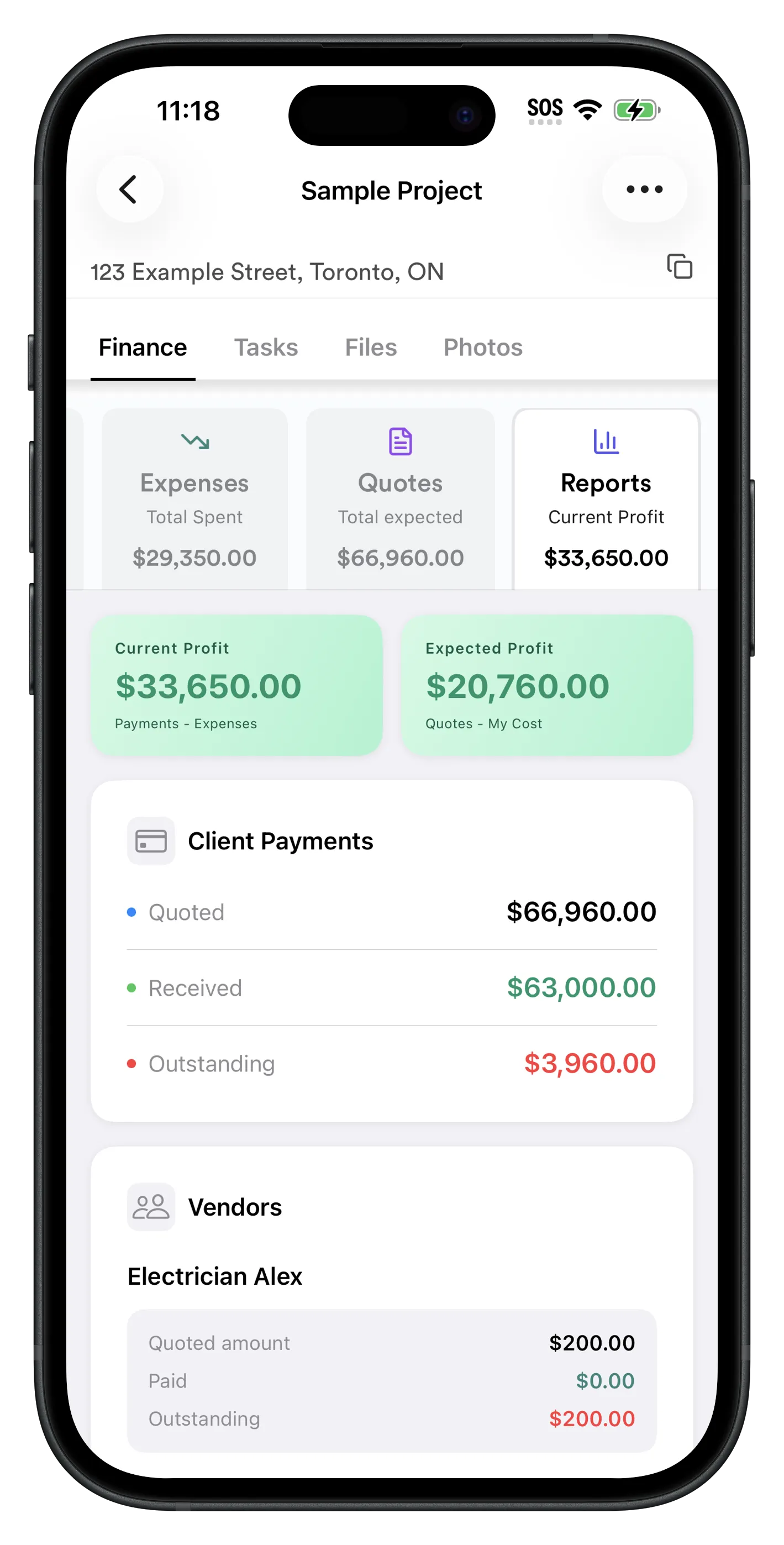
Record receipts, expenses, client and subcontractor payments, and change orders by project. Review current and expected profit. Quotes, invoices, and mobile crew clock-in support the job-finance workflow.
Check before choosing: Do not treat it as a full JobTread replacement for takeoffs, purchase orders, customer portals, or a general ledger. Mobile offline entry does not mean every connected service works offline.
Contractor Foreman
Its official site lists job-costing reports alongside construction-management features. Price the plan that includes your required workflow, not just the cheapest advertised plan.
Check before choosing: A trial is not an ongoing free plan. Confirm user limits and plan-level features before comparing costs.
Knowify
Knowify's plan comparison describes job costing across labor, materials, equipment, and subcontractors. It is worth evaluating if detailed trade financials drive your choice.
Check before choosing: Do not compare an entry-plan price with job-costing features from a higher tier.
Buildertrend
Compare it if you want a construction platform rather than an expense-only workflow. It also supports mobile receipt capture and job assignment.
Check before choosing: Use a current written quote; older public plan prices are not your current offer.
Google Sheets or Excel
Use one consistent project ID and record agreed revenue, changes, costs, and payments separately. Keep receipt links with each cost and protect the formulas.
Check before choosing: You maintain the calculations and review process. Configure offline access and shared editing deliberately.
Test job costing with the same project in each app
Use an illustrative bathroom renovation, not a vendor's prefilled demo: a $15,000 contract and a $1,500 approved extra produce $16,500 of agreed revenue. Materials of $4,000, subcontractors of $3,000, and labor of $2,000 produce $9,000 in recorded costs.
- Revenue less recorded costs: $16,500 − $9,000 = $7,500, before overhead, tax, missing costs, and any remaining work.
- Cash received less those costs: if the client has paid $8,000, $8,000 − $9,000 = negative $1,000. This is not the same measure as eventual job profit.
- Remaining cost forecast: another $2,000 of work would reduce the expected difference to $5,500. Check how your chosen tool records or displays that forecast.
These are teaching numbers, not customer results or a promise that every app calculates reports identically. Add your own labor allowance and allocated overhead. Review whether costs mean incurred costs or only paid amounts; a supplier bill and its payment must not become two costs.
Then try a returned material item, an unpaid sub invoice, a second progress payment, and a change order. Can you explain each balance without exporting a spreadsheet? Our job-profit calculation guide covers the financial distinction.
When to stay with JobTread
Keep it on your shortlist if you rely on connected project workflows. A cheaper app is not a saving if you must rebuild those processes across separate systems. Before switching, list the reports, approvals, schedules, and documents you use each week, export your records, and reconcile one completed project.
RenoJira's QuickBooks expense integration does not mean that every invoice, payment, or historical JobTread record syncs automatically. Confirm the exact records you need before changing systems.
Frequently asked questions
Is there a free JobTread alternative for job costing?
RenoJira is a free option for small contractors who need receipts, expenses, client payments, change orders, and profit per job on iPhone, Android, and the web. It is a focused job-finance tool, not a replacement for every JobTread workflow. A spreadsheet is another option if you maintain the records and formulas yourself.
Does JobTread already have job costing?
Yes. JobTread has job costing; an alternative should be chosen for workflow fit and cost, not because JobTread lacks it. Compare how each tool handles your estimated costs, actual costs, unpaid bills, and change orders.
Which JobTread alternative is best for a solo remodeler?
If your main task is keeping receipts, payments, and profit organized by project, try a focused tool such as RenoJira on one real job. If you need scheduling, purchase orders, takeoffs, or customer portals in the same system, compare full construction platforms before switching.
Will switching automatically move my JobTread records?
Do not assume that it will. No automatic JobTread-to-RenoJira migration is offered here. Export and preserve your existing records, then reconcile one project before moving active work. Keep signed documents and attachments accessible.
Try one job in RenoJira
Start with your own receipts and payments, or add a partner when you need help. Free on iPhone, Android, and the web.
Get started free →Related: Buildertrend alternatives · Best free job costing app for contractors · Free construction expense trackers