A whole-house renovation, a Google Sheet and receipts I could no longer find
On a whole-house renovation, I used a Google Sheet to record money coming in from the client, my expenses, and payments to employees and subcontractors. I usually updated it on my computer. During the day, the information ended up in WhatsApp.
That worked until I had to catch up. I was busy on the job, so purchases waited. Then I had to search through messages and find the receipts before I could update the sheet. I lost some Home Depot receipts. When the client asked to see them, I could no longer provide them.
Changes made the job harder to follow. The client would add or remove work, and I had to keep track of the costs associated with those changes. Some arrangements with my crew or subcontractors were verbal. The longer I left the records, the more there was to reconstruct.
I sometimes remembered an expense well after I thought I had worked out what I earned. Once I included it, the job had made less money than I thought.
What I do differently with RenoJira
Now, when I have a receipt, I scan it into the project. When I have another expense, I add it on my phone. If I receive a client payment while I am out, I can record it while sitting in the car. I have found it much easier to keep the records accurate when I enter things as they happen.
I also record changes and their expected costs together. For example, if the client adds $700 of work and I expect it to cost $500, I keep both amounts on the change order. That gives me something to check when it is time to pay the crew or subcontractor, including work we originally agreed verbally. When I need to sync with QuickBooks, I can do that through the app.
The biggest difference is that I no longer find out what a job made weeks later. The project Summary shows what the client has paid, what is still owed and the profit so far, so a forgotten expense shows up while I can still do something about it.
The $200 difference is what the change should add to the job before anything else comes up. When the real bill arrives, I compare it with the $500 I expected.
Five construction expense management tools compared
Start with the handoff that currently causes extra work. Is someone losing receipts, waiting for reimbursement, chasing vendor bills or re-entering costs into the books? Use that problem to narrow your shortlist.
| Tool | Consider it for | Cost or plan check | Check before choosing |
|---|---|---|---|
| RenoJira | An owner who wants receipts, client payments, change orders and profit on each job, entered from the phone (works offline) | Free on iPhone, Android and web | Scan a real receipt into a job, then check the job Summary and the records you need to send to QuickBooks. Expense entry guide |
| Expensify | Crews submitting expenses for reimbursement | Check the team plan and payment terms | Confirm approval rules, accounting mappings and how job tags appear in reports. Construction expense workflow |
| QuickBooks Online | A business keeping job costs in its accounting system | Projects available in Plus and Advanced | Confirm your plan and who assigns each transaction to its project. Project costing and plan requirements |
| JobTread | A contractor managing budgets, vendor bills and purchase orders together | Paid subscription | Walk through bill approval and budget updates with the people who will enter costs. Job costing and bill review |
| Contractor Foreman | A team evaluating job costs within a wider construction platform | Paid plans with different feature access | Confirm the exact financial tools, users and accounting integration included in your plan. Job-costing reports |
RenoJira publishes this comparison. The founder account is personal experience with RenoJira. Competitor descriptions come from their official documentation, checked on the date above. Product fit is our editorial judgment. Confirm the required features and current terms for your own account.
RenoJira for receipts, payments and costs on the same job
Open the project, go to Finance, and add an expense. On a phone or tablet, start with Scan receipt. On a computer, import the receipt file. You can also enter an expense manually. Review the vendor, date, amount and tax before saving. Receipt photos can fill fields automatically, while PDFs are attached for manual entry.
Crew do not need the app to send you receipts. Give them a Crew Link and they can clock in and upload receipt photos from their phone browser, even with no signal. You review each receipt and turn it into an expense on the right job.
If a crew member or subcontractor buys materials, record who paid. Keep the expense attached to its job and track the reimbursement separately. Repaying a worker for an already-recorded purchase should settle what you owe them, without counting the materials a second time.
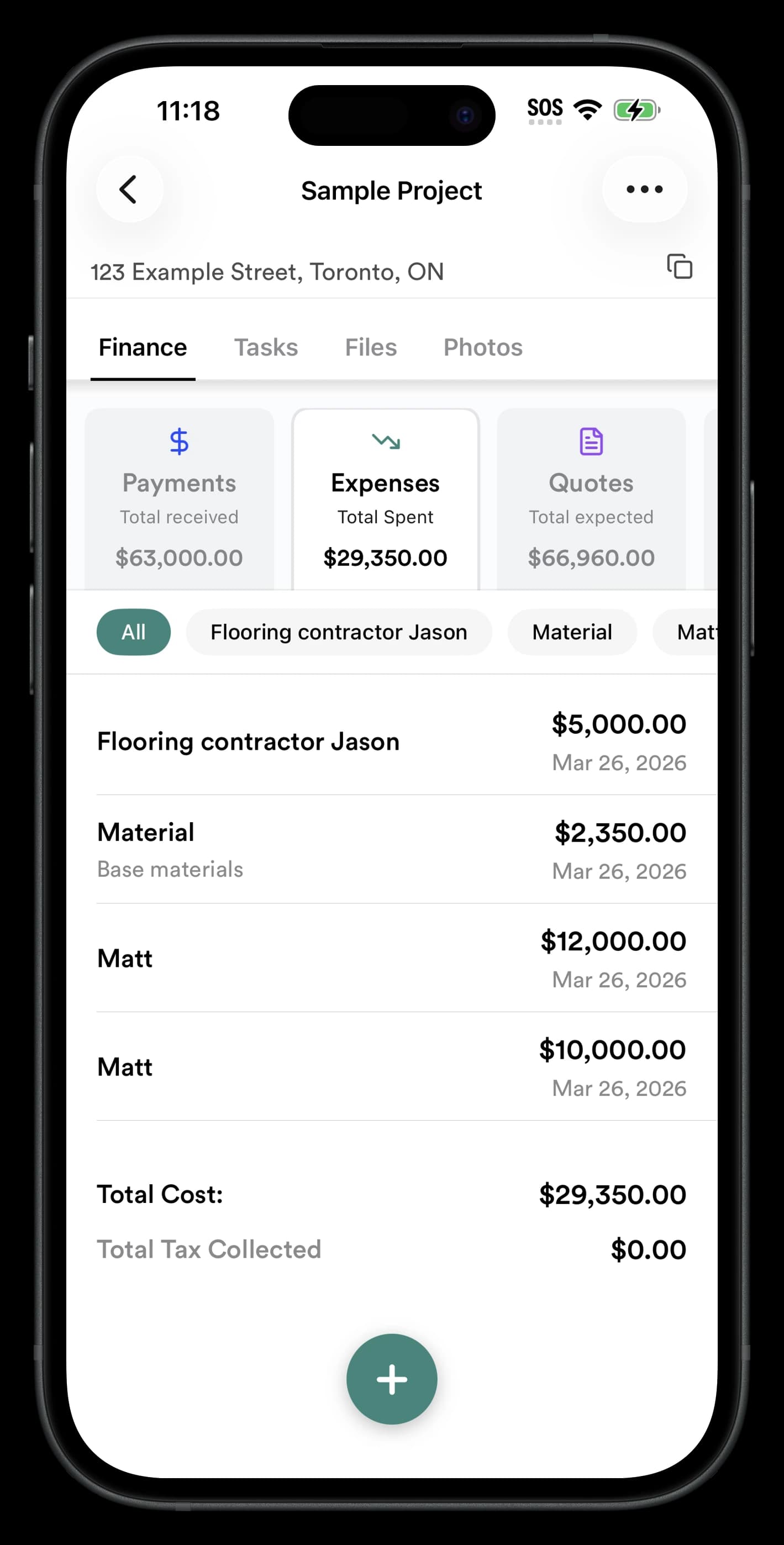
Keep client receipts in Payments and agreed scope changes in Change Orders. For a change, enter the amount charged and its expected cost while the agreement is fresh. Check the actual cost when the work is billed or paid. A deposit or progress payment can improve the bank balance while the job still has costs to come, so check the project Summary: it shows payments, the balance owed and profit for that job.
The iPhone and Android apps work offline, so a basement or a new build with no signal does not stop you entering a receipt. Everything syncs when the phone reconnects, and the web app shows the same numbers in the office.
For the exact steps, see scanning a receipt, recording a cost someone else paid, creating a change order and what syncs to QuickBooks. Test a project transfer with your bookkeeper so the records land in the intended accounts.
Expensify for submitted expenses and reimbursements
Expensify's construction workflow includes mobile receipt capture, tags for jobs or phases, approved reimbursements and company-card support. Consider it when several people buy things and the office needs a consistent way to collect, review and repay those purchases.
Try this in the trial
During a trial, follow one worker-paid purchase through submission, approval and reimbursement. Ask how your job tags transfer into accounting and which team features are included. Official construction workflow.
QuickBooks Online for job costs in the books
QuickBooks Online Plus and Advanced include project costing. They can track materials, labor and vendor costs by project and report on profitability. If you already use QuickBooks, check whether the problem is missing project assignments, the wrong plan, or getting purchases from the field into the system.
Try this in the trial
Have your bookkeeper demonstrate one receipt assigned to the right project and its effect on the profitability report. If you add a separate field app, agree on which system creates each expense and payment. Official job-costing features and plan requirements.
JobTread for budgets, bill review and vendor costs
JobTread tracks costs against budgets, supports bill review and approval, and compares vendor expenses with purchase orders. Reports can break costs down by category, phase or item. This is worth evaluating when the expense record is part of a larger process involving estimates, commitments and vendor bills.
Try this in the demo
Bring a real vendor bill to the demo. Ask who receives it, who approves it, when it updates the budget and how an outstanding bill appears. Check the subscription for the people who will use that workflow. Official job-costing workflow and pricing.
Contractor Foreman for costs within a construction platform
Contractor Foreman offers job-costing reports that examine material and labor costs and identify project items that made or lost money. Its wider platform includes purchase orders, invoices and time cards. Consider it if those records also need to sit within your construction management process.
Try this in the walkthrough
Request a walkthrough using your own job structure. Check how a purchase reaches the cost report, which financial tools are included in your chosen plan, and what the QuickBooks connection transfers. Official reports and plan comparison.
Try one purchase before moving your records
Use the same small set of records in each tool. Include a material purchase, something a worker paid for, a cost you will bill back to the client and a scope change. This shows where your crew or bookkeeper would have to do extra work.
- Capture the receipt. Can the person at the supplier record it on their phone? Check a faded receipt and correct a misread amount.
- Choose the job. Put the purchase on its project, then come back a week later and see how quickly you can find the receipt again.
- Record who paid. Follow an employee-paid purchase through reimbursement and check the resulting job total.
- Bill it back. Mark a cost the client agreed to pay for and check that it reaches their balance, not just your expenses.
- Record a change. Keep the client's agreed amount and the expected subcontractor cost together, then reconcile the actual cost.
- Check the job profit. After entering everything, see whether the tool shows what the job has made so far without building a report yourself.
- Check the books. Review the accounting transfer or export with your bookkeeper. Repeat it once to see how the tool handles records already sent.
Also ask someone on your crew to do the phone steps. Their experience will show whether the workflow is practical during a working day. If your sites have poor signal, turn off mobile data and test capture, saving and later sync.
For a daily routine you can use with whichever tool you choose, read how contractors track expenses per job. For phone receipt capture, see collecting receipts from the field.
Common questions about construction expense software
What does construction expense management software do?
It keeps purchases and their supporting receipts connected to jobs, so an owner can review costs by project. Depending on the product and plan, it may also handle expense approvals, reimbursements, vendor bills, labor costs and accounting transfers.
What digital tools help with on-site expense tracking in construction?
A phone app that lets the crew capture a receipt and pick the job while the purchase is still fresh. In RenoJira the owner scans receipts straight into a project, and crew can send receipts from a Crew Link in their phone browser without installing an app. Expensify supports receipt and reimbursement workflows, and QuickBooks Online Plus or Advanced supports project costing in the accounting system. Test the full handoff to the person who reviews the cost.
Is there a construction expense app that works offline and on Android?
Yes. RenoJira runs on Android, iPhone and the web, and the mobile apps work offline. Expenses and receipts entered without signal sync when the phone reconnects. Crew Link clock-ins and receipts are also held on the phone until it is back online. For any other app, turn off data on a test phone and try capturing and saving a receipt before you commit.
Can I track construction expenses in Google Sheets or Excel?
Yes. A spreadsheet can track job costs if every purchase has a project, amount and receipt reference, and someone keeps it current. Check how purchases from the field reach the sheet and how you record supplier refunds, crew reimbursements and changes to the scope.
Is there free construction expense management software?
RenoJira is free on iPhone, Android and the web for recording expenses, client payments and change orders by project. When comparing alternatives, check whether receipt capture, team access, reporting and accounting connections are included in the advertised plan.
Which tool automates construction expense tracking and approvals?
Match the automation to the task. RenoJira can read receipt photos to fill expense fields for review. Expensify supports expense submission and approved reimbursements. JobTread provides bill review and approval workflows. Confirm the approval permissions and plan with the provider before adopting it.
Does QuickBooks Online track costs and profit by construction project?
Yes. QuickBooks Online Plus and Advanced include Projects and job costing. Transactions still need to be assigned correctly. If another app sends costs to QuickBooks, check which records it creates and how those records are mapped before sending a full project.
Put your next receipt on its project
Try RenoJira with one current job. Add a receipt, record a client payment and review the costs you have entered. Free on iPhone, Android and the web.